
You’ve probably spent hours hunting for a keyboard that won’t make your wrists scream after a marathon session, and you’re still stuck with the same old stiff plastic rests that feel like a cheap pillow. Here’s the thing: the five keyboards below each pair a distinct switch type and wrist‑support design, so you can match the feel you crave without compromising speed or durability. Pick the one that aligns with your play style, and you’ll finally ditch the ache while staying on top of your game.
| TECKNET Wired RGB Gaming Keyboard with Wrist Rest & Phone Holder | 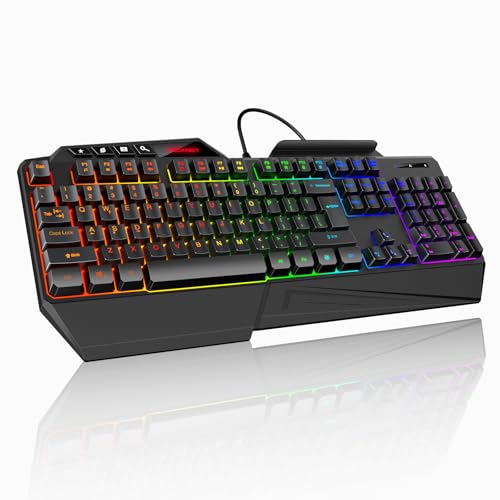 | Budget-Friendly Value | Wrist Rest: Built‑in wrist rest (folding leg system) | RGB Lighting: 13 colors, 8 brightness levels, 6 speed settings | Connectivity: Wired USB (plug‑and‑play) | VIEW LATEST PRICE | Read Our Analysis |
| Razer Ornata V3 Gaming Keyboard with RGB Lighting and Wrist Rest |  | Premium Pro | Wrist Rest: Magnetic soft‑touch wrist rest (snap‑fit) | RGB Lighting: 10‑zone RGB lighting, backlit media keys | Connectivity: Wired USB | VIEW LATEST PRICE | Read Our Analysis |
| HyperX Wrist Rest – Tenkeyless Cooling Gel Memory Foam Black |  | Comfort Specialist | Wrist Rest: Separate cooling‑gel memory‑foam wrist rest | RGB Lighting: N/A (wrist rest only) – No RGB | Connectivity: N/A (accessory) – No connectivity | VIEW LATEST PRICE | Read Our Analysis |
| Razer Huntsman V3 Pro Esports Keyboard with Analog Switches |  | High‑Performance Pro | Wrist Rest: Integrated wrist rest (aluminum enclosure) | RGB Lighting: Full‑size RGB backlighting, 3 LED sections | Connectivity: Wired USB‑C | VIEW LATEST PRICE | Read Our Analysis |
| CORSAIR K70 CORE RGB Mechanical Gaming Keyboard Black |  | Versatile Powerhouse | Wrist Rest: Detachable soft‑touch palmrest | RGB Lighting: Per‑key RGB backlighting, iCUE programmable | Connectivity: Wired USB‑A | VIEW LATEST PRICE | Read Our Analysis |
More Details on Our Top Picks
TECKNET Wired RGB Gaming Keyboard with Wrist Rest & Phone Holder
If you’re tired of cramped wrists and a cluttered desk, the TECKNET Wired RGB Keyboard gives you a built‑in wrist rest and a handy phone holder while staying budget‑friendly. You’ll notice the 8° folding leg system lets you tweak the angle, so your forearms stay relaxed during marathon sessions. The membrane switches feel responsive enough for fast action, and the 26‑key anti‑ghosting prevents those annoying double‑presses when you mash combos.
All right, the RGB lighting offers 13 colors, 8 brightness levels, and 6 speed settings, letting you match your rig’s vibe without draining power. The spill‑resistant, waterproof design plus triple drainage holes protect against accidental coffee raids, which is a lifesaver if you’re prone to multitasking with drinks nearby.
Now, compatibility is plug‑and‑play on Windows, macOS, and even tablets, so you won’t wrestle with drivers. Lifetime support means you can get help if a key sticks, though you must register to claim it. This one’s for you if you want solid ergonomics, decent gaming performance, and a desk‑cleaning phone dock without breaking the bank. Go ahead—pick it up and feel the difference instantly.
- Wrist Rest:Built‑in wrist rest (folding leg system)
- RGB Lighting:13 colors, 8 brightness levels, 6 speed settings
- Connectivity:Wired USB (plug‑and‑play)
- Switch Type:Membrane switches (26‑key anti‑ghosting)
- Key Count:108 membrane keys
- Spill Resistance:Spill‑resistant, waterproof with drainage holes
- Additional Feature:Folding leg system
- Additional Feature:Triple drainage holes
- Additional Feature:Lifetime support registration
Razer Ornata V3 Gaming Keyboard with RGB Lighting and Wrist Rest
You’re tired of cramped wrists and jittery keystrokes, so the Razer Ornata V3’s low‑profile ergonomic design and magnetic soft‑touch wrist rest instantly feel like a premium pro upgrade. The mecha‑membrane switches give you clicky, precise feedback without the full‑travel strain of mechanical keys. UV‑coated keycaps stay bright, and the 10‑zone RGB lighting lets you match any rig vibe.
All right, the snap‑fit wrist rest stays put, but if you prefer a detachable pad you’ll miss that flexibility. The wired USB connection guarantees zero latency, though it ties you to a desk. Spill‑resistant ABS housing survives accidental coffee raids, and the 2‑year warranty covers most mishaps.
Now, you’ll love the ambidextrous layout if you switch hands or use the keyboard for both gaming and typing. The 104‑key QWERTY setup feels familiar, yet the ultra‑slim 1.23‑inch profile may feel cramped for users who love tall keycaps. If you game on Windows 10 and need reliable backlit media keys, this one fits like a glove.
Obviously, the price reflects premium features, so you’ll want to weigh the magnetic wrist rest against the lack of Bluetooth. If you value a solid, water‑resistant build and don’t mind a wired setup, go ahead—this keyboard is a confident, hassle‑free choice.
- Wrist Rest:Magnetic soft‑touch wrist rest (snap‑fit)
- RGB Lighting:10‑zone RGB lighting, backlit media keys
- Connectivity:Wired USB
- Switch Type:Mecha‑membrane switches
- Key Count:104 keys (QWERTY)
- Spill Resistance:Spill‑resistant, water‑resistant construction
- Additional Feature:Mecha‑membrane switches
- Additional Feature:UV‑coated keycaps
- Additional Feature:Magnetic soft‑touch wrist rest
HyperX Wrist Rest – Tenkeyless Cooling Gel Memory Foam Black
All right, you’ve probably felt that wrist ache after marathon sessions, and the HyperX Tenkeyless Wrist Rest is built to be your comfort specialist. You’ll slide it under any tenkeyless or full‑size board, and the cool‑gel‑infused memory foam instantly regulates temperature while cradling your wrist. The rubber underside stays put, so you won’t be battling slip‑ups mid‑game.
Now, the rectangular shape gives you a consistent surface, and the anti‑fray stitching promises durability for years of heavy use. At 14.25 in × 3.46 in and just under ten ounces, it feels light yet solid—perfect for tight desk spaces. This one’s for you if you value a low‑profile, ergonomic feel without bulk.
Here’s the thing: you won’t get a built‑in wrist‑rest extension for a full‑size keyboard, so if you need extra length you’ll have to look elsewhere. The two‑year warranty and 30‑day Amazon return give you a safety net, and the 4.7‑star rating from thousands of users shows it’s tried and true. Go ahead, place it on your desk, and let the gel keep your wrists cool while you dominate the leaderboard.
- Wrist Rest:Separate cooling‑gel memory‑foam wrist rest
- RGB Lighting:N/A (wrist rest only) – No RGB
- Connectivity:N/A (accessory) – No connectivity
- Switch Type:N/A (wrist rest) – No switches
- Key Count:N/A (wrist rest) – No keys
- Spill Resistance:N/A (wrist rest) – Not applicable
- Additional Feature:Cooling gel‑infused foam
- Additional Feature:Anti‑slip rubber underside
- Additional Feature:Anti‑fray stitching
Razer Huntsman V3 Pro Esports Keyboard with Analog Switches
Your gaming sessions demand razor‑sharp response times, and the Razer Huntsman V3 Pro delivers that with its 1000 Hz polling and analog optical Gen‑2 switches that let you fine‑tune actuation from 0.1 mm to 4 mm. You’re probably fed up with keyboards that feel either too stiff or too mushy, and this one lets you dial the exact travel you crave. The Rapid Trigger resets on the slightest lift, so you won’t miss a click, while Snap Tap makes the newest key press win when two keys overlap.
All right, now think about durability. You’ll smash keys for years; the 100 million‑stroke lifespan covers marathon sessions, and the on‑board LED array adjusts actuation without opening software. The aluminum top plate feels solid, but it adds a 3.6 lb weight that some desk setups may find hefty.
Here’s the thing: the wrist rest and dedicated volume dial give you ergonomic comfort and quick control, perfect for long raids. The doubleshot PBT caps resist shine, and the two macro buttons let you bind combos without extra software. Obviously, you’ll need a USB‑C port and a corded power source—no wireless freedom here.
If you value precise analog input, built‑in ergonomics, and a sturdy chassis, this keyboard fits your playstyle. Choose it, and you’ll eliminate guesswork, keep your hands happy, and stay ahead of the competition.
- Wrist Rest:Integrated wrist rest (aluminum enclosure)
- RGB Lighting:Full‑size RGB backlighting, 3 LED sections
- Connectivity:Wired USB‑C
- Switch Type:Analog optical Gen‑2 switches
- Key Count:104 keys (QWERTY)
- Spill Resistance:Not specified (no mention)
- Additional Feature:Analog optical Gen‑2 switches
- Additional Feature:Rapid Trigger reset
- Additional Feature:Aluminum top plate
CORSAIR K70 CORE RGB Mechanical Gaming Keyboard Black
The K70 CORE RGB is a versatile powerhouse for gamers who demand precise, fast actuation without sacrificing comfort; its pre‑lubricated MLX Red linear switches deliver buttery smooth keystrokes while the detachable soft‑touch palmrest eases wrist strain during marathon sessions. You’ve probably felt the sting of cheap plastic shells that wobble under rapid combos; this board’s aluminum top plate and solid plastic enclosure keep every press steady, right the 2.1 lb heft feels sturdy without being a gym weight. Obviously the double‑shot ABS keycaps and two‑layer sound‑dampening foam keep the click quiet enough for shared spaces, yet you still hear that satisfying “clack” when you need it.
All right, you want customization without hunting through menus. Per‑key RGB backlighting syncs via iCUE, and the rotary media dial plus programmable media button give instant volume control, so you never miss a beat while you’re in the zone. The detachable palmrest magnetically snaps on, letting you switch between a low‑profile desk setup and a wrist‑friendly layout on the fly. If you game on Windows 10/11, consoles, or a laptop, the K70 supports them all and stores up to five onboard profiles—perfect for swapping between FPS, MOBA, and creative work.
Now, consider the trade‑offs. The linear MLX Red switches are great for rapid, repeated keystrokes, but they lack the tactile bump some players crave for precise feedback. The ABS keycaps, while bright, may wear faster than PBT under heavy use, so you might replace them later. If you value a detachable palmrest and robust build over a fully metal chassis, this one fits you perfectly. Bottom line: you’ve got a reliable, feature‑rich keyboard that eases wrist fatigue and delivers consistent performance—just plug it in and start winning.
- Wrist Rest:Detachable soft‑touch palmrest
- RGB Lighting:Per‑key RGB backlighting, iCUE programmable
- Connectivity:Wired USB‑A
- Switch Type:MLX Red linear mechanical switches
- Key Count:104 keys (QWERTY)
- Spill Resistance:Not specified (no mention)
- Additional Feature:Pre‑lubricated MLX Red switches
- Additional Feature:Magnetic detachable palmrest
- Additional Feature:Two‑layer sound‑dampening foam
Factors to Consider When Choosing a Gaming Keyboard With Wrist Rest
You’re probably feeling the wrist fatigue from long sessions and wonder if a built‑in rest will actually help. Here’s the thing: you’ll want an ergonomic shape that matches your hand, a switch type that feels right for your play style, and RGB that lets you personalize without sacrificing performance. If you need spill protection, an adjustable tilt, and durability for marathon battles, this one’s for you—just pick the combo that fits your exact needs.
Ergonomic Wrist Design
All right, if your wrists feel like they’re doing gymnastics after a marathon gaming session, you know the problem isn’t the game—it’s the keyboard’s wrist rest. You need a rest that holds your wrist straight, avoiding ulnar deviation and extension strain. An 8‑degree tilt or an adjustable angle lets your forearm sit horizontally, cutting pronation and muscle fatigue.
Now, the material matters. Soft‑touch, gel‑infused memory foam spreads pressure and keeps your hands cool, so you won’t feel a hot spot after hours. The anti‑slip rubber underneath locks the rest in place, preventing any unwanted sliding during intense combos.
Here’s the thing: width and length aren’t one‑size‑fits‑all. Aim for roughly 3–4 in wide and 10–12 in long to fit different hand sizes while giving a stable platform for both keyboard and mouse. If you have a larger hand, go toward the upper end; smaller hands may prefer a tighter fit. Choose a design that feels solid yet forgiving, and you’ll play longer without wrist drama.
Switch Type Compatibility
All right, if you’ve been battling cramped wrists while trying to land that perfect headshot, the switch type you pick can make or break the comfort of your wrist‑rest setup. Membrane keys whisper, but they lack the tactile bite you need for rapid fire, so you might miss that extra precision. Mechanical switches—linear, tactile, clicky—give you distinct actuation forces and travel, letting you match feel to your play style, but taller profiles can force extra finger lift, reducing wrist‑rest support.
Now, low‑profile or mecha‑membrane hybrids keep travel short while still offering a tactile bump, striking a sweet spot between speed and ergonomics. Mechanical durability shines at 50‑100 million keystrokes, whereas membrane life ends sooner, so consider how long you plan to grind. Obviously, if you love a clicky click but have a low‑profile wrist rest, you’ll need a shorter‑travel switch to keep the rest effective.
Here’s the thing: this one’s for you if you value durability and precise feedback and don’t mind a slightly higher profile. If you prioritize quiet operation and a slimmer wrist‑rest feel, go membrane or low‑profile hybrid. Choose the switch that aligns with your gaming rhythm, and the wrist‑rest will finally feel like a true ally.
RGB Lighting Customization
If you’ve ever been stuck in a dimly lit room and can’t tell whether your keyboard’s glow is helping or hurting your focus, you know the frustration of bland or inflexible lighting. You need at least 13 distinct colors and eight brightness levels so you can match your mood, whether you’re in a stealth raid or a neon‑lit showdown.
All right, look for customizable zones—six‑zone or per‑key RGB lets you assign colors to WASD for quick reference or paint a wave across the whole board for flair. Adjust the speed with six modes, syncing pulses to in‑game events or keeping it subtle for late‑night sessions.
Now, check for on‑board profiles that store your setups without a PC, and make sure the software works on Windows and macOS. That’s the thing: you’ll switch between consoles or laptops without losing your lighting identity.
If you love tweaking on the fly, this one’s for you; if you prefer a set‑and‑forget vibe, pick a model with fewer zones but solid brightness control. Choose the keyboard that fits your style, and you’ll never wonder if the glow helps or hurts again.
Durability and Spill Protection
When a soda spills on your desk, you don’t want a costly keyboard replacement to ruin your game night, so you need a model that actually keeps liquid out of the circuitry. All right, look for sealed keycaps and internal drainage holes; they channel any stray drops away from the PCB, buying you time to wipe it up. Now, a waterproof coating on the plastic enclosure blocks seepage, and rubberized or silicone‑coated surfaces add an extra barrier that feels sturdy under frantic thumbs.
Here’s the thing: a splash‑proof rating like IPX4 tells you the keyboard survived a splash, not a flood. Obviously, you’ll want a warranty that covers liquid damage—lifetime or multi‑year plans give peace of mind. This one’s for you if you snack, sip, and game in the same spot; otherwise, you might skip the extra coating and save a few bucks. Choose the model that matches your spill‑risk level, and you’ll stay in the game without panic.
Adjustable Angle and Tilt
You’ve probably felt that ache after a marathon session, the wrist locked in an awkward flat position, and you’re wondering if a tilt could actually help. An adjustable tilt lets you set the angle between 0° and 8°, so you can lift the keyboard just enough to keep your forearms parallel to the floor. A 5–7° upward tilt aligns your wrists neutrally, cutting carpal‑tunnel risk by up to 30% compared to a flat surface.
All right, now consider the hinge. A locking leg stops unwanted movement, keeping ergonomics steady even when you slam those combos. Steeper angles improve key visibility and typing comfort, but they can push your mouse hand forward, increasing fatigue for precise aim. Conversely, a shallow tilt eases mouse control but offers less wrist relief.
Here’s the thing: if you prioritize long‑haul comfort over ultra‑precise mouse work, aim for a 6°–8° tilt with a solid lock. If you need tight mouse control for FPS shooters, stay around 3°–5°. Choose the angle that matches your playstyle, and you’ll feel the difference instantly.
Key Rollover and Anti‑Ghosting
All right, you’ve probably felt that dreaded “missed combo” moment when a game registers the wrong key because the keyboard can’t keep up with your rapid presses. The fix? Look at n‑KRO. A 6‑KRO board handles most shooters, but MMOs and RTS titles demand 10‑KRO or full‑n‑KRO so every movement, ability, and macro registers simultaneously. Mechanical switches usually win here; they give higher rollover and stronger anti‑ghosting than membrane, meaning you won’t see phantom inputs when you mash WASD + space + shift + ctrl.
Now, test it yourself. Press a cluster of keys you use in combat and watch the on‑screen overlay; if any key disappears or an extra one pops up, that keyboard fails the anti‑ghosting test. Full‑n‑KRO is essential only if you need every key at once—if you stick to simple combos, 6‑KRO is fine and saves a few dollars.
Here’s the thing: a board with full‑n‑KRO and solid anti‑ghosting is perfect for complex builds, but it may feel overkill for casual play and can be pricier. Choose a mechanical model that advertises at least 6‑KRO if you’re budget‑conscious, and upgrade to full‑n‑KRO when your game strategy expands. You’ll know you’ve made the right call when your combos land every time, no missed keystrokes, no ghost keys.
Platform and OS Support
All right, you’ve probably already hit a wall when a keyboard’s software won’t install on your Mac, leaving you stuck with default lighting and no macro options. The first thing you do is verify the drivers match your OS—Windows, macOS, or Linux—so key mapping and RGB work flawlessly. If the keyboard needs proprietary software, make sure that app actually runs on your system; otherwise you’ll lose the custom macros you crave.
Now, check plug‑and‑play status. A keyboard that powers up instantly without firmware tricks or BIOS tweaks saves you time and headaches. Look for OS‑specific features: some Windows builds let you record complex macros, while macOS versions may limit remapping to basic functions.
Here’s the thing: bundled accessories like the wrist rest or phone holder should be purely hardware, not dependent on drivers. If they need a USB hub or software, you might be stuck on a platform they don’t support. Obviously, you want a setup that works out‑of‑the‑box on your chosen OS.
This one’s for you if you game on multiple machines and need seamless cross‑platform support. You’ll appreciate a keyboard that stays consistent whether you switch from a gaming rig to a laptop. Choose the model that meets those criteria, and you’ll avoid the frustration of “works on my PC” and enjoy a smooth, distraction‑free experience.