
You’re juggling a laptop, notes, and a coffee, and the desk feels like a cluttered obstacle course. All right, a rolling stand can untangle that mess, letting you glide from seated to standing with a single push, but you’ll need one that actually holds weight without wobbling. Here’s the thing: if you want a sturdy steel frame, lock‑in casters, and a tilt‑adjustable tray that won’t scream “budget,” you’re about to find the perfect match. Let’s get started.
| Tossbiss Laptop Tripod with Wheels and Shelves | 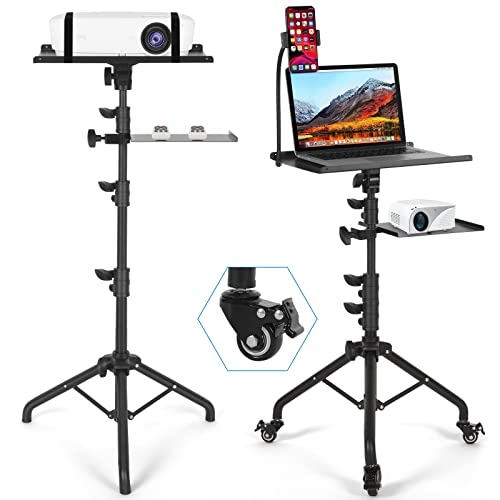 | Versatile 3‑in‑1 | Height Range: 25.9–51.8 in | Load Capacity: 11.1 lb (top tray) | Casters / Wheels: 3 silent swivel wheels (brake) | VIEW LATEST PRICE | Read Our Analysis |
| Amada Adjustable Rolling Projector Stand with Mouse Tray |  | Heavy‑Duty Pro | Height Range: 25–51 in | Load Capacity: 22 lb | Casters / Wheels: 4 premium 360° casters (lockable) | VIEW LATEST PRICE | Read Our Analysis |
| Furist Adjustable Laptop Stand with Wheels and Mouse Pad |  | Compact Comfort | Height Range: 22–30 in | Load Capacity: Not specified (typical laptop) | Casters / Wheels: Lockable wheels (4) | VIEW LATEST PRICE | Read Our Analysis |
| Seville Classics Airlift Mobile Laptop Stand (24″) |  | Premium Mobility | Height Range: 20.5–33 in | Load Capacity: 15 lb | Casters / Wheels: 4 swivel caster wheels (2 lockable) | VIEW LATEST PRICE | Read Our Analysis |
| TigerDad Adjustable Laptop Stand with Wheels and Mouse Pad |  | Robust Workhorse | Height Range: 23–33 in | Load Capacity: 44 lb (evenly distributed) | Casters / Wheels: 4 rolling casters (brake stop plugs) | VIEW LATEST PRICE | Read Our Analysis |
| SHW Adjustable Laptop Rolling Cart Black | 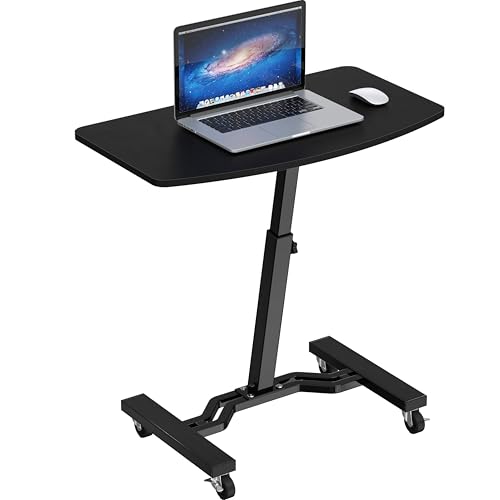 | Sleek Minimalist | Height Range: 28–33 in | Load Capacity: 14.8 lb | Casters / Wheels: 4 smooth‑rolling caster wheels (2 lockable) | VIEW LATEST PRICE | Read Our Analysis |
| Techni Mobili Sit-to-Stand Laptop Cart with Storage |  | Sit‑to‑Stand Elite | Height Range: 28–45.5 in | Load Capacity: 22 lb (total) | Casters / Wheels: Double‑wheel nylon casters (2 lockable) | VIEW LATEST PRICE | Read Our Analysis |
More Details on Our Top Picks
Tossbiss Laptop Tripod with Wheels and Shelves
All right, if you need a desk that rolls, tilts, and holds a projector, this versatile 3‑in‑1 tripod solves that problem. You’ll love the two adjustable trays and a gooseneck phone holder that let you mount a laptop, tablet, or projector in any combo you fancy. The reinforced metal base feels sturdy, and the powder‑coated black finish hides office dust.
Now, think about height. You can stretch it from 25.9 to 51.8 inches, and the top tray tilts 90° both ways, so you can angle your screen for perfect ergonomics. The bottom tray slides up or down, giving you a custom workspace without straining your wrists.
Here’s the thing: portability matters. Three silent swivel wheels with brakes let you glide across a room, then lock in place for stability. The top tray holds up to 11.1 lb, enough for most laptops and a projector, while the unit weighs just 4.16 kg, so you can move it without a workout.
Obviously, safety isn’t optional. Each tray sports a lip, sponge gasket, and elastic belt, keeping your gear from sliding off. Those features also encourage a healthier posture, reducing the risk of wrist pain during long sessions.
If you’re okay with a bit of assembly and you need a rugged, all‑in‑one stand that rolls, tilts, and supports a projector, this Tossbiss tripod fits you perfectly. Choose it, and you’ll get a flexible, stable workstation without the hassle of buying separate pieces.
- Height Range:25.9–51.8 in
- Load Capacity:11.1 lb (top tray)
- Casters / Wheels:3 silent swivel wheels (brake)
- Tray / Platform Size:Two adjustable trays (top 11.1 lb)
- Material / Finish:Powder‑coated black metal
- Adjustability Mechanism:Height knobs, tray tilt, gooseneck phone holder
- Additional Feature:Gooseneck phone holder
- Additional Feature:Dual adjustable trays
- Additional Feature:Powder‑coated black finish
Amada Adjustable Rolling Projector Stand with Mouse Tray
If you’re juggling a laptop, projector, and mouse while moving between rooms, the Amada rolling stand solves that chaos. You’ll appreciate the 26‑inch triangular base that steadies up to 22 lb, plus elastic straps and a foam mat that keep gear from wobbling. The four 360‑degree casters roll silently, and you can lock them when you need a stationary setup.
Now, the height adjusts from 25 to 51 inches with a simple lever lock, and you can tilt the platform ±90° to hit the perfect projection angle. The 16.1 × 11‑in metal platform gives you space for a laptop and projector, while the detachable 8 × 7.9‑in mouse tray slides up the pole for ergonomic control.
All right, when you fold it down it fits inside the included storage bag, making transport a breeze for on‑the‑go presentations. This one’s for you if you need a sturdy, mobile workstation that doubles as a projector stand without sacrificing mouse comfort. Obviously, the steel construction adds weight, so it’s not the lightest option for backpack‑style travel, but the stability and flexibility outweigh that for most office or event settings. Choose it, and you’ll glide through setups with confidence.
- Height Range:25–51 in
- Load Capacity:22 lb
- Casters / Wheels:4 premium 360° casters (lockable)
- Tray / Platform Size:16.1 × 11 in metal platform
- Material / Finish:Cold‑rolled steel, black finish
- Adjustability Mechanism:Lever locks, +/-90° tilt
- Additional Feature:26‑inch triangular base
- Additional Feature:Detachable mouse tray
- Additional Feature:Storage bag included
Furist Adjustable Laptop Stand with Wheels and Mouse Pad
You’re juggling a laptop, a mouse, and a cramped bedside table, so you need a setup that slides effortlessly while staying stable. This Furist stand fits a 12‑inch‑deep, 23‑inch‑wide niche beside a bed or sofa, and its 22‑to‑30‑inch height range lets you raise the screen to eye level without straining your neck. The 160‑degree tilt and 360‑degree swivel give you freedom to angle the laptop for typing or watching, and the lockable wheels keep it from rolling off when you’re settled.
All right, the engineered‑wood top looks sleek, while the metal or plastic base feels sturdy enough for a 15‑inch laptop. Rounded corners protect your forearms, and the edge‑stopper stops the tray from sliding off when you nudge it. The built‑in mouse pad saves desk space, but if you prefer a separate mouse you’ll have to lift the tray.
Now, this one’s for you if you need a portable, space‑saving workstation that moves with you from bed to couch. It isn’t a heavy‑duty drafting station, so it won’t hold a massive monitor, but for a laptop and mouse it’s spot‑on. Clearly, the lockable wheels give you confidence that the stand stays put when you’re typing, and the swivel desk adds a playful twist to your nightly routine. Choose it, and you’ll glide into a more ergonomic, clutter‑free zone without a second thought.
- Height Range:22–30 in
- Load Capacity:Not specified (typical laptop)
- Casters / Wheels:Lockable wheels (4)
- Tray / Platform Size:Top tray 12 × 23 in (approx.)
- Material / Finish:Engineered wood top, metal/plastic base
- Adjustability Mechanism:Height knob, 160° tilt, 360° rotation
- Additional Feature:Natural wood finish
- Additional Feature:360° rotating tray
- Additional Feature:Rounded corners safety
Seville Classics Airlift Mobile Laptop Stand (24″)
You’ve been juggling a laptop, a tablet, and a stack of papers on a cramped desk, and the constant reaching for the right height feels like a workout. Now, the Seville Classics Airlift Mobile Laptop Stand (24″) lets you glide your work zone with a solid steel frame and four swivel casters, two of which lock when you need stability. Obviously, the twist‑lock knob lets you dial height from 20.5 to 33 inches, so you can sit upright or lean back without straining.
All right, the rectangular MDF top measures 23.75 × 15.75 inches, holds up to 15 pounds, and offers a single open shelf for a keyboard or notebook. The 0.75‑inch thickness feels sturdy yet light enough to move, and the black powder‑coat hides fingerprints. This one’s for you if you work in a home office, classroom, or studio and want a modern, portable workstation that doesn’t wobble.
Here’s the thing: assembly is a breeze—no drilling, just a few tools that come in the box, and you wipe it clean with a dry cloth. The 11‑pound weight means you can roll it around but not toss it. If you value mobility over a massive stationary desk, this stand fits your ergonomic needs without breaking the bank. Go ahead and roll it out; you’ll feel the difference instantly.
- Height Range:20.5–33 in
- Load Capacity:15 lb
- Casters / Wheels:4 swivel caster wheels (2 lockable)
- Tray / Platform Size:Desktop 23.75 × 15.75 in
- Material / Finish:Steel frame, engineered wood tabletop, black powder coat
- Adjustability Mechanism:Twist‑lock knob, height adjustment
- Additional Feature:Twist‑lock height knob
- Additional Feature:Open shelf storage
- Additional Feature:Limited manufacturer warranty
TigerDad Adjustable Laptop Stand with Wheels and Mouse Pad
All right, you’re juggling a laptop, a mouse, and a cramped bedside table, so you need a stand that moves without wobbling. This TigerDad QQ‑111 rolls on four 1‑inch casters, yet locks solid when you need stability. The wood‑grain MDF top looks sleek, and the safety edge stopper keeps your device from sliding off.
Now, you’ll love the height range—23 to 33 inches—so you can raise the screen to eye level or lower it for a cozy bed‑side setup. The tilt locks at any angle, and the secondary 8 × 12‑inch mouse pad gives you a dedicated spot for the cursor. It holds up to 44 lb, which covers most laptops and even a small desktop monitor.
Here’s the thing: assembly takes a few minutes with the included Allen key, and the 12‑lb weight is light enough to move but sturdy enough for daily use. If you work from bed, the rolling wheels and brake plugs let you glide the desk without wobble, but the MDF surface isn’t waterproof, so keep drinks away. This one’s for you if you want a portable, adjustable workstation that looks like a desk and rolls like a cart. Go ahead—pick it, set it up, and enjoy a wobble‑free workspace.
- Height Range:23–33 in
- Load Capacity:44 lb (evenly distributed)
- Casters / Wheels:4 rolling casters (brake stop plugs)
- Tray / Platform Size:Main table 15 × 12 in; mouse pad 8 × 12 in
- Material / Finish:MDF panel, alloy steel frame, wood‑grain laminate
- Adjustability Mechanism:Height knob, tilt lock, adjustable mouse pad
- Additional Feature:Laminated wood grain style
- Additional Feature:Integrated safety edge stopper
- Additional Feature:Four 1‑inch rolling casters
SHW Adjustable Laptop Rolling Cart Black
If you’re juggling a laptop, notes, and a coffee while trying to stay comfortable, the SHW Adjustable Laptop Rolling Cart, Black is the sleek minimalist solution you’ve been hunting. You’ll love the 28‑to‑33‑inch height range, locked with a simple knob, so you can switch from seated to standing without a fuss. The black, rectangular laminate desk looks sharp while the steel frame and 1‑inch engineered‑wood top keep it sturdy under a 14.8‑pound load.
All right, the four caster wheels glide smoothly, and two lock in place when you need stability for a video call or a focused writing session. You’ll appreciate the single drawer with ball‑bearing slides and a shelf for pens, chargers, or a snack—perfect for a tidy home office or bedroom work nook. The cart fits through doorways, and the tools‑included assembly takes under an hour for one person.
Now, consider the trade‑offs: the 26‑inch width limits ultra‑wide monitors, and the 14.8‑pound capacity means you can’t stack heavy books on top. If you mostly use a laptop, a small external monitor, and need mobility, this cart is for you. Otherwise, a stationary desk might serve larger setups better. Choose it if you value flexibility, clean lines, and a quick‑adjust height that moves with you.
- Height Range:28–33 in
- Load Capacity:14.8 lb
- Casters / Wheels:4 smooth‑rolling caster wheels (2 lockable)
- Tray / Platform Size:Desktop 26 × 15.75 in
- Material / Finish:Steel frame, engineered wood desktop, black finish
- Adjustability Mechanism:Locking knob, height adjustment
- Additional Feature:Single center drawer
- Additional Feature:Minimalist black aesthetic
- Additional Feature:Nylon drawer glides
Techni Mobili Sit-to-Stand Laptop Cart with Storage
Your desk feels cramped, and you keep juggling a laptop, papers, and a coffee mug. The Techni Mobili sit‑to‑stand cart solves that chaos with a sleek black graphite desk that slides from 28 in to 45.5 in, so you can stand or sit without moving a thing. It holds up to 22 lb, and its 15 mm top feels sturdy under a 15‑inch screen.
All right, the dual knobs let you adjust height in seconds, and the two open shelves each support 20 lb, perfect for a printer or a stack of files. The alloy‑steel frame resists scratches, while the moisture‑resistant laminate veneer keeps spills from warping the wood. Double‑wheel nylon casters roll smoothly, and the locking wheels keep the cart steady when you work.
Now, assembly needs two people and a bit of patience—no tools are included, but the instructions are clear. The 5‑year limited warranty backs the frame, so you’re covered if anything gives. This cart fits you if you want a mobile workstation that shifts between sitting and standing, offers generous storage, and looks modern in any office. Choose it, and you’ll free up desk space while staying flexible.
- Height Range:28–45.5 in
- Load Capacity:22 lb (total)
- Casters / Wheels:Double‑wheel nylon casters (2 lockable)
- Tray / Platform Size:Desktop 21.5 × 15.75 in
- Material / Finish:Alloy steel frame, engineered wood panels, graphite finish
- Adjustability Mechanism:Dual adjustment knobs, height lock
- Additional Feature:Dual height adjustment knobs
- Additional Feature:Two open storage shelves
- Additional Feature:5‑year limited warranty
Factors to Consider When Choosing a Rolling Stand for Laptop
You’re probably frustrated that every cart you’ve seen either wobbles under your gear or locks you into a single height, and that’s why stability and load capacity matter first. Now, think about how far you need to raise the desk, whether the wheels actually lock, and if the tray tilts or rotates for your typing angle—these details decide if the stand fits your workflow or just looks nice. Here’s the thing: if you need a sturdy, adjustable, and durable cart that won’t tip over when you move it, this one’s for you; otherwise, keep scrolling.
Stability and Load Capacity
A wobbling stand ruins focus, and you’ve probably felt that jitter when the base tilts under a heavy laptop or a stack of accessories. The thing is, a wide triangular base made of reinforced metal keeps the whole thing from tipping, even when you add a monitor or a charger. You’ll want a clear weight rating for the main platform and any secondary shelves; if you’re stacking a 5‑kg laptop with a mouse and a power bank, the stand must support at least 8 kg without sagging.
All right, look for robust locking mechanisms on both the height adjustment and the wheels—otherwise you’ll get a wobble‑free zone when you lock it in place. A lower center of gravity helps too; place the heavier gear on the bottom tray or pick a low‑slung design, and the stand stays steadier. Some models throw in non‑slip mats, edge stoppers, and straps, which stop equipment from sliding and add a safety net.
Now, if you’re a minimalist with a light ultrabook, a simple metal base will do; but if you run a workstation with multiple peripherals, you’ll need a higher weight capacity and those extra safety features. Choose the stand that matches your load, lock it down, and you’ll glide through work without a wobble in sight.
Height Adjustability Range
A wobbling laptop at eye level is a productivity killer, especially when you’re juggling video calls and spreadsheets. You need a stand that slides up and down smoothly, so you can switch from standing to sitting without a headache. The range should cover at least 8‑12 inches; anything less forces you to crane your neck, anything more makes the base wobble.
All right, check the mechanism. Telescoping tubes give you fine‑grained control but add weight, while crank‑adjusted legs are lighter but require a pause to lock. If you move a lot, go for the tube; if you stay put, the crank feels snappier.
Now, think about your desk height. A stand that reaches 30 inches works for most sit‑stand desks, but if your desk sits low, you’ll need a model that starts at 20 inches. This one’s for you if you want to keep elbows at a 90‑degree angle without straining.
Obviously, you’ll hit a sweet spot when the stand’s lowest and highest positions match your ergonomic goals. Pick a range that aligns with your posture, and you’ll feel the difference instantly.
Here’s the thing: you don’t have to compromise. Choose a height adjustability range that fits your workflow, and you’ll glide through the day with confidence.
Wheel Locking Mechanisms
If your laptop stand wobbles the moment you shift your weight, you’ll end up fighting the floor instead of your work. All right, you need wheel locks that actually stop both rolling and swiveling. Look for a lever or push‑button that presses a rubber pad against the wheel; that friction keeps the stand planted on carpet, hardwood, or tile.
Now, some models lock only two of the four casters. Obviously that gives you mobility when you disengage the locks, but it also means the disengaged wheels can still swivel, which might feel a little loose on smooth floors. If you prefer a rock‑solid workstation, choose a stand with locks on every wheel—every wheel stays dead‑stop, so nothing slides when you type hard.
Here’s the thing: integrated locks are a safety feature, not a gimmick. They prevent accidental movement that could tip your laptop or cause a spill. This one’s for you if you work on uneven surfaces or have a pet that likes to push things. If you only need occasional mobility, a two‑wheel lock saves weight and cost without sacrificing stability when you’re seated. Pick the lock style that matches your workflow, and you’ll feel confident that the stand stays put while you focus on the task at hand.
Tray Tilt and Rotation
All right, you’re tired of craning your neck because the tray stays flat or twists unexpectedly while you type. The tilt angle matters—if you need a gentle 5‑10° lift for ergonomic typing, look for a stand with a smooth, locked hinge. If you switch between drawing, coding, and video calls, a 15‑20° range plus a swivel lock lets you rotate the tray without wobble.
Now, consider how the rotation mechanism locks. A friction‑based turntable feels solid but may need occasional tightening; a click‑to‑lock disc offers instant certainty but can be noisy. Obviously, a wider base reduces wobble when you swivel heavy laptops.
Here’s the thing: this one’s for you if you love quick adjustments and don’t mind a tiny extra weight for a sturdier swivel. Choose a tilt‑only model if you never rotate; pick a dual‑tilt‑and‑rotate unit if you juggle multiple postures throughout the day. Either way, you’ll eliminate neck strain and keep your workflow rolling smoothly.
Material Durability and Finish
All right, you’ve already sorted out tilt and swivel, so let’s talk about what actually holds up under daily use. You’ll notice powder‑coated steel frames resist scratches and stay looking fresh, even after countless coffee spills. If you prefer a warmer look, engineered wood panels with moisture‑resistant laminate give a solid desktop that won’t warp, but they can chip if you slam heavy books onto them.
Now, thickness matters: a 0.75‑inch surface feels light, yet a full‑inch slab boosts load‑bearing capacity, especially for larger laptops and accessories. Cold‑rolled steel frames crank the weight limit past 20 pounds, so you won’t worry about a heavy workstation. Welded metal joints add sturdiness without adding bulk, keeping the stand portable yet rock‑solid.
Here’s the thing: if you value a sleek, industrial vibe and need to haul the stand around, go for the cold‑rolled steel with powder coating. If you love a wood finish and mostly stay put, engineered wood with laminate works fine—just avoid rough handling. Choose the material that matches your workspace hustle, and you’ll feel confident about the purchase.
Portability and Storage Size
All right, you’ve probably felt that bulky stand takes up half the desk and trips you up when you try to stash it away. You need something you can roll under a couch or tuck into a bag without sacrificing stability. The trick is balancing footprint with load capacity; a compact base saves space but may wobble under a heavy 17‑inch laptop.
Now, look for a fold‑away frame that collapses to under 12 inches tall. If you travel by train, a stand that slides into a standard 15‑inch laptop case saves you a separate suitcase. Obviously, a telescoping handle adds convenience but adds a few extra grams.
Here’s the thing: a lightweight aluminum model is perfect for frequent movers, while a sturdier steel version suits a permanent office corner. This one’s for you if you value quick setup over ultra‑thin storage. Choose the one that fits your routine, and you’ll glide past clutter without a second thought.
Ergonomic Posture Support
Ergonomic posture support starts with the right height, and you’ll feel the difference the moment you stop hunching over a low desk. You need a stand that reaches 20.5–51 inches so your screen sits at or just below eye level; that range eliminates neck strain instantly.
All right, a tilting tray that swings to 90° or more lets you angle the laptop for a neutral wrist position, cutting repetitive‑strain risk. Edge stoppers, elastic straps, or a non‑slip surface keep the device from sliding, so your hands stay steady and you avoid awkward adjustments.
Now, lockable wheels are a must—otherwise the stand will drift and ruin your setup. If you move often, choose a model with easy‑to‑engage locks; if you stay put, a simple brake works fine.
Here’s the thing: this one’s for you if you value a stable, adjustable work surface that stays put while you type. Choose confidently; the right height and angle will make your day feel smoother and healthier.
Assembly Complexity and Tools
One or you’ll hate is wrestling with a half‑assembled stand while trying to set up your desk. You’ve seen those boxes that promise “quick‑assemble” but still need an Allen key and a screwdriver. That’s why you should check if the manufacturer includes the right tools; otherwise you’ll be hunting for a spare at the last minute.
All right, if you love tool‑free designs, look for twist‑lock knobs or pre‑attached legs. Those models skip drilling and let you snap everything together in minutes. Obviously, they cost a bit more, but you avoid the frustration of missing hardware.
Now, some heavy‑duty rolling stands need two people because they have multiple base plates and a height‑adjustable column. You’ll appreciate the sturdier feel, but only if you have a partner or can spare a few extra minutes. This one’s for you if you value stability over speed.
If you’re on a budget, expect a simple assembly with an included Allen key and a basic wrench. You’ll spend a few minutes tightening bolts, then enjoy a functional stand without breaking the bank. This option works if you’re comfortable with a bit of DIY.
Pick the level of complexity that matches your patience and workspace needs, and you’ll glide into a smoother setup without the hassle.