
You might think a wrist‑rest keyboard is just a fancy accessory, but the truth is it can be the difference between a sore forearm and a marathon‑session power‑hour. Imagine typing for hours without that nagging ache, because the palm support keeps your hands in a neutral posture. Now, picture a lineup that actually fits your style—whether you need a backlit layout for low‑light coding, a spill‑resistant design for coffee‑filled desks, or a sustainable model that feels good on the planet and your wrists. The right choice will let you stay comfortable, stay productive, and skip the “I should’ve bought a better keyboard” regret. Ready to see which ones match your workflow?
| SABLUTE K21 Pro Large Print Backlit Keyboard | 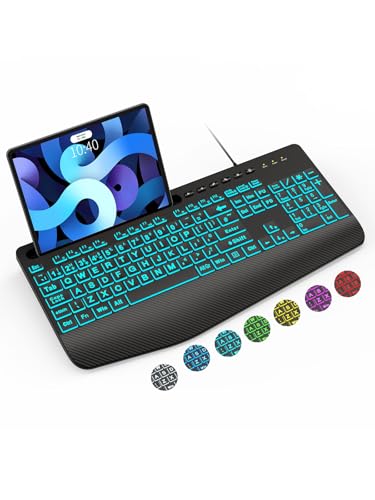 | Accessibility Champion | Wrist Rest: Integrated wrist rest | Connectivity: Wired (USB‑A) | Key Count: 78 keys (111 buttons) | VIEW LATEST PRICE | Read Our Analysis |
| Logitech MK345 Wireless Keyboard & Mouse Combo (Black) |  | Budget-Friendly Pick | Wrist Rest: Palm rest | Connectivity: 2.4 GHz wireless (USB receiver) | Key Count: 104 keys | VIEW LATEST PRICE | Read Our Analysis |
| Logitech Wave Keys Wireless Ergonomic Keyboard – Graphite |  | Ergonomic Pro | Wrist Rest: Cushioned palm rest | Connectivity: Bluetooth / Logi Bolt USB receiver | Key Count: 101 keys | VIEW LATEST PRICE | Read Our Analysis |
| Logitech G213 Prodigy Gaming Keyboard – RGB Palm Rest Media Controls |  | Gaming Focus | Wrist Rest: Integrated palm rest | Connectivity: Wired (USB) | Key Count: 104 keys | VIEW LATEST PRICE | Read Our Analysis |
| Logitech K650 Wireless Keyboard with Wrist Rest and Numpad (Graphite) |  | Long-Lasting Battery | Wrist Rest: Integrated soft‑touch palm rest | Connectivity: Bluetooth / Logi Bolt USB receiver | Key Count: 104 keys | VIEW LATEST PRICE | Read Our Analysis |
| Logitech K345 Wireless Keyboard with Palm Rest |  | Compact Comfort | Wrist Rest: Palm rest | Connectivity: 2.4 GHz wireless (USB receiver) | Key Count: 102 keys | VIEW LATEST PRICE | Read Our Analysis |
| Logitech Wave Keys Ergonomic Keyboard with Palm Rest |  | Sustainable Ergonomic | Wrist Rest: Cushioned palm rest | Connectivity: Bluetooth / Logi Bolt USB receiver | Key Count: 99 keys | VIEW LATEST PRICE | Read Our Analysis |
More Details on Our Top Picks
SABLUTE K21 Pro Large Print Backlit Keyboard
If you’re tired of squinting at tiny keys and feeling your wrists ache after a few minutes, the SABLUTE K21 Pro is an accessibility champion that finally lets you type comfortably. You’ll love the oversized fonts and backlit glow—seven colors, seven brightness levels—so you can work in dim rooms without straining. The built‑in wrist rest eases fatigue, and the ergonomic layout keeps your hands neutral, especially during long sessions. All right, the phone and tablet holder lets you watch tutorials or video‑chat while you type, though it won’t charge devices. It plugs into any USB‑A port, needs no batteries, and sleeps after five idle minutes, waking with a double‑tap. This one’s for you if you need a sturdy, waterproof, ambidextrous keyboard that works on Windows, Mac, or PC, and you appreciate a 12‑month warranty. Embrace the comfort, and you’ll notice the difference instantly.
- Wrist Rest:Integrated wrist rest
- Connectivity:Wired (USB‑A)
- Key Count:78 keys (111 buttons)
- Layout:QWERTY, ambidextrous
- Power Source:No batteries (wired)
- Warranty:12‑month limited
- Additional Feature:Large‑print oversized keys
- Additional Feature:7‑color backlit lighting
- Additional Feature:Phone & tablet holder
Logitech MK345 Wireless Keyboard & Mouse Combo (Black)
You’ve been battling cramped wrists and a cluttered desk, and the Logitech MK345 is the budget‑friendly pick that finally eases that strain. You’ll love its full‑size QWERTY layout, quiet keys, and built‑in palm rest that keeps your hands level while you type. All right, the 2.4 GHz receiver gives you a solid 10‑meter range, and plug‑and‑play means you’re up and running in seconds on Windows, macOS, or ChromeOS. The mouse, right‑handed and contoured, tracks optically and scrolls smoothly, sharing the same receiver. Battery life’s a win: three years for the keyboard, 18 months for the mouse, AA batteries included. Spill‑resistant design and a one‑year warranty add peace of mind. This combo is for you if you need a reliable, comfortable setup without breaking the bank. Go ahead, plug it in, and feel the difference.
- Wrist Rest:Palm rest
- Connectivity:2.4 GHz wireless (USB receiver)
- Key Count:104 keys
- Layout:QWERTY, full‑size
- Power Source:2 AA batteries
- Warranty:1‑year limited
- Additional Feature:2.4 GHz 10 m range
- Additional Feature:Spill‑resistant design
- Additional Feature:Dedicated media keys
Logitech Wave Keys Wireless Ergonomic Keyboard – Graphite
Your wrists ache after marathon typing sessions, and you’re craving a keyboard that actually respects your posture. The Logitech Wave Keys Wireless Ergonomic Keyboard in Graphite does just that with its wave‑shaped layout that guides your hands, wrists, and forearms into a natural position. All right, the cushioned memory‑foam palm rest eases tension, and the compact 14.8‑inch width lets your mouse sit closer, reducing shoulder strain. You’ll love the wireless freedom via Bluetooth or the Logi Bolt receiver, plus Easy‑Switch lets you hop between laptop, tablet, or phone without fuss. Obviously, it’s a membrane board, so the feel is softer than mechanical clicks—great if you prefer quiet typing but not ideal for click‑lovers. The recycled‑plastic construction feels sturdy, and the 2‑year battery life (with two included batteries) means you won’t be swapping cells often. If you work on Windows or Mac and want programmable shortcuts through Logi Options+, this is a solid, eco‑friendly pick. This one’s for you if you value comfort, portability, and a bit of green tech without sacrificing reliability. Give it a try—you’ll notice the difference right away.
- Wrist Rest:Cushioned palm rest
- Connectivity:Bluetooth / Logi Bolt USB receiver
- Key Count:101 keys
- Layout:QWERTY, ambidextrous
- Power Source:2 batteries
- Warranty:1‑year limited
- Additional Feature:Wave‑shaped ergonomic layout
- Additional Feature:Recycled‑plastic construction
- Additional Feature:Logi Options+ customization
Logitech G213 Prodigy Gaming Keyboard – RGB Palm Rest Media Controls
A full‑size, spill‑resistant keyboard with an integrated palm rest is exactly what you need when long gaming sessions start hurting your wrists. You’ve probably felt the sting of cramped hands, and the G213’s slim, liquid‑proof body plus the padded rest gives you instant relief. The Mech‑Dome switches feel tactile and fire up to four times faster than a regular membrane, so you won’t miss that combo move. Anti‑ghosting lets you mash multiple keys without lag, and the 5‑zone RGB lighting (over 16.8 million colors) syncs with other Logitech G gear. Dedicated media controls keep you in the game while you skip tracks or adjust volume. The USB cable is rock‑solid, and the two‑year warranty backs it up. This keyboard is perfect for you if you want a responsive, colorful setup that stays clean and comfortable, but if you need a fully mechanical feel, you might look elsewhere. All right, give it a try and you’ll see why it’s a solid, stress‑free choice.
- Wrist Rest:Integrated palm rest
- Connectivity:Wired (USB)
- Key Count:104 keys
- Layout:QWERTY, full‑size
- Power Source:No batteries (wired)
- Warranty:2‑year limited
- Additional Feature:Mech‑Dome tactile switches
- Additional Feature:Anti‑ghosting gaming matrix
- Additional Feature:RGB lighting zones
Logitech K650 Wireless Keyboard with Wrist Rest and Numpad (Graphite)
If you spend hours typing and your wrists start to protest, the Logitech K650 with its integrated soft‑touch palm rest is the remedy you’ve been hunting for. You’ll love the deep‑cushioned keys that feel familiar and satisfying, plus the adjustable feet that let you tilt the board to your comfort. The full‑size layout includes a numpad, so you can breeze through spreadsheets without juggling extra devices.
All right, the K650 connects via Bluetooth Low Energy or the included Logi Bolt USB receiver, giving you a tidy, cord‑free desk. Two AA batteries last up to 36 months, so you won’t be swapping them every week. It works on Windows, macOS, Chrome OS, Linux, iPadOS, iOS, and Android—so you’re covered no matter which platform you favor.
Now, the spill‑resistant plastic is 28 % post‑consumer recycled, and the 707‑gram weight feels solid without being a slog to move. You get 24 shortcut commands for mic mute, screenshots, and web navigation, and you can pair it with the Signature M650 mouse for a seamless workflow.
Here’s the thing: if you need a quiet, ergonomic keyboard that stays put on any desk and lasts years without a battery headache, the K650 is a smart, low‑maintenance choice. It’s not a mechanical switch, so hardcore gamers might look elsewhere, but for office work, coding, or casual writing it hits the sweet spot. Go ahead—make the switch and feel the difference.
- Wrist Rest:Integrated soft‑touch palm rest
- Connectivity:Bluetooth / Logi Bolt USB receiver
- Key Count:104 keys
- Layout:QWERTY, full‑size
- Power Source:2 AA batteries (pre‑installed)
- Warranty:1‑year limited
- Additional Feature:Soft‑touch palm rest
- Additional Feature:24 shortcut commands
- Additional Feature:36‑month battery life
Logitech K345 Wireless Keyboard with Palm Rest
You’ve been typing for hours, wrists aching, and the cramped desk setup isn’t helping. The Logitech K345 Wireless Keyboard with Palm Rest steps in as a practical relief. It’s full‑sized, 102‑key QWERTY, and the built‑in palm rest cradles your wrists, reducing strain during marathon sessions. Its spill‑resistant design tolerates up to 60 ml of liquid, so accidental coffee drips won’t ruin your day. The 2.4 GHz USB receiver gives a solid connection up to 33 feet, and two AAA batteries last up to 36 months—no frequent changes. Adjust the tilt legs for a custom angle, and use the media F‑keys for quick control. This keyboard shines for Windows, macOS, and ChromeOS users who value portability (we at 21 oz) without sacrificing a numeric pad. If you need a lightweight, durable workhorse that eases wrist fatigue, the K345 fits the bill. Give it a try and you’ll notice the difference instantly.
- Wrist Rest:Palm rest
- Connectivity:2.4 GHz wireless (USB receiver)
- Key Count:102 keys
- Layout:QWERTY, full‑size
- Power Source:2 AAA batteries
- Warranty:1‑year limited
- Additional Feature:Adjustable tilt legs
- Additional Feature:102‑key layout with numpad
- Additional Feature:Energy‑saving battery tech
Logitech Wave Keys Ergonomic Keyboard with Palm Rest
Your wrists ache after hours of typing, and you’re looking for a keyboard that actually eases the strain without compromising on style. The Logitech Wave Keys ergonomic keyboard does just that with its wavy, natural‑angle layout that cradles your hands, wrists, and forearms. The cushioned memory‑foam palm rest feels like a gentle hug, and the compact footprint lets you keep your mouse closer, reducing shoulder tension. All right, you can flip between laptop, tablet, or phone with a single tap thanks to Easy‑Switch, and Bluetooth or the Logi Bolt receiver keep you wired‑free for up to three years. The Logi Options+ app lets you map shortcuts, so you stay efficient without hunting menus. Obviously, the 0.5 kg weight makes it portable, but the membrane keys feel softer than mechanical clicks—if you love that tactile snap, you might prefer another model. The graphite version uses 61 % recycled plastic, the off‑white 46 %, so you’re also choosing sustainability. This one’s for you if you crave ergonomic comfort, wireless flexibility, and a bit of eco‑credibility without breaking the bank. Go ahead and give your wrists the break they deserve; the Wave Keys will fit right into your workflow.
- Wrist Rest:Cushioned palm rest
- Connectivity:Bluetooth / Logi Bolt USB receiver
- Key Count:99 keys
- Layout:QWERTY, ambidextrous
- Power Source:2 batteries
- Warranty:1‑year limited
- Additional Feature:Wave‑shaped ergonomic design
- Additional Feature:Memory‑foam palm rest
- Additional Feature:Easy‑Switch device pairing
Factors to Consider When Choosing a Keyboard With Wrist Rest
You’re probably feeling that your wrists ache after hours of typing, and you know a good rest can make all the difference. The thing is, you’ll want ergonomic wrist support that actually cradles your hands, an adjustable tilt so you can find a neutral angle, and key travel that feels satisfying without forcing you to pound the keys. Add backlighting for low‑light sessions, and choose between wired or wireless based on how much desk clutter you tolerate—each factor narrows the field, so you can pick the keyboard that fits your style and comfort without second‑guessing.
Ergonomic Wrist Support
All right, you’ve probably felt that sting in your wrist after a marathon typing session, and you’re wondering whether a keyboard with a built‑in wrist rest will actually make a difference. The trick is to keep your hands in a neutral position, aligned with the home row, so tendons don’t stretch. A memory‑foam cushion contours to your palm, spreading pressure evenly and cutting down extension angles that spark strain. If the rest is too short, you’ll reach for the mouse, hunching your shoulders; if it’s too long, your wrists hover too high. Look for a rest that sits just behind the keys, letting the mouse sit close to your body. Adjustable feet let you tilt the whole assembly, but the rest itself must stay level with your hands. Choose a size that matches your hand width—big hands need a broader pad, small hands benefit from a compact one. When the fit feels right, you’ll notice less fatigue and smoother typing, making the purchase feel like a no‑brainer.
Adjustable Tilt Angles
If you’ve ever found yourself hunched over a keyboard, feeling the strain in your forearms because the whole thing is either too flat or too steep, you know the frustration of a bad tilt. The right angle can turn a painful marathon into a smooth sprint. Adjustable tilt legs let you dial in a neutral wrist position, reducing pronation and keeping your forearms parallel to the desk. Look for a sturdy, non‑slipping base; cheap plastic hinges wobble and force you to readjust constantly. A 5‑degree increment gives fine‑tuning, while a 15‑degree range covers most body types. Some models lock in place; others float, letting you nudge as you type. If you’re a coder who spends hours on spreadsheets, a lock‑in tilt prevents drift. If you’re a gamer who darts between intense sessions, a floating mechanism feels more responsive. Remember, the best angle is the one that lets your elbows stay at a 90‑degree angle without lifting your shoulders. Test a few settings, feel the difference, and you’ll know which one clicks for you.
Key Travel & Feel
You’ve probably spent countless evenings wrestling with a keyboard that feels either too mushy or too rigid, and the wrist‑rest can’t hide the fact that the keys themselves are sabotaging your comfort. All right, key travel is the distance a key moves—1.5 mm gives a low‑profile, laptop‑like feel, while 4 mm offers a deeper, traditional press. If you love a soft, quiet tap, a membrane rubber dome will cushion each stroke, but expect modest tactile feedback. Mechanical switches bring distinct bumps, clicks, or linear smoothness and usually longer travel, so you’ll feel each actuation clearly—great for typing marathons. Scissor switches sit between, with 1–2 mm travel and a crisp snap, perfect for compact setups. Actuation force matters too; 45 g keys are easy on the fingers, whereas 60 g demands more effort but can reduce accidental presses. Choose the combo that matches your typing style and wrist‑rest height, and you’ll finally type without grimacing.
Backlighting & Visibility
Most of the time you’re battling a dimly lit workspace, squinting at keys that disappear as soon as the lights go off, and that frustration can turn a simple email into a marathon of missed letters. Backlighting solves that, but you need to know what to look for. Look for keyboards with multiple brightness levels—seven is common—so you can dial it down for late‑night coding or crank it up for a coffee‑shop vibe. If you love personalization, choose a model with over 16.8 million color options and zone‑specific LEDs; it helps you spot shortcuts fast. Remember, most wired units draw power directly from USB, so you won’t waste battery life. The downside? Many lack memory, meaning you’ll set your hue each session. This is fine if you enjoy tweaking, but if you prefer “set‑and‑forget,” pick a keyboard that remembers its last setting. All right, pick the one that matches your lighting habits, and you’ll type confidently even when the lights are out.
Connectivity Options
You’ve probably wrestled with laggy Bluetooth drops or tangled cables while trying to keep your wrists comfy, and that frustration can turn a simple typing session into a headache‑inducing mess. The thing is, connectivity decides whether you stay in the flow or fight the tech. All right, if you love a clutter‑free desk, look for a low‑latency Bluetooth 5.0 keyboard with a reliable dongle; it pairs quick, but you’ll need a decent battery life—some models need charging every few weeks. Now, wired USB‑C gives rock‑solid response and no battery worries, yet you’ll have a cable to manage. If you switch between laptop and tablet, a dual‑mode (wired + wireless) unit saves you swapping gear. Obviously, the range matters: a 10‑meter Bluetooth radius works for most coffee‑shop setups, but walls can cut it. Choose the option that matches your workflow, and you’ll keep your wrists happy without tech drama.
Durability & Materials
After wrestling with laggy Bluetooth drops, you’ve probably noticed that a flimsy wrist rest can turn a comfortable setup into a wobbly mess, especially when you’re typing for hours. The material you pick matters. Soft‑touch plastic feels nice, but it can warp under heavy use; memory‑foam cushions stay comfy but may flatten over weeks. If you’re prone to spills, look for a keyboard with a waterproof enclosure—ABS plastic or aluminum frames keep liquids out and crumbs at bay. Recycled‑plastic shells add durability and a greener footprint, though they can feel a bit heavier. Metal bases, especially aluminum, give rock‑solid stability but add weight. Integration matters too—if the wrist rest is bolted to the chassis, it won’t wobble when you rest your palms. All right, choose the material that matches your work style, and you’ll avoid a wobbly, worn‑out setup.
Battery Life & Power
If your wrist‑rest keyboard keeps dying mid‑sentence, you know how annoying that is—especially when you’ve got a deadline or a gaming session to finish. Obviously you want a power plan that won’t interrupt your flow. Wired keyboards solve that instantly; they draw power straight from the USB or PS/2 cable, so you never hunt for a fresh battery. For wireless, look at the advertised lifespan—some models last 18 months, premium ones stretch to 36 months if you use energy‑saving tricks like auto‑sleep or a manual on/off switch. All right, the trade‑off is a tiny receiver dongle and occasional charging. If you’re a marathon coder who hates cords, a battery‑powered board with a three‑year claim fits you. If you game nonstop and can’t risk a dead‑key moment, stick with a wired option. Either way, pick the power style that matches your workflow and you’ll stay productive without a hitch.