
You’re battling wrist pain and jittery clicks, and you know a better mouse could save your day. Here’s the thing: a vertical design can actually keep your hand neutral, but it feels odd until you get used to it, and the battery life varies wildly. If you want a device that feels natural, lasts long, and works on any surface, you’re just a few clicks away from a smoother, healthier workflow.
| Logitech Lift Vertical Ergonomic Wireless Mouse (Rose) |  | Ergonomic Essential | Connectivity: Bluetooth LE / Logi Bolt USB receiver | DPI Range: 0 – 4000 DPI (adjustable) | Button Count: 6 buttons (4 customizable) | VIEW LATEST PRICE | Read Our Analysis |
| Logitech MX Master 4 Ergonomic Wireless Mouse |  | Power Professional | Connectivity: Bluetooth / USB‑C dongle (Logi Bolt) | DPI Range: 0 – 8000 DPI (adjustable) | Button Count: 7 buttons (customizable) | VIEW LATEST PRICE | Read Our Analysis |
| TECKNET Ergonomic Wireless Mouse 2600 DPI Purple |  | Compact Performer | Connectivity: 2.4 GHz USB‑A mini‑receiver | DPI Range: 800 – 2600 DPI (5 steps) | Button Count: 6 buttons | VIEW LATEST PRICE | Read Our Analysis |
| Logitech Ergo M575S Wireless Trackball Mouse (Black/Silver) |  | Trackball Pro | Connectivity: Bluetooth / Logi Bolt USB receiver | DPI Range: 0 – 4000 DPI (adjustable) | Button Count: 3 buttons (customizable) | VIEW LATEST PRICE | Read Our Analysis |
| TECKNET Wireless Bluetooth Ergonomic Vertical Mouse |  | Multi‑Device Master | Connectivity: Bluetooth 5.0 / 2.4 GHz USB‑A receiver | DPI Range: 800 – 4800 DPI (6 steps) | Button Count: 6 buttons | VIEW LATEST PRICE | Read Our Analysis |
| Logitech Lift Vertical Ergonomic Mouse – Graphite Wireless |  | Sustainable Choice | Connectivity: Bluetooth LE / Logi Bolt USB receiver | DPI Range: 0 – 4000 DPI (adjustable) | Button Count: 6 buttons (4 customizable) | VIEW LATEST PRICE | Read Our Analysis |
| ProtoArc Ergonomic Bluetooth Vertical Mouse Multi‑Device Connectivity | 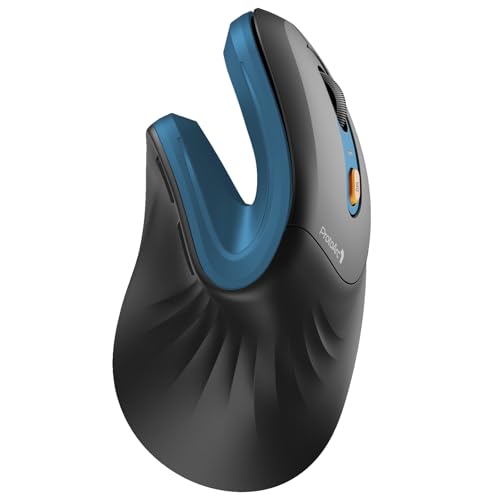 | Versatile Connectivity | Connectivity: Bluetooth 5.0 / 2.4 GHz USB‑A receiver | DPI Range: 1000 – 2400 DPI (3 steps) | Button Count: 6 buttons | VIEW LATEST PRICE | Read Our Analysis |
More Details on Our Top Picks
Logitech Lift Vertical Ergonomic Wireless Mouse (Rose)
If your wrist aches from traditional mice, the Logitech Lift’s 57‑degree vertical shape makes it an ergonomic essential for you. You’ll feel the natural posture lift as the snug thumb rest cradles your hand, easing strain on a small‑to‑medium right hand. Obviously, the 4000‑DPI optical sensor lets you fine‑tune sensitivity, and the 125 g weight keeps it light yet stable.
All right, the quiet clicks and SmartWheel scrolling give you smooth control, while four programmable buttons let you map shortcuts in Logi Options+. You can switch between three devices via Bluetooth or the Logi Bolt receiver, and Flow lets the cursor glide across screens without a hitch.
Now, battery life lasts up to 24 months on a single AA, so you won’t chase chargers. The only trade‑off is the right‑handed design, which won’t suit lefties. If you crave comfort, customization, and cross‑device fluency, this one fits you perfectly—go ahead and make the switch.
- Connectivity:Bluetooth LE / Logi Bolt USB receiver
- DPI Range:0 – 4000 DPI (adjustable)
- Button Count:6 buttons (4 customizable)
- Battery Type:1 AA (included)
- Handedness:Right‑handed only
- Weight:125 g
- Additional Feature:Ergo‑certified design
- Additional Feature:SmartWheel scrolling
- Additional Feature:Logitech Flow support
Logitech MX Master 4 Ergonomic Wireless Mouse
All right, you’ve been battling wrist strain and endless scrolling, so you need a mouse that actually eases the load. The MX Master 4’s ergonomic tilt and thumb wheel keep your hand in a natural pose, cutting stress while you glide through spreadsheets. Its quiet clicks shave off distractions, letting you stay in the zone without annoying clicks.
Now, the haptic sense panel lets you feel feedback for shortcuts and notifications, and you can dial intensity in Logi Options+. The actions ring hugs each app, putting your most used tools right at the cursor, which can shave up to 33 % off repetitive moves and reduce motion by 63 %.
Here’s the thing: the MagSpeed wheel scrolls 1,000 lines per second and stops on a pixel, so you’ll zip through long documents without missing a beat. The 8k DPI sensor tracks on any surface, even glass, and the new USB‑C dongle doubles connectivity strength, giving you a stable link up to 10 meters away.
Obviously, battery life is a win—70 days on a single charge and a quick one‑minute top‑up for three more hours. The build uses recycled plastics and cobalt, so you feel good about sustainability while the matte finish resists stains.
If you juggle multiple OSes, you’ll love the cross‑platform support—Windows, macOS, Linux, Chrome OS, iPadOS, Android—and the Logi Options+ app enables deep customization. This mouse fits you if you crave precision, tactile feedback, and a comfortable grip for long‑haul work. Go ahead, grab it, and let your workflow finally flow.
- Connectivity:Bluetooth / USB‑C dongle (Logi Bolt)
- DPI Range:0 – 8000 DPI (adjustable)
- Button Count:7 buttons (customizable)
- Battery Type:1 AA (included)
- Handedness:Right‑handed only
- Weight:~120 g (approx.)
- Additional Feature:Haptic Sense Panel
- Additional Feature:MagSpeed scroll wheel
- Additional Feature:54% recycled plastic
TECKNET Ergonomic Wireless Mouse 2600 DPI Purple
You’ve been battling cramped hands and jittery cursors, and you need a mouse that won’t add to the chaos. This TECKNET model fits your right hand with a contoured ABS shell, rubber side‑grips, and a feather‑light 85 g weight, so you’ll feel less fatigue during long sessions. The compact 4.09×2.68×1.49 in. size slides into any bag, making it perfect for on‑the‑go work.
All right, the 2.4 GHz dongle gives you a reliable plug‑and‑play link up to 15 m, and the six buttons plus TruWave optical tracking let you toggle five DPI presets—800 to 2600—without hunting for software. You’ll love the precision when you’re editing graphics or scrolling through spreadsheets. Obviously, the side buttons won’t work on macOS, and the mouse won’t glide on glass, so you’ll need a proper mouse pad.
Now, battery life is a winner: up to 24 months, or 700 hours, on two AAA cells (not included) plus a power‑saving mode and on/off switch. You won’t be swapping batteries every week, and the 12‑month warranty covers any early hiccups. This one’s for you if you want a portable, high‑DPI, right‑hand‑only device that stays cheap and reliable without extra software. Pick it up, plug the receiver in, and feel your workflow smooth out instantly.
- Connectivity:2.4 GHz USB‑A mini‑receiver
- DPI Range:800 – 2600 DPI (5 steps)
- Button Count:6 buttons
- Battery Type:2 AAA (not included)
- Handedness:Right‑handed only
- Weight:85 g
- Additional Feature:Compact travel size
- Additional Feature:Receiver stored in mouse
- Additional Feature:TruWave precision tech
Logitech Ergo M575S Wireless Trackball Mouse (Black/Silver)
You’ve probably spent hours fighting forearm fatigue from a regular mouse, and that’s why the Logitech Ergo M575S is a trackball pro for anyone who wants relief. You’ll notice the sculpted shape cradles your hand, aligning the forearm and cutting strain by about 25 % versus a typical M650. The thumb‑controlled ball lets you glide the cursor without sweeping your arm, so you stay relaxed even during marathon sessions.
All right, the ball works on any surface, and the quiet clicks keep the office zen. You can pair via Bluetooth or the Logi Bolt dongle, enjoying up to 18 months of life on a single AA. The 10‑meter range means you won’t be tethered to a desk, and the three programmable buttons let you map shortcuts in Logi Options+—but you’ll need Windows 10 or macOS 10.15+ for full customization.
Here’s the thing: the M575S uses recycled plastic (52 % in the black model), so you get a light 0.21 kg device with a one‑year warranty and an eco‑friendly vibe. It fits small desks and travel kits perfectly, yet the ball may feel odd if you’re used to a traditional mouse. If you value comfort, quiet operation, and sustainability, this one’s for you. Choose it, and you’ll turn forearm pain into a thing of the past.
- Connectivity:Bluetooth / Logi Bolt USB receiver
- DPI Range:0 – 4000 DPI (adjustable)
- Button Count:3 buttons (customizable)
- Battery Type:1 AA (included)
- Handedness:Right‑handed only
- Weight:210 g (0.21 kg)
- Additional Feature:Trackball thumb control
- Additional Feature:25% forearm strain reduction
- Additional Feature:Recycled post‑consumer plastic
TECKNET Wireless Bluetooth Ergonomic Vertical Mouse
If your wrist aches from traditional mice, the TECKNET Vertical Mouse can finally give you relief. You’ll notice the near‑vertical palm posture right away, cutting pressure on your forearm. It fits your right hand snugly, weighing just 0.27 lb, so you won’t feel it dragging you down.
All right, Bluetooth 5.0 and a 2.4 GHz dongle let you juggle three devices—two Bluetooth, one dongle—by pressing a tiny button. You’ll stay within a 33‑foot range, switching instantly without fumbling with settings. The downside? macOS side‑button shortcuts won’t work, so you’ll need a work‑around if you rely on them.
Now, the 4800 DPI sensor gives you six DPI choices, flashing LEDs to confirm each level. The chip tracks smoothly on any surface, so you can glide across a desk or a coffee‑stained notebook without jitter. If you need ultra‑precise control, bump to 4800 DPI; for everyday browsing, 800 DPI saves battery.
Power-wise, two AAA cells (not included) last up to two years, and the mouse sleeps after 10‑30 minutes of inactivity. A blinking LED warns you when it’s time to replace the batteries, preventing surprise shutdowns. You’ll love the quiet left‑right clicks, though the function buttons are a bit louder.
Here’s the thing: this mouse is perfect for you if you want ergonomic relief, multi‑device flexibility, and a lightweight design that won’t hog your desk. If you’re left‑handed or need silent function keys, you might look elsewhere. Otherwise, go ahead—your wrist and workflow will thank you.
- Connectivity:Bluetooth 5.0 / 2.4 GHz USB‑A receiver
- DPI Range:800 – 4800 DPI (6 steps)
- Button Count:6 buttons
- Battery Type:2 AAA (not included)
- Handedness:Right‑handed only
- Weight:122 g (0.27 lb)
- Additional Feature:Dual‑mode Bluetooth & 2.4 GHz
- Additional Feature:LED DPI indicator
- Additional Feature:36‑month warranty
Logitech Lift Vertical Ergonomic Mouse – Graphite Wireless
The 57‑degree vertical angle eases wrist strain for anyone who spends hours scrolling, and its recycled‑plastic body makes it a sustainable choice. You’ve probably felt that nagging ache after a marathon of spreadsheets, and this mouse tackles it head‑on. Its contoured shape fits small‑to‑medium right hands, while the soft grip and thumb rest keep you comfortable for days.
All right, the tech side checks out: 4000 DPI adjustable, SmartWheel for rapid scrolling, and four programmable buttons that stay quiet. You’ll love the 10‑meter wireless range and the ability to switch between three devices with Easy‑Switch, but remember you need Logi Options+ for full customization.
Now, battery life is a win—one AA cell lasts up to two years, so you won’t be hunting chargers. The recycled‑plastic construction (70 % post‑consumer) aligns with your eco‑values, and the two‑year warranty gives peace of mind. If you prioritize ergonomics, durability, and sustainability without sacrificing performance, this one’s for you.
Here’s the thing: it isn’t a gaming mouse, so you won’t get ultra‑fast polling rates, but for office work and creative tasks it feels spot‑on. Choose it, and you’ll finally give your wrist the break it’s been begging for.
- Connectivity:Bluetooth LE / Logi Bolt USB receiver
- DPI Range:0 – 4000 DPI (adjustable)
- Button Count:6 buttons (4 customizable)
- Battery Type:1 AA (included)
- Handedness:Right‑handed only
- Weight:125 g
- Additional Feature:Post‑consumer recycled plastic
- Additional Feature:Easy‑Switch multi‑device
- Additional Feature:Logi Bolt receiver included
ProtoArc Ergonomic Bluetooth Vertical Mouse Multi‑Device Connectivity
You’re battling wrist fatigue from endless scrolling, and you need a mouse that won’t add to the strain. The ProtoArc vertical design forces your hand into a neutral handshake posture, which eases forearm tension for people with sub‑7.5‑inch palms. You’ll feel the learning curve for a week or two, but the quiet left‑right clicks and adjustable 1000‑2400 DPI make the shift painless.
Now, think about juggling work, personal,, and a tablet. This mouse pairs with up to three devices via Bluetooth 5.0 or the included 2.4 GHz USB‑A receiver, so you can switch between a Windows PC, a Mac, and an Android phone without unplugging anything. The 8‑meter range keeps you comfortable even when you stretch out on a couch. Just remember the forward/back buttons won’t work on macOS, and none of the six buttons are programmable.
Here’s the thing: the built‑in 500 mAh rechargeable battery lasts weeks, and you recharge it with the supplied Type‑C cable—no disposable cells to track. At 0.27 kg it feels light, yet sturdy enough for daily use, and the two‑year warranty covers any early hiccups. If you value a natural grip, multi‑device freedom, and don’t mind a short adaptation period, this one’s for you. Go ahead and plug it in; your wrists will thank you.
- Connectivity:Bluetooth 5.0 / 2.4 GHz USB‑A receiver
- DPI Range:1000 – 2400 DPI (3 steps)
- Button Count:6 buttons
- Battery Type:Built‑in rechargeable Li‑Ion (included)
- Handedness:Right‑handed only
- Weight:270 g (0.27 kg)
- Additional Feature:Rechargeable Li‑Ion battery
- Additional Feature:8‑meter range
- Additional Feature:2‑year warranty
Factors to Consider When Choosing an Ergonomic Mouse
You’re probably frustrated by cramped wrists and missed clicks, so let’s sort out the shape, angle, and hand‑size match before you buy. Now, think about button placement and count—too many or oddly placed controls can slow you down, while a clean layout boosts productivity; DPI adjustability lets you fine‑tune sensitivity for gaming or design, and connectivity options (Bluetooth vs. dongle) dictate range and battery life. Here’s the thing: if you need a vertical grip for wrist relief, a modest DPI range, and reliable Bluetooth for multiple devices, this one fits you; otherwise, a traditional ergonomic shape with wired stability might be better.
Ergonomic Shape and Angle
If you’ve been battling wrist ache after hours at the desk, you know a cramped mouse just isn’t cutting it. The angle matters: a 57‑degree vertical tilt lets your hand stay neutral, lifting the wrist and easing forearm muscles. All right, you’ll feel the difference instantly, especially if you keep your forearm relaxed.
Here’s the thing: a contoured shape that matches your hand’s curve keeps alignment solid and eliminates wobble. A thumb‑controlled cursor lets you move the pointer without sweeping your whole arm, cutting strain. Obviously, a softly textured grip and built‑in thumb rest smooth out pressure points, so you won’t notice fatigue after long sessions.
If you crave a snug, supportive fit that feels like an extension of your hand, this design is for you. It won’t work if you prefer a flat, low‑profile mouse, but for most users it makes the shift painless and the upgrade obvious. Choose the shape that hugs you, and you’ll notice the relief right away.
Hand Size Compatibility
A cramped mouse that forces your fingers to stretch is a fast track to fatigue, so matching the mouse to your hand size matters more than any fancy sensor. You’ll notice the difference the second a contoured shape mirrors your palm’s natural curve—no more pressure points, just steady support.
All right, measure your hand from thumb knuckle to pinky base; if it’s under 7.5 inches, target small‑to‑medium models. Those usually sport a thumb rest and a textured grip sized for that range, keeping your hand stable during long sessions.
Now, look at width and height. A mouse that fills your palm without spilling over lets your fingers rest naturally, preventing overextension. If you have a larger hand, a wider, taller design will feel comfortable; a tiny one will cramp you.
Here’s the thing: this one’s for you if you want a seamless, strain‑free grip. Choose a size that matches your measurements, and you’ll eliminate the cramped‑hand frustration before it even starts.
Button Placement and Count
When your thumb constantly wrestles with cramped side buttons, fatigue sneaks in before you even notice it. You need a layout that respects your natural grip, so look for a contoured thumb rest that houses the side controls. Obviously, a thumb scroll wheel or extra buttons on the side let you scroll horizontally or fire app‑specific shortcuts without shifting your hand.
Now, count the buttons. A typical ergonomic mouse offers four to seven programmable keys plus the standard left, right, and scroll clicks. More buttons mean more shortcuts, but they also crowd the thumb area; if you only need a couple of macros, a four‑button model keeps things tidy. Quiet click mechanisms on the primary buttons cut noise—great for open‑plan offices or late‑night sessions.
Here’s the thing: if you love customizing every command, go for a seven‑button mouse with a thumb‑rest that feels like a glove. If you prefer simplicity, a five‑button layout with a smooth scroll wheel will still boost efficiency without overwhelming you. Choose the count that matches your workflow, and you’ll notice the strain melt away.
DPI Adjustability and Sensitivity
You’re tired of the cursor sprinting across a 4K screen while your hand barely moves, then lagging when you need pixel‑perfect control for design work. DPI adjustability lets you dial the speed up or down in a heartbeat, so you stay fluid on large monitors and razor‑sharp on intricate graphics. A mouse that spans 800‑8000 DPI covers everything from casual browsing to CAD‑level detail, and the sensor’s optical precision guarantees smooth tracking at any setting.
Now, look for pre‑set DPI shortcuts—often flashing LEDs—so you can switch without digging into software. This is handy when you hop between Photoshop and Excel, because you won’t waste time hunting menus. The maximum DPI tells you the top‑end speed; the adjustable range gives you granular control for personal comfort.
Here’s the thing: high DPI feels great on high‑resolution screens, but it can feel jittery on low‑res displays. If you work on a 1080p laptop, a 1600‑3200 DPI range is plenty; go higher only if you regularly use 4K or ultra‑wide monitors. Choose a mouse with an optical sensor that matches the advertised DPI range—otherwise you’ll get ghosting or lag.
All right, if you need instant sensitivity shifts for gaming and design, pick a model with on‑the‑fly DPI buttons. If you prefer a single, stable setting, a mouse with a fixed high‑precision sensor works fine. Either way, you’ll eliminate the sprint‑and‑stall frustration and feel confident that your cursor obeys exactly how you want it.
Connectivity Options and Range
If your desk is a maze of cables and you keep losing connection mid‑scroll, that’s the frustration we’re fixing. You’ll want a mouse that talks to your PC without a tangled mess. Bluetooth gives you up to 15 meters of freedom, but you must pair it each time and sometimes wrestle with latency. A 2.4 GHz dongle plugs in once and stays solid, letting you forget about pairing entirely.
Now, think about multi‑device pairing. If you flip between a laptop, tablet, and desktop, a mouse that stores three profiles saves you swapping receivers. The trade‑off is a tiny learning curve to switch channels, but the convenience pays off.
All right, consider software. Some advanced features—like cross‑computer cursor movement—need a driver, so you’ll have to install it. If you’re a minimalist, stick with a plug‑and‑play dongle; if you love custom shortcuts, the driver‑dependent model fits. Choose the one that matches your workflow, and you’ll never miss a beat.
Battery Life and Type
All right, you’ve just sorted out how you’ll stay connected, now let’s talk about how long that connection actually lasts. You’re probably annoyed by constantly swapping AA batteries, so consider models that promise up to 24 months on disposable cells—great for low‑usage desks but still dependent on your power‑draw habits.
Now, if you’re a power user, a built‑in lithium‑ion pack can give you about 70 days of continuous work, and some even hand you three hours of use after a one‑minute charge. That’s a sweet trade‑off: you’ll need a cable occasionally, but you’ll never hunt for replacements again.
Here’s the thing: power‑saving modes and deep‑sleep functions can stretch any battery, regardless of type, by shutting down after inactivity. If you’re prone to stepping away, this feature will keep your mouse alive longer without you thinking about it.
Obviously, wireless range—10 to 15 meters—doesn’t change with battery choice, but it matters if you move around a lot. Choose disposable if you hate cables altogether; pick rechargeable if you value longer sessions and don’t mind a nightly plug‑in.
Bottom line, match the battery strategy to your workflow rhythm, and you’ll avoid surprise shutdowns while staying comfortable.
Surface Tracking Performance
All right, you’ve probably noticed your cursor jittering on a glossy desk or refusing to move on a glass tabletop, and that frustration can ruin a smooth workflow. Here’s the thing: optical sensors with high‑DPI chips can dance on non‑reflective glass, but some cheap models still demand a matte pad. If you swing between 400 DPI for casual browsing and 8000 DPI for pixel‑perfect design, pick a mouse that lets you dial DPI on the fly; you’ll cut repetitive motions by up to 63 %.
Now, wireless reliability matters too. Optimized antenna placement and a robust radio chip keep the signal steady across a 10‑15 meter range, so you won’t lose control when you stretch across a large desk.
Obviously, if your office has a glass conference table, you need a sensor explicitly rated for glass; otherwise you’ll be stuck with a jittery cursor. This one’s for you if you crave precision without swapping mousepads. Choose the sensor that matches your surface, and you’ll glide through tasks with confidence.
Material Sustainability and Build Quality
All right, you’ve probably noticed how a cheap plastic shell cracks after a few months of heavy use, and that wear‑and‑tear can ruin an otherwise ergonomic design. Now, think about the material you want to put your hand on for years. If you care about sustainability, look for models that boast 21‑70 % post‑consumer recycled plastic; the higher the percentage, the lighter your eco‑footprint.
Here’s the thing: recycled‑cobalt batteries and stain‑resistant finishes extend lifespan, so you won’t replace the mouse every season. Obviously, warranty length tells you how confident manufacturers are about build quality—12 months to two years is typical, so a longer warranty usually means sturdier internals.
If you need a certified ergonomic mouse, independent certification signals rigorous development and durable materials. This one’s for you if you want a greener, longer‑lasting device without sacrificing comfort. Choose the model that aligns with your eco‑values and warranty expectations, and you’ll feel confident about the purchase.