
A cramped wrist feels like a clenched fist, a reminder that every click could be a silent alarm for carpal tunnel. You’ve tried flat mice, but the strain persists, so you need a vertical design that lets your hand rest naturally and eases ulnar deviation. Here’s the low‑down on seven options—each with its own tilt angle, grip texture, battery type, and DPI range—so you can match the one that fits your work style without guessing.
| Logitech Lift Vertical Ergonomic Mouse Wireless Bluetooth Bolt |  | Best Overall | Hand Orientation: Right‑handed | Connectivity Type: Bluetooth + Logi Bolt USB | Adjustable DPI: Up to 4000 DPI | VIEW LATEST PRICE | Read Our Analysis |
| Lekvey Ergonomic Vertical Wireless Mouse Rechargeable 6-Button Pink-Purple | 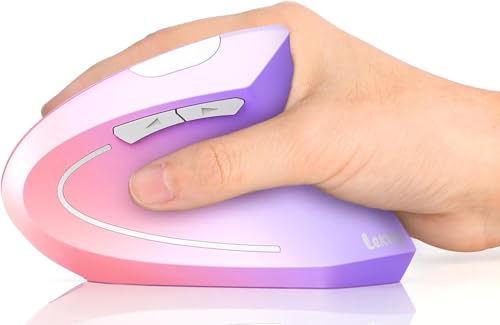 | Trendy Design | Hand Orientation: Right‑handed | Connectivity Type: 2.4 GHz USB receiver only | Adjustable DPI: 800 / 1200 / 1600 DPI | VIEW LATEST PRICE | Read Our Analysis |
| Philips Ergonomic Vertical Wireless Mouse – Adjustable DPI Silent Buttons |  | Budget-Friendly Pick | Hand Orientation: Right‑handed | Connectivity Type: 2.4 GHz USB receiver only | Adjustable DPI: 800 / 1200 / 1600 DPI | VIEW LATEST PRICE | Read Our Analysis |
| Seenda Wireless Ergonomic Vertical Mouse (Bluetooth) |  | Multi‑Device Pro | Hand Orientation: Right‑handed | Connectivity Type: Bluetooth + 2.4 GHz USB receiver | Adjustable DPI: 1000 / 1600 / 2400 DPI | VIEW LATEST PRICE | Read Our Analysis |
| TECKNET Vertical Ergonomic Wireless Mouse – 4800 DPI 6 Buttons Black |  | High‑DPI Power | Hand Orientation: Right‑handed | Connectivity Type: 2.4 GHz USB receiver only | Adjustable DPI: 800 / 1600 / 2400 / 3200 / 4800 DPI | VIEW LATEST PRICE | Read Our Analysis |
| TECKNET Ergonomic Vertical Wireless Mouse – 4800 DPI Pink | Silent Precision | Hand Orientation: Right‑handed | Connectivity Type: 2.4 GHz USB receiver only | Adjustable DPI: 800 / 1600 / 2400 / 3200 / 4800 DPI | VIEW LATEST PRICE | Read Our Analysis | |
| ProtoArc Ergonomic Bluetooth Vertical Mouse 3-Device Connectivity (Black) |  | Premium Connectivity | Hand Orientation: Right‑handed | Connectivity Type: Bluetooth + 2.4 GHz USB receiver | Adjustable DPI: 1000 / 1600 / 2400 DPI | VIEW LATEST PRICE | Read Our Analysis |
More Details on Our Top Picks
Logitech Lift Vertical Ergonomic Mouse Wireless Bluetooth Bolt
If you spend hours scrolling or coding and feel your wrist screaming, the Logitech Lift’s 57° vertical angle lets you work with a natural forearm posture, cutting strain like a charm. You’ll notice the soft textured grip and snug thumb rest immediately, and the ergonomic certification backs the claim. All right, the mouse weighs just 125 g, so you won’t feel it dragging your hand down.
Now, connectivity is painless: Bluetooth Low Energy or the Logi Bolt USB receiver lets you switch between up to three devices with a simple toggle. The single AA battery lasts roughly two years, so you won’t be hunting for chargers. Obviously, the 4 customizable buttons and quiet clicks keep your workflow smooth, while the SmartWheel offers precise scrolling without jerky jumps.
Here’s the thing: the DPI tops out at 4000, which is plenty for most office tasks but might feel limited if you do high‑resolution graphic work. The recycled post‑consumer plastic enclosure feels sturdy, yet some users miss a metal finish. This one’s for you if you crave a lightweight, low‑maintenance ergonomic mouse that blends into any setup without breaking the bank. Choose it, and you’ll give your wrist a break while staying productive.
- Hand Orientation:Right‑handed
- Connectivity Type:Bluetooth + Logi Bolt USB
- Adjustable DPI:Up to 4000 DPI
- Number of Buttons:4 customizable buttons
- Power Source:Single AA battery (≈24 months)
- Warranty Length:2 years
- Additional Feature:Recycled post‑consumer plastic
- Additional Feature:SmartWheel scrolling ring
- Additional Feature:24‑month battery life
Lekvey Ergonomic Vertical Wireless Mouse Rechargeable 6-Button Pink-Purple
You’ve been battling wrist strain from cramped, flat‑handed mice, and you need something that actually lets your arm stay neutral. The Lekvey vertical mouse does exactly that with its scientific ergonomic shape that keeps your wrist straight, and its pink‑to‑purple finish looks sharp on any desk. It’s a bit larger than a classic mouse, so if you have a small hand you might feel it’s bulky, but the 95 g weight still feels light enough for long sessions.
All right, the performance side shines: you can switch DPI between 800, 1200, and 1600, and six programmable buttons give you shortcuts for browsing or design work. The metal scroll wheel scrolls smoothly, and the left/right clicks are whisper‑quiet—great for shared spaces. Sleep mode kicks in after 20 minutes, waking instantly with any button press, and the 10 meter wireless range lets you work from couch to desk.
Now, power is hassle‑free. A three‑hour charge yields up to 150 hours of use, so you’ll never chase disposable batteries. The included 150 cm USB‑C cable plugs into the nano 2.4 GHz receiver—just plug, play, and you’re set. Bluetooth isn’t an option, which could be a downside if you prefer that, but the reliable dongle eliminates pairing headaches.
Here’s the thing: compatibility covers Windows, Linux, and macOS, though macOS needs a USB‑A port or adapter you’ll have to buy. The two‑year warranty and responsive support email add peace of mind. If you value ergonomic design, programmable controls, and a pop of color, this mouse is for you—just be sure your hands can accommodate its size. Choose it, and you’ll likely feel the strain melt away.
- Hand Orientation:Right‑handed
- Connectivity Type:2.4 GHz USB receiver only
- Adjustable DPI:800 / 1200 / 1600 DPI
- Number of Buttons:6 programmable buttons
- Power Source:Built‑in rechargeable (≈150 h)
- Warranty Length:2 years
- Additional Feature:Metal scroll wheel
- Additional Feature:150‑hour usage per charge
- Additional Feature:10‑m wireless range
Philips Ergonomic Vertical Wireless Mouse – Adjustable DPI Silent Buttons
Sick of wrist ache after hours of scrolling? You’ll love the 57° vertical angle that puts your hand in a natural handshake, slashing fatigue for small‑to‑medium palms. The six silent buttons keep clicks quiet, and the lightweight, compact shape slides into any bag.
All right, the 2.4 GHz dongle gives you a reliable 10 m range without Bluetooth hassles, and you can switch DPI between 800, 1200 and 1600 with a single click. Battery life lasts long, but you must remove the battery before use, and a USB‑C to USB‑A adapter isn’t included.
Now, it works with Windows 7+, macOS 9 and Linux, but only right‑handed users. If you’re a right‑hander who values quiet clicks and adjustable sensitivity, this mouse fits your needs. The 12‑month warranty and easy Amazon returns make the decision painless—just plug the receiver in, set your DPI, and enjoy smoother scrolling.
- Hand Orientation:Right‑handed
- Connectivity Type:2.4 GHz USB receiver only
- Adjustable DPI:800 / 1200 / 1600 DPI
- Number of Buttons:6 silent buttons
- Power Source:One AA battery (included)
- Warranty Length:12 months
- Additional Feature:Fits ≤ 7‑inch hands
- Additional Feature:Built‑in USB receiver storage
- Additional Feature:12‑month warranty
Seenda Wireless Ergonomic Vertical Mouse (Bluetooth)
Ever feel your wrist screaming after hours on a mouse? You’re not alone. The Seenda Wireless Ergonomic Vertical Mouse puts your hand in a natural handshake grip, keeping your forearm neutral and easing that nagging carpal tunnel pressure.
All right, here’s the thing: the built‑in volume knob lets you pause, play, or adjust music without hunting for keyboard shortcuts, and the silent clicks keep office chatter down. You can switch DPI between 1000, 1600, and 2400, so you stay precise whether you’re designing graphics or scrolling through emails.
Now, connectivity is a breeze. You can pair three devices at once—two via Bluetooth, one through the 2.4 GHz USB receiver—so your laptop, tablet, and phone all share the same mouse. It works on Windows, macOS, iOS, Android, and Chrome OS, covering virtually any setup you own.
Power-wise, the 500 mAh battery charges via USB‑C and lasts up to two months; you’ll still need an AA battery for the starter pack, but that’s a one‑time hassle. The mouse weighs just 0.17 kg, fits comfortably in your right hand, and offers a five‑meter range, so you won’t feel tethered.
Obviously, the right‑hand‑only design means left‑handed users must look elsewhere. If you’re a right‑handed office worker or designer dealing with wrist strain, this mouse feels like a custom fit. The two‑year warranty adds peace of mind, and the playful purple color gives a subtle personality boost.
If you want a vertical mouse that blends ergonomic relief with handy media controls and solid multi‑device support, this one’s for you. Give it a try and let your wrist thank you.
- Hand Orientation:Right‑handed
- Connectivity Type:Bluetooth + 2.4 GHz USB receiver
- Adjustable DPI:1000 / 1600 / 2400 DPI
- Number of Buttons:5 buttons (incl. volume knob)
- Power Source:Integrated 500 mAh battery + optional AA
- Warranty Length:2 years
- Additional Feature:Volume control knob
- Additional Feature:500 mAh rechargeable battery
- Additional Feature:3‑device simultaneous connection
TECKNET Vertical Ergonomic Wireless Mouse – 4800 DPI 6 Buttons Black
Do you spend hours battling wrist strain while scrolling through spreadsheets? You’ll love the TECKNET vertical mouse because its upright design aligns your arm and wrist, cutting the usual forearm twist. It fits right‑hand users with palms 6.7‑8.3 in long and 3.5‑4.7 in wide, so you’ll feel natural after a quick 1‑2 week adjustment.
All right, the performance side delivers five DPI settings from 800 up to 4800, letting you dial precision for design work or speed for browsing. Six buttons cover left, right, scroll and forward/backward, though the side buttons won’t work on Macs. Silent clicks keep your office quiet, and the 2.4 GHz dongle reaches 49 ft, so you won’t be tethered to a desk.
Now, power is straightforward: two AAA batteries (not included) last about six months, and the mouse sleeps after eight minutes of inactivity, waking instantly with any button press. The red LED shows DPI changes and low battery alerts, so you won’t be caught off guard.
Here’s the thing: this mouse works with Windows and Linux, but if you rely on macOS or need a USB‑C receiver, you’ll need an adapter. The 36‑month warranty applies only after registration, so keep that paperwork handy. If you want a reliable, ergonomic solution that’s easy on the budget and you’re comfortable with a small learning curve, this one fits you perfectly. Take the plunge and give your wrist the break it deserves.
- Hand Orientation:Right‑handed
- Connectivity Type:2.4 GHz USB receiver only
- Adjustable DPI:800 / 1600 / 2400 / 3200 / 4800 DPI
- Number of Buttons:6 buttons
- Power Source:Two AAA batteries (not included)
- Warranty Length:36 months (registered)
- Additional Feature:6‑month average battery life
- Additional Feature:49‑ft (15 m) range
- Additional Feature:36‑month registered support
TECKNET Ergonomic Vertical Wireless Mouse – 4800 DPI Pink
You’ve probably spent hours battling wrist strain from a flat‑hand mouse, and the TECKNET vertical wireless mouse finally steps in with silent precision. This pink, right‑hand‑only device forces your hand into a natural handshake grip, easing carpal‑tunnel pressure. You’ll love the 4800 DPI sensor, which you can dial down to 800 for smoother control, and the six programmable buttons—two side buttons for forward/backward navigation, though they won’t work on macOS.
All right, the 2.4 GHz USB‑A receiver gives you a 49‑ft range, so you can work from the couch without lag. The silent‑click mechanism cuts noise by over 90 %, and the auto‑sleep after eight minutes preserves battery life—just pop in two AAA cells when it flashes low.
Now, if you need a plug‑and‑play solution, this mouse works on Windows, Linux, and macOS (side buttons disabled on the latter). No drivers, no hassle. The 36‑month support and Amazon’s 30‑day return guarantee give you peace of mind.
Here’s the thing: this one’s for you if you crave a stylish, ergonomic upgrade that stays quiet and reliable, and you don’t mind the side buttons being useless on macOS. Go ahead, click “Add to Cart”—your wrist will thank you.
- Hand Orientation:Right‑handed
- Connectivity Type:2.4 GHz USB receiver only
- Adjustable DPI:800 / 1600 / 2400 / 3200 / 4800 DPI
- Number of Buttons:6 buttons
- Power Source:Two AAA batteries (not included)
- Warranty Length:36 months (registered)
- Additional Feature:4.4‑star Amazon rating
- Additional Feature:Auto‑sleep after 8 min
- Additional Feature:LED low‑battery indicator
ProtoArc Ergonomic Bluetooth Vertical Mouse 3-Device Connectivity (Black)
If your wrist aches from scrolling all day, the ProtoArc EM11 NL vertical mouse is a game‑changer, especially with its premium connectivity that lets you switch between three devices instantly. You’ll love the natural grip that keeps your hand in a relaxed, handshake‑like posture, which eases the strain that causes carpal tunnel pain. The quiet left‑right clicks stay silent, while the back/forward buttons give you the tactile feedback you need for browsing.
All right, the mouse pairs via Bluetooth 5.0 or a 2.4 GHz USB‑A receiver, so you can hop from laptop to tablet to desktop without fumbling for cables. You can connect up to three devices at once, but note there’s no USB‑C receiver—just a Type‑C cable for charging. The 500 mAh battery lasts about a month, and the DPI ranges from 1000 to 2400, letting you fine‑tune sensitivity for design work or spreadsheets.
Now, the 7‑button layout gives you extra shortcuts, though the back/forward keys are audible, which might bother you in quiet offices. It fits small‑to‑medium right hands under 7.5 in, and at 250 g it feels solid without being heavy. If you have a larger hand, the vertical angle could feel cramped, but for most users it reduces repetitive‑strain risk.
Obviously, the two‑year warranty and 30‑day Amazon return policy back you up if anything goes wrong. This one’s for you if you need a versatile, multi‑device mouse that eases wrist pain while staying portable and affordable. Go ahead and give it a try—you’ll likely find the shift smoother than you expect.
- Hand Orientation:Right‑handed
- Connectivity Type:Bluetooth + 2.4 GHz USB receiver
- Adjustable DPI:1000 / 1600 / 2400 DPI
- Number of Buttons:7 buttons
- Power Source:Built‑in rechargeable 500 mAh Li‑Ion
- Warranty Length:2 years
- Additional Feature:500 mAh Li‑Ion battery
- Additional Feature:7‑button layout
- Additional Feature:3‑device simultaneous connection
Factors to Consider When Choosing an Ergonomic Mouse for Carpal Tunnel
You’re probably feeling wrist strain from a flat‑hand grip, so the mouse’s ergonomic angle and posture support matter most. Now, think about adjustable DPI sensitivity and button placement—high DPI lets you move less, while well‑spaced buttons keep your fingers from overreaching. And don’t forget material, grip texture, and wireless options; a soft matte finish can reduce sweat, but a heavier wireless dongle might add latency if you need instant response.
Ergonomic Angle and Posture
When your wrist feels like a clenched fist after hours at the desk, the angle of your mouse can be the hidden culprit. A vertical mouse tilted 55°‑60° aligns your forearm with your hand, keeping the wrist neutral and slashing ulnar deviation. Obviously, that neutral posture cuts median‑nerve pressure up to 30% compared with a flat‑profile mouse.
Now, aim for 0°‑5° wrist flexion while you click; anything beyond 15° spikes strain. The ergonomic angle should let your palm rest naturally, so your thumb stays relaxed and doesn’t twist outward. Studies show users who stick with the right angle see a 20‑40% drop in wrist discomfort after four weeks.
All right, if you love a natural hand‑rest feeling and want to avoid thumb fatigue, this one fits you. If you prefer a flatter feel, you might need a different model. Choose the angle that lets your wrist stay neutral, and you’ll feel the difference instantly.
Adjustable DPI Sensitivity
All right, you’re probably feeling the sting of countless tiny wrist flicks that add up to a full‑day of strain. The good news? Higher DPI lets the cursor travel farther while your hand stays still, slashing the distance you move the mouse. If you have a small hand or a light grip, dial the DPI up; if you favor a relaxed palm, keep it lower. Switching from 800 to 1600 DPI can cut travel distance by half, so you won’t over‑extend your wrist.
Now, look for a mouse that lets you tweak DPI in 200‑400 step increments. Small jumps keep your hand posture steady across spreadsheets, design work, or gaming sessions, preventing awkward angles that aggravate carpal tunnel. A button‑controlled DPI switch is a real time‑saver; you’ll stay in the zone without hunting through software menus.
Here’s the thing: not every mouse offers on‑the‑fly changes, and some only support a narrow DPI range. If you need ultra‑precise control for photo editing, pick a model with 100‑2000 DPI and smooth scaling. If you mostly browse and write, a 400‑1200 range is plenty. Choose the one that matches your workflow, and you’ll feel the strain melt away.
Button Placement and Reach
All right, you’ve already seen how DPI tweaks can spare your wrist from endless sweeps, but if the buttons sit too far out, you’ll still end up over‑extending your hand. You need primary click pads right under your index and middle fingers, so you never stretch your thumb. The thumb‑side button should sit where your thumb rests naturally, letting you fire it without moving the hand from a neutral grip.
Now, the scroll wheel belongs dead center, letting your forefinger spin it without twisting your wrist. Keep any extra programmable keys at least 10 mm apart; that spacing stops accidental presses while you stay relaxed.
Here’s the thing: align button height with the palm’s curve, keeping your fingers parallel to the mouse surface. If you prefer a low‑profile feel, this one works; if you love a taller, sculpted shape, look elsewhere. Pick the mouse that matches your hand size and grip style, and you’ll feel the difference instantly.
Material and Grip Texture
If your hand feels like it’s gripping a cold, slippery stone, the material and texture of the mouse become the real game‑changer. Soft textured grips spread pressure evenly, so you avoid hot spots that aggravate the carpal tunnel. Matte or rubberized surfaces give you friction, stopping the hand from sliding and letting you relax your grip.
All right, now consider breathability. Porous skins wick sweat, keeping your palm dry and reducing swelling during long sessions, while smooth plastics just make you slide and increase strain. A thin cushioned layer adds a millimeter of padding, cutting peak pressure by up to fifteen percent—perfect if you need that extra buffer.
Obviously, the right texture depends on your style. If you love a firm hold, go rubberized; if you prefer a light, airy feel, choose breathable mesh. This one’s for you if you want consistent comfort without constantly readjusting. Pick the material that matches your grip habit, and you’ll feel the relief instantly.
Wireless Connectivity Options
Ever feel like your mouse is a tug‑of‑war with your wrist, and the wireless link is the hidden culprit? You’ll notice Bluetooth Low Energy gives you a tidy 10 m range and lets you hop between laptop, tablet, and phone without fumbling for a dongle. That’s perfect if you juggle devices daily and want a clean desk, but remember older PCs might lack native Bluetooth, forcing you to buy a separate adapter.
All right, now think about latency. A 2.4 GHz USB receiver usually beats Bluetooth in response time, which matters when you’re doing pixel‑perfect design work or fast spreadsheet navigation. The trade‑off is a dedicated dongle that can clutter USB ports, and you’ll need to keep a spare battery handy if the mouse uses disposables.
Here’s the thing: Bluetooth mice often carry built‑in rechargeable cells, saving you from swapping AA or AAA batteries, while many USB‑receiver models still rely on disposables, raising long‑term cost. If you dislike charging chores, go the USB route; if you prefer fewer batteries, Bluetooth wins. Obviously, you’ll want the option that matches your workflow, so pick the connection that feels seamless, not stressful.
Battery Life and Power
When you’re juggling deadlines and a sore wrist, the last thing you need is a mouse that dies mid‑task, so prioritize battery life early.
All right, AA or AAA cells give you 12‑24 months of typical office use, meaning you’ll barely notice a replacement. That’s perfect if you hate hunting for chargers.
Now, rechargeable models pack a lithium‑ion cell that lasts 1‑2 months per charge, but you’ll need a regular recharging routine. If you can remember a weekly plug‑in, you’ll enjoy a sleek, cable‑free setup.
Here’s the thing: Bluetooth Low Energy drains less power than a 2.4 GHz RF receiver, extending life by up to 30 %. Look for auto‑sleep after 5‑10 minutes of idle time; it conserves energy and stretches your battery’s lifespan.
Obviously, USB‑C charging tops micro‑USB in speed, often topping up in under 2 hours. If you value quick top‑ups, go for a USB‑C‑compatible mouse.
Pick the one that matches your routine: AA/AAA for “set‑and‑forget,” rechargeable for a clean desk, or Bluetooth‑LE with auto‑sleep for marathon sessions. You’ll stay productive, wrist‑friendly, and never caught off‑guard.
Device Compatibility Range
All right, you’ve got a mouse that lasts forever, but if your laptop only has USB‑C and no Bluetooth, that battery‑saving champion won’t even turn on. Verify OS support first—Windows 10/11, macOS 10.15+, Linux, Android 8+, iOS—so the driver loads and custom buttons work. Now, check the connection method: Bluetooth Low Energy works on most modern laptops, but a 2.4 GHz USB receiver needs a USB‑A port or an adapter; otherwise you’re stuck.
Here’s the thing: if you juggle a PC, a tablet, and a laptop, look for a mouse that handles up to three simultaneous connections. That way you can switch without re‑pairing each time. Obviously, the software must match your OS version; some ergonomic models demand proprietary apps for button mapping.
If your system lacks a native port for the receiver or charging cable, grab a USB‑C‑to‑USB‑A adapter—cheap, but essential. This one’s for you if you want seamless toggling between devices without hunting for adapters.
Pick the model that matches your ports, OS, and connection habits, and you’ll avoid the frustration of a mouse that looks great on paper but won’t power up on your setup.
Warranty and Support Coverage
If your mouse dies after a few months, the last thing you need is a surprise repair bill, so start by checking the warranty length—two or three years usually means you won’t be left holding the bag. All right, you’ll want a guarantee that covers hardware defects and the battery or charging system, because a dead‑on‑arrival unit is a nightmare. Look for a clear 30‑day full‑refund window; it lets you test the ergonomics without risk.
Now, make sure the manufacturer offers easy support—email, phone, or live chat—so you can get help without hunting for a hidden portal. Obviously, they should honor the warranty with just the original receipt, not a mountain of paperwork.
Here’s the thing: read the fine print on accidental damage exclusions, because a slip could cost you. This one’s for you if you value peace of mind and don’t want surprise out‑of‑pocket fees. Choose a mouse with solid coverage, and you’ll feel confident in your purchase.