
You’ve got a cluttered desk, a laptop that constantly slides off, and monitors that never sit at the right angle, so you’re stuck tweaking posture all day. Here’s the thing: a dual‑monitor arm with laptop support can free up space, keep your screen at eye level, and let you swivel a 32‑inch panel while your 13‑inch laptop stays snug on a ventilated tray. Pick the model that matches your desk’s mounting style and weight needs, and you’ll finally have a clean, ergonomic workstation without the guesswork.
| Mount Pro 2‑in‑1 Laptop & Monitor Desk Mount with VESA Bracket |  | Professional Grade | VESA Compatibility: 75 × 75 mm, 100 × 100 mm | Weight Capacity (per arm): 8 kg (≈ 17.6 lb) | Tilt Range: ±90° | VIEW LATEST PRICE | Read Our Analysis |
| WALI Dual Monitor Laptop Arm Mount (Black) | 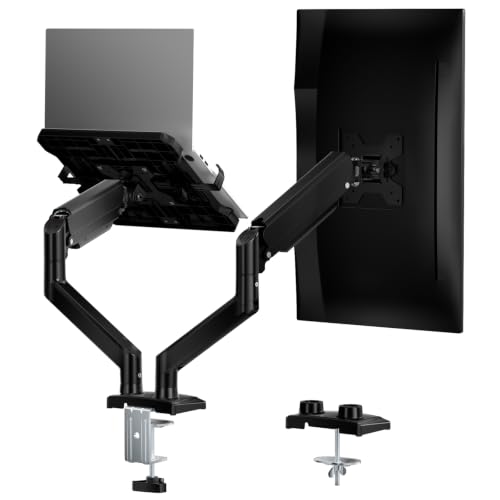 | Best Value | VESA Compatibility: 75 × 75 mm, 100 × 100 mm | Weight Capacity (per arm): 19.8 lb (≈ 9 kg) per arm | Tilt Range: ±90° | VIEW LATEST PRICE | Read Our Analysis |
| WALI Triple Arm Laptop & Dual Monitor Desk Mount (M002XLLP) |  | Heavy‑Duty Power | VESA Compatibility: 75 × 75 mm, 100 × 100 mm | Weight Capacity (per arm): 22 lb (≈ 10 kg) per arm | Tilt Range: ±90° | VIEW LATEST PRICE | Read Our Analysis |
| MOUNTUP Dual Monitor Laptop Mount Adjustable 27″ Stand | 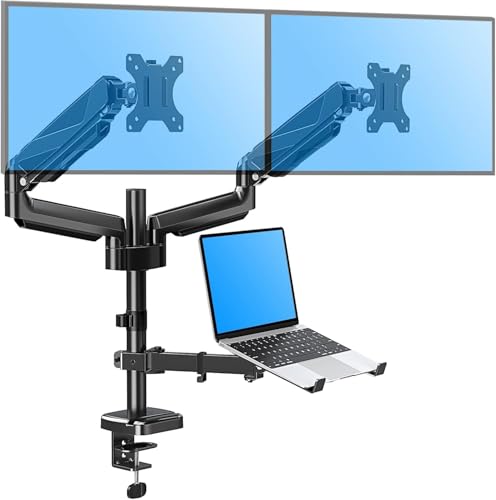 | Versatile Workhorse | VESA Compatibility: 75 × 75 mm, 100 × 100 mm | Weight Capacity (per arm): 17.6 lb (≈ 8 kg) per arm | Tilt Range: ±90° | VIEW LATEST PRICE | Read Our Analysis |
| UANUO Adjustable Monitor Stand Single Arm Desk Mount |  | Compact Efficiency | VESA Compatibility: 75 × 75 mm, 100 × 100 mm | Weight Capacity (per arm): 22 lb (≈ 10 kg) per arm | Tilt Range: ±45° | VIEW LATEST PRICE | Read Our Analysis |
| Hemudu Adjustable Dual Monitor Stand (Clear) | 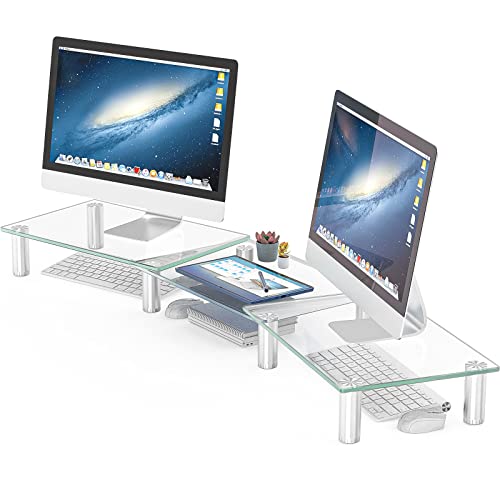 | Minimalist Elegance | VESA Compatibility: Not specified (no VESA‑compatible arms) | Weight Capacity (per arm): 3.96 kg total (≈ 8.7 lb) | Tilt Range: 0‑15° (forward tilt) | VIEW LATEST PRICE | Read Our Analysis |
| VIVO Dual Monitor & Laptop Mount (STAND-V013L) |  | Space‑Saving Solution | VESA Compatibility: 75 × 75 mm, 100 × 100 mm | Weight Capacity (per arm): 15.4 lb (≈ 7 kg) per arm | Tilt Range: +90° to –45° | VIEW LATEST PRICE | Read Our Analysis |
More Details on Our Top Picks
Mount Pro 2‑in‑1 Laptop & Monitor Desk Mount with VESA Bracket
You’ve got a cluttered desk and a laptop that’s constantly slipping off the edge—sounds familiar, right? You need a mount that tames both monitors and laptop without stealing space. The Mount Pro 2‑in‑1 gives you a sturdy C‑clamp or grommet base, holds two 13‑27‑inch screens (4.4‑17.6 lb each) and a laptop up to 17.6 lb, and lets you swivel 360°, tilt ±90°, and raise or lower the tray.
All right, the metal enclosure stays cool, the VESA 75×75 mm/100×100 mm holes lock in any modern display, and the 10‑17‑inch laptop tray slides smoothly. You’ll love the 360° rotation for side‑by‑side work and the ±90° swivel for quick angle tweaks.
Now, the trade‑off: the mount caps at 8 kg total, so super‑heavy ultrawide rigs won’t fit, and it isn’t water‑resistant—don’t splatter coffee on it. If you work from a standing desk or need a tidy home office, this one fits perfectly.
Here’s the thing: you’ll save desk real, boost productivity, and keep everything within arm’s reach. No complicated assembly—clear instructions and labeled parts get you set up in minutes.
Obviously, if you only have a single monitor, you’re over‑paying; but if you juggle two screens and a laptop, this is a solid, reliable upgrade.
Choose the Mount Pro 2‑in‑1 and enjoy a clean, ergonomic workspace without the hassle.
- VESA Compatibility:75 × 75 mm, 100 × 100 mm
- Weight Capacity (per arm):8 kg (≈ 17.6 lb)
- Tilt Range:±90°
- Rotation (Swivel):360° swivel
- Mounting Options (C‑Clamp / Grommet):C‑Clamp & Grommet
- Warranty Length:2 years
- Additional Feature:360° rotation laptop tray
- Additional Feature:3‑in‑1 workspace upgrade
- Additional Feature:2‑year warranty
WALI Dual Monitor Laptop Arm Mount (Black)
All right, if you’re juggling a 17‑inch laptop and a 32‑inch monitor on a cramped desk, this arm gives you the space you crave without draining your wallet. You’ll love the 19.9‑inch reach and 16‑inch lift, letting you pull the screens out of the way when you need room for notes. The metal construction feels sturdy, and the two‑stage lock keeps everything steady, even when you tilt 90 degrees or spin 360.
Now, you can mount laptops up to 17 inches and monitors up to 32 inches, with a combined weight limit of 22 lb—perfect for most work‑from‑home rigs. The detachable 75 × 75 mm or 100 × 100 mm plates let you swap devices quickly, and the vented laptop tray prevents overheating. If you have a desk with a 0.39‑3.1‑inch C‑clamp or a 0.39‑1.77‑inch grommet, installation takes about ten minutes, and the included hardware kit covers everything.
Here’s the thing: the dual arms retract, so you can tuck the monitors flat when you’re not using them, saving precious desk real. The 0.6‑inch lip on the tray holds your laptop securely, and the 10‑year warranty plus US‑based support means you won’t be left hanging. This mount is for you if you value flexibility, solid build, and a budget‑friendly price—just snap it on and enjoy a cleaner, more ergonomic workspace.
- VESA Compatibility:75 × 75 mm, 100 × 100 mm
- Weight Capacity (per arm):19.8 lb (≈ 9 kg) per arm
- Tilt Range:±90°
- Rotation (Swivel):360° rotation
- Mounting Options (C‑Clamp / Grommet):C‑Clamp & Grommet
- Warranty Length:10 years
- Additional Feature:Dual monitor retractable arms
- Additional Feature:Venting holes prevent overheating
- Additional Feature:10‑year manufacturer warranty
WALI Triple Arm Laptop & Dual Monitor Desk Mount (M002XLLP)
The heavy‑duty power of the WALI Triple Arm Laptop & Dual Monitor Desk Mount instantly solves the cluttered‑desk chaos you’ve been battling. You’ll love its metal enclosure, 14‑inch by 11‑inch vented tray that keeps your laptop cool, and the 31.5‑inch pole that slides up or down for perfect eye level. All right, each arm holds up to 22 lb, so a 27‑inch monitor and a 17‑inch laptop sit securely while you swivel 360° or tilt ±90° for portrait work.
Now, the VESA plates accept 75 × 75 mm or 100 × 100 mm holes, so most monitors fit without adapters. The laptop tray tilts only 15°, which is fine for typing but not ideal if you need steep angles. The base clamps to a 4‑inch C‑clamp or a 3‑inch grommet, giving you flexibility on desks or tables.
Here’s the thing: if you need a sturdy, all‑in‑one station for a dual‑monitor setup and a sizable laptop, this mount delivers. You get a 10‑year warranty, a 30‑day return, and US‑based support, so you’re covered if anything goes wrong. Otherwise, if you prefer lighter gear or more tilt on the laptop tray, you might look elsewhere. Choose this if you want confidence, durability, and a tidy workspace without fuss.
- VESA Compatibility:75 × 75 mm, 100 × 100 mm
- Weight Capacity (per arm):22 lb (≈ 10 kg) per arm
- Tilt Range:±90°
- Rotation (Swivel):360° rotation
- Mounting Options (C‑Clamp / Grommet):C‑Clamp & Grommet
- Warranty Length:10 years
- Additional Feature:Triple‑arm configuration
- Additional Feature:31.5‑inch pole height
- Additional Feature:10‑year warranty
MOUNTUP Dual Monitor Laptop Mount Adjustable 27″ Stand
If you’re juggling two monitors and a laptop on a cramped desk, the MOUNTUP 27‑inch 3‑in‑1 mount becomes your versatile workhorse. You’ll love how the 90° tilt, 90° swivel, and 360° rotation let you find the perfect angle in seconds, and the 20.7‑inch arm extension lifts the screens up to 18.5 inches, freeing precious desktop real. Obviously, the alloy‑steel enclosure feels solid, and the VESA‑compatible clamps fit most tables, though you’ll need a reinforcement plate for glass tops.
All right, now think about compatibility. This mount handles two flat or curved monitors from 13‑27 inches and a laptop up to 17 inches, each arm supporting 4.4‑17.6 lb. If your gear pushes the 17.6 lb limit, you might feel a wobble—so keep heavy ultrawide screens in mind. The C‑clamp works on desks 0.39‑1.97 inches thick; the grommet option fits holes up to 2.36 inches, giving you flexibility for different workstations.
Here’s the thing: installation is straightforward, with labeled parts and a clear guide, and the three‑year warranty backs you up if anything goes wrong. The 30‑day return guarantee lets you test the mount without risk. If you value a tidy workspace, full‑motion adjustment, and sturdy construction, this one’s for you if you want a reliable, adaptable solution that won’t break the bank.
- VESA Compatibility:75 × 75 mm, 100 × 100 mm
- Weight Capacity (per arm):17.6 lb (≈ 8 kg) per arm
- Tilt Range:±90°
- Rotation (Swivel):360° rotation
- Mounting Options (C‑Clamp / Grommet):C‑Clamp & Grommet
- Warranty Length:3 years
- Additional Feature:3‑in‑1 adjustable design
- Additional Feature:Alloy steel enclosure
- Additional Feature:3‑year warranty
UANUO Adjustable Monitor Stand Single Arm Desk Mount
You’re juggling a laptop and a 27‑inch monitor on a cramped desk, so you need a mount that saves space without sacrificing adjustability. UANUO’s single‑arm stand stretches up to 16 inches, tilts ±45°, swivels ±90°, and spins a full 360°, letting you line up that 32‑inch screen or 13‑inch laptop just right. The alloy‑steel arm holds up to 22 lb, so heavy monitors stay steady, and the breathable tray keeps your 17‑inch laptop cool.
All right, the clamp fits desks 0.39‑3.07 inches thick, while the grommet works for 0.39‑2.36 inches, but it only clings to wood, not glass. You’ll tighten the screws as you adjust, which feels solid but adds a tiny extra step. Integrated cable management hides cords, and the five‑year warranty backs you up.
Now, if you love a tidy workspace and don’t mind a wooden desk, this one fits you perfectly. The arm’s range covers most setups, yet the clamp won’t stick to metal surfaces, so you might need a different mount if your desk is metal. Choose UANUO when you want flexibility, durability, and a clean look without breaking the bank.
- VESA Compatibility:75 × 75 mm, 100 × 100 mm
- Weight Capacity (per arm):22 lb (≈ 10 kg) per arm
- Tilt Range:±45°
- Rotation (Swivel):360° rotation
- Mounting Options (C‑Clamp / Grommet):C‑Clamp & Grommet
- Warranty Length:5 years
- Additional Feature:Integrated cable management
- Additional Feature:5‑year warranty
- Additional Feature:Breathable tray design
Hemudu Adjustable Dual Monitor Stand (Clear)
A sleek, clear‑finished Hemudu stand solves your cramped desk dilemma, letting you lift monitors and laptop to eye level without sacrificing space. You’ll love the stainless‑steel legs and tempered‑glass base that feel sturdy yet airy, and the 3.4‑4.9 inch height range lets you dial in perfect ergonomics. The forward tilt of up to 15° and length‑adjustable arms keep screens at a comfortable viewing angle, so neck and back strain disappear.
All right, the assembly is straightforward—just a few screws, and you’re set. The single‑leg design frees up floor space, but it does mean the stand leans a bit, so it suits desks with a solid, flat surface. If you need a spot for keyboard, files, or a calculator, the riser stores them neatly underneath.
Now, this one’s for you if you crave a minimalist look and don’t mind a clear, glass‑like aesthetic. The 3.96 kg weight keeps the unit stable, yet it’s light enough to move when you rearrange. Obviously, the clear finish shows fingerprints, so a quick wipe‑down keeps it pristine. Choose this if you want a sleek, ergonomic upgrade without clutter—your desk will thank you.
- VESA Compatibility:Not specified (no VESA‑compatible arms)
- Weight Capacity (per arm):3.96 kg total (≈ 8.7 lb)
- Tilt Range:0‑15° (forward tilt)
- Rotation (Swivel):Not specified (fixed)
- Mounting Options (C‑Clamp / Grommet):Not applicable (floor‑stand)
- Warranty Length:Not specified
- Additional Feature:Tempered glass base
- Additional Feature:Height 3.4‑4.9 inches
- Additional Feature:Forward tilt 0‑15°
VIVO Dual Monitor & Laptop Mount (STAND-V013L)
All right, you’re juggling a laptop and two monitors on a cramped desk, and the clutter’s driving you nuts. This VIVO mount grabs 13‑27‑inch screens up to 15.4 lb and 10‑15.6‑inch laptops up to 9.9 lb, so you finally free up that precious surface. The alloy‑steel cage feels solid, and the heavy‑duty C‑clamp holds desks up to 3.2 in thick, while a grommet option fits thinner tables.
Now you get +90° to –45° tilt, 180° swivel, and 360° rotation, plus 1.1 in vertical height tweak for perfect alignment. Portrait or landscape? No problem. The ventilated laptop tray keeps heat down, and rubber tabs lock your devices without scratching.
Here’s the thing: the 17.8‑lb unit isn’t feather‑light, so you’ll need a sturdy desk. If you love a clean look and need full articulation, this one’s for you. The three‑year warranty backs it up, making the decision feel safe and smart.
- VESA Compatibility:75 × 75 mm, 100 × 100 mm
- Weight Capacity (per arm):15.4 lb (≈ 7 kg) per arm
- Tilt Range:+90° to –45°
- Rotation (Swivel):360° rotation
- Mounting Options (C‑Clamp / Grommet):C‑Clamp & optional Grommet
- Warranty Length:3 years
- Additional Feature:Ventilated laptop tray
- Additional Feature:Protective padding pads
- Additional Feature:3‑year warranty
Factors to Consider When Choosing a Dual Monitor Stand With Laptop.
You’re probably juggling a laptop that barely fits and monitors that wobble, and you need a stand that actually holds everything steady. Here’s the thing: check the compatibility range and weight capacity first, because a flimsy arm will sag under a 27‑inch screen and a heavy MacBook, while adjustable tilt and swivel mechanisms let you fine‑tune ergonomics without a fight. If you’ve got a desk with limited space, choose a mounting option that matches your setup—clamp, grommet, or freestanding—and prioritize solid build quality, otherwise you’ll spend more time tightening screws than working.
Compatibility Range
All right, you’re staring at a mess of monitor specs and wondering if any stand will actually fit your setup. First, verify the stand covers your screen’s diagonal—most dual arms handle 13‑32 inches, so if you’re on the low end you’ll have plenty of room, but a 34‑inch ultrawide will need a specialty model. Next, check the VESA plate; 75×75 mm and 100×100 mm dominate the market, so if your monitor uses a rare pattern you’ll have to hunt.
a custom bracket.
Now, look at the laptop tray. It should accept up to 17‑inch laptops and weigh about 17.6 lb; anything larger or heavier forces you into a sturdier, often pricier, design.
Here’s the thing: the base mounting must match your desk thickness. C‑clamps typically span 0.39‑3.2 inches, so measure your tabletop before you click “add to cart.”
Obviously, if your desk is ultra‑thin, a grommet mount might be the only viable path.
Choose the stand that ticks all these boxes, and you’ll avoid the dreaded “doesn’t fit” regret.
Weight Capacity
If your dual‑monitor setup feels like a wobbly tower, the first thing to check is the weight capacity of each arm and the laptop tray. You’ll find most mounts list a combined limit around 17.6–22 lb, with each arm handling up to 19.8 lb. Obviously, you need the per‑arm limit to exceed the total mass of your two screens and laptop; otherwise you’ll see sagging or, worse, a mechanical failure.
All right, some models split the spec: laptop trays often top out at 17.6 lb, while monitor arms may only support 15.4 lb each. If you’re pairing a 32‑inch display with a heavy gaming laptop, you’ll need a sturdier arm that clears those numbers.
Now, compare your device weights against the manufacturer’s ratings before you click “add to cart.” This one’s for you if you demand rock‑solid stability across 13‑ to 32‑inch screens. Remember, exceeding the limit compromises ergonomics, so pick a stand that comfortably covers your gear. Choose confidently, and your desk will feel solid, not shaky.
Adjustment Mechanics
Weight capacity got you worried about sagging; now think about how you’ll actually move those screens. You’ll want a center pole that slides up to 18.5 inches, letting your eyes line up without straining. That range covers most desk heights, but if you’re tall or short, check the pole’s travel before you buy.
All right, tilt and swivel matter. Articulating arms give you ±90° tilt and full 360° spin, so you can flip from landscape to portrait in a snap. Independent side‑to‑side swivel lets you angle each monitor ±90°, perfect for multi‑tasking corners.
Now, reach matters too. Retractable arms stretch from 19.9 in to 31.5 in, covering shallow and deep desks alike. Small vertical increments—about 1.1 in—let you align two screens perfectly on the same horizontal plane.
Here’s the thing: if you need fine‑tuned eye level and love portrait mode, go for a pole with that 18.5 in lift and independent swivel. If you work on a cramped desk, prioritize the longer retractable arm. Choose the combo that matches your workspace, and you’ll feel confident that the stand will adapt, not the other way around.
Mounting Options
Wondering how to secure your stand without turning your desk into a construction site? You’ll find two main routes: a heavy‑duty C‑clamp or a grommet base. The C‑clamp works on desks 0.39‑3.2 inches thick, and many models reinforce the clamp to hold up to 22 lb per arm, so you can stack monitors and a laptop without wobble.
All right, if your desk already has a pre‑drilled hole, the grommet option fits openings 0.39‑2.36 inches in diameter. You slide the base into the hole, tighten the bolt, and you avoid any clamping pressure on the tabletop surface.
Now, consider interchangeable plates: a VESA pattern of 75×75 mm or 100×100 mm lets you attach almost any monitor. This flexibility matters if you swap screens later.
Here’s the thing: pick the clamp if your desk is thick or you dislike drilling; pick the grommet if you have a clean hole and want a low‑profile look. Either way, you’ll lock your gear in place without a construction‑site vibe.
Build Quality
All right, you’ve probably noticed cheap stands wobble the moment you nudge a monitor, and that jitter can ruin both focus and ergonomics. You need a mount that feels solid, not a wobbling seesaw. High‑grade alloy steel or stainless steel enclosures give you heavy‑duty stability for 32‑inch screens and a laptop at the same time.
Now, check the mounting hardware. C‑clamps that grip desks 0.39‑3.1 inches thick lock in place, and rubber padding protects your tabletop from scratches while keeping the stand from sliding. Multi‑stage locks and a 15.4‑22 lb per‑arm capacity keep the arms rigid when you adjust height or tilt.
Here’s the thing: metal trays with ventilation let heat escape, so your laptop stays cool and the mount resists deformation over years. If you love a clean desk, this one’s for you if you want durability without sacrificing aesthetics. You’ll feel confident picking a stand that won’t sag under load—just set it up and forget it.