
You’ve got a curved screen that’s hogging desk space, and you’re tired of awkward angles and tangled cords. All right, you need a stand that lets you tilt, swivel, and rise without turning your workspace into a circus. Here’s the thing: the right mount depends on whether you want a sleek single‑arm, a flexible dual‑arm, or a freestanding base that fits your height and weight needs—pick the one that matches your setup, and you’ll finally get the ergonomic freedom you’ve been hunting for.
| VIVO Dual LED Monitor Stand for Two 27‑inch Screens |  | Dual‑Screen Pro | Mount Type: Tabletop dual‑monitor stand | VESA Compatibility: 75 × 75 mm / 100 × 100 mm | Screen Size Range: 13‑27 in | VIEW LATEST PRICE | Read Our Analysis |
| WALI Adjustable Single Monitor Mount for 13‑34″ Screens (GSMP001N) |  | Flexible Solo | Mount Type: Tabletop single‑monitor mount (clamp/grommet) | VESA Compatibility: 75 × 75 mm / 100 × 100 mm | Screen Size Range: 13‑34 in (regular up to 32 in) | VIEW LATEST PRICE | Read Our Analysis |
| HUANUO Freestanding VESA Monitor Stand 5 Heights 360° Rotation |  | Space‑Saving Stand | Mount Type: Freestanding tabletop stand | VESA Compatibility: 75 × 75 mm / 100 × 100 mm | Screen Size Range: 13‑34 in | VIEW LATEST PRICE | Read Our Analysis |
| HUANUO FlowLift™ Dual Monitor Stand Adjustable VESA Mount |  | Gaming‑Ready Duo | Mount Type: Dual‑monitor C‑clamp or grommet mount | VESA Compatibility: 75 × 75 mm / 100 × 100 mm | Screen Size Range: 13‑32 in | VIEW LATEST PRICE | Read Our Analysis |
| VIVO Single Monitor Desk Stand – Adjustable VESA Mount 32‑38″ Black | 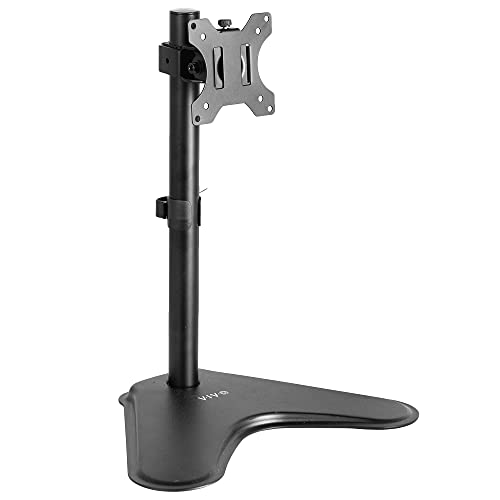 | Ultra‑Wide Specialist | Mount Type: Freestanding tabletop single‑monitor stand | VESA Compatibility: 75 × 75 mm / 100 × 100 mm | Screen Size Range: 13‑38 in (regular up to 32 in, ultrawide up to 38 in) | VIEW LATEST PRICE | Read Our Analysis |
More Details on Our Top Picks
VIVO Dual LED Monitor Stand for Two 27‑inch Screens
All right, if you’re juggling two 27‑inch curved screens and need a sturdy, flexible setup, the VIVO Dual LED Monitor Stand is a dual‑screen pro’s dream. You’ll love the alloy‑steel frame and black finish that blend into any office, and the 13 × 10.5 in heavy‑duty base keeps wobble at bay. Obviously, the detachable VESA plates and 360° rotation let you dial in the perfect angle for each screen, while tilt from –90° to +90° gives you ergonomic freedom.
Now, think about cable chaos—VIVO’s built‑in clips grab power and AV cords, keeping your desk tidy. You can adjust height along the center pole without hunting for tools, and the tabletop mount fits most desks. Just remember: if you push the monitors too far forward without bolting the base, stability drops, so keep the base firmly seated.
Here’s the thing: this stand shines for you if you need a reliable, affordable solution for two 27‑inch curved panels and you don’t mind a modest 4.48 lb weight. The three‑year warranty backs you up, and Amazon’s 30‑day return lets you test it risk‑free. Go ahead—set it up, enjoy the flexibility, and let your workspace finally feel organized.
- Mount Type:Tabletop dual‑monitor stand
- VESA Compatibility:75 × 75 mm / 100 × 100 mm
- Screen Size Range:13‑27 in
- Weight Capacity per Arm/Monitor:22 lb (max)
- Adjustability (Tilt / Swivel / Rotation):Tilt ±90°, Swivel 180°, Rotation 360°
- Material / Finish:Alloy steel, black finish
- Additional Feature:Detachable cable clips
- Additional Feature:Heavy‑duty base
- Additional Feature:3‑year warranty
WALI Adjustable Single Monitor Mount for 13‑34″ Screens (GSMP001N)
If you’re juggling a curved screen and a cramped desk, the WALI adjustable single monitor mount is the flexible solo solution you need. You’ll love the 180° swivel and full 360° rotation, letting you glance left‑ right without straining your neck. The tilt range of +70° to –45° and a 19.3‑in outward extension give you ergonomic freedom, while the 17.3‑in vertical lift clears any clutter.
All right, the metal construction feels sturdy, and the black finish blends with most setups. It supports 13‑34‑in screens, but note the load drop to 19.8 lb for curved panels—so a 34‑in ultra‑wide might be a tight fit. The clamp or grommet base lets you secure it on a thin desk or a thick tabletop, though you’ll need a solid edge for the clamp.
Now, the package includes all mounting hardware and a clear manual, and US‑based support is available seven days a week. You get a 10‑year warranty and a 30‑day Amazon return guarantee, so you can try it risk‑free. This mount is for you if you want a single‑monitor setup that moves with you, doesn’t dominate your workspace, and offers solid durability without breaking the bank. Choose it, and you’ll enjoy a cleaner desk and a healthier posture.
- Mount Type:Tabletop single‑monitor mount (clamp/grommet)
- VESA Compatibility:75 × 75 mm / 100 × 100 mm
- Screen Size Range:13‑34 in (regular up to 32 in)
- Weight Capacity per Arm/Monitor:26.4 lb flat / 19.8 lb curved
- Adjustability (Tilt / Swivel / Rotation):Tilt +70°/‑45°, Swivel ±180°, Rotation 360°
- Material / Finish:Metal, black finish
- Additional Feature:10‑year warranty
- Additional Feature:Clamp or grommet base
- Additional Feature:19.3 in extension
HUANUO Freestanding VESA Monitor Stand 5 Heights 360° Rotation
You’re juggling a cramped desk and a curved monitor that needs a sturdy, adaptable base, so a space‑saving stand is essential. This HUANUO freestanding VESA stand gives you five height slots from 9.27 in to 15.26 in, letting you raise or lower the screen without digging holes. The 360° rotation means you can flip from landscape to portrait in a snap, and the ±50° swivel plus 10°/‑15° tilt let you fine‑tune your viewing angle.
All right, the tall steel column holds a tempered‑glass base that stays put thanks to anti‑slip pads and cable clips. You won’t scratch your desk, and you avoid the hassle of drilling. The stand supports 13‑34 in monitors up to 44 lb, so most mid‑size curved panels fit perfectly.
Now, if you love a clean desktop and need quick adjustments, this one’s for you. It’s not a wall‑mount, so you lose the ultra‑slim look, but you gain portability and easy setup. The U.S. support team and 30‑day Amazon return give you peace of mind, making the decision feel obvious and smart.
- Mount Type:Freestanding tabletop stand
- VESA Compatibility:75 × 75 mm / 100 × 100 mm
- Screen Size Range:13‑34 in
- Weight Capacity per Arm/Monitor:44 lb (max)
- Adjustability (Tilt / Swivel / Rotation):Tilt +10°/‑15°, Swivel ±50°, Rotation 360°
- Material / Finish:Reinforced steel column, tempered‑glass base, black finish
- Additional Feature:Tempered glass base
- Additional Feature:No drilling required
- Additional Feature:5 height positions
HUANUO FlowLift™ Dual Monitor Stand Adjustable VESA Mount
The HUANUO FlowLift™ Dual Monitor Stand solves the cramped‑desk dilemma for gamers who need two curved screens side‑by‑side, and it’s a gaming‑ready duo that stays rock‑solid during intense sessions. You’ll love how the alloy‑steel arms hold up to 19.8 lb each, while the C‑clamp or grommet base locks onto any wooden desk 0.59–3.54 in thick. Obviously, the tilt (‑85°/‑50°), swivel (±90°), and 360° rotation let you dial in perfect angles without wobble.
All right, now picture your keyboard and notebook freed from a sea of cables. The built‑in guides hide wires, and the 15.75″ height lift keeps your posture ergonomic for marathon play. This one’s for you if you crave a tidy rig and can tolerate a 11 lb mount weight.
Here’s the thing: you’ll need a desk without cross‑beams under the mount area, and the VESA 75×75/100×100 pattern is a must. If your setup meets those specs, the FlowLift gives you dual‑screen freedom without sacrificing stability. Choose it, and you’ll feel confident that your desk can handle the action—no more desk‑clutter drama.
- Mount Type:Dual‑monitor C‑clamp or grommet mount
- VESA Compatibility:75 × 75 mm / 100 × 100 mm
- Screen Size Range:13‑32 in
- Weight Capacity per Arm/Monitor:4.4‑19.8 lb per arm
- Adjustability (Tilt / Swivel / Rotation):Tilt +85°/‑50°, Swivel ±90°, Rotation 360°
- Material / Finish:Alloy steel, black finish
- Additional Feature:Dual C‑clamp or grommet
- Additional Feature:One‑hand operation
- Additional Feature:Built‑in cable guides
VIVO Single Monitor Desk Stand – Adjustable VESA Mount 32‑38″ Black
All right, you’ve probably wrestled with cramped desk space and a monitor that just won’t sit right for a 34‑inch ultrawide. The VIVO Single Monitor Desk Stand solves that by lifting your screen to eye level, freeing up precious desk real. Its alloy‑steel base feels solid, yet it weighs only 3 kg, so you can move it without a crew. You’ll love the 360° rotation and 90° swivel—great for sharing the view or switching between portrait and landscape. The tilt range of ±15° lets you fine‑tune the angle, reducing neck strain during long work sessions.
Now, the VESA plate slides into an open‑top slot, and all hardware comes included, so assembly takes minutes. It supports VESA 75×75 mm or 100×100 mm patterns, covering most 13‑38″ monitors, and the weight capacity of 22 lb handles even a hefty ultrawide. The integrated cable‑management keeps cords tidy, which is a lifesaver on a cluttered desk. Obviously, if your monitor exceeds 38″ or weighs more than 22 lb, you’ll need a sturdier solution.
Here’s the thing: you’ll get a 3‑year warranty and a 30‑day return window for dead‑on‑arrival items, but misrepresented condition may incur a 15 % restocking fee. If you value a simple, adjustable stand that doesn’t break the bank, this one fits you perfectly. Go ahead and add it to your cart—you’ll notice the ergonomic boost right away.
- Mount Type:Freestanding tabletop single‑monitor stand
- VESA Compatibility:75 × 75 mm / 100 × 100 mm
- Screen Size Range:13‑38 in (regular up to 32 in, ultrawide up to 38 in)
- Weight Capacity per Arm/Monitor:22 lb (max)
- Adjustability (Tilt / Swivel / Rotation):Tilt ±15°, Swivel 90°, Rotation 360°
- Material / Finish:Alloy steel, black finish
- Additional Feature:Freestanding steel base
- Additional Feature:Integrated cable‑management
- Additional Feature:Portrait orientation support
Factors to Consider When Choosing a Monitor Stand for Curved Monitors
All right, you’re probably worried whether the stand will actually hold your curved screen without wobbling, and that’s a legit concern. First, check the VESA pattern and weight capacity—if they don’t match, the whole setup fails, and you’ll end up with a sagging monitor; next, consider the height‑adjust range and tilt/swivel angles because you’ll want ergonomic comfort without sacrificing the curve’s viewing angle. Finally, measure your desk space; a bulky base can steal precious real estate, while a compact arm might leave you with limited stability, so pick the one that fits your workflow and desk layout.
VESA Compatibility Check
If you’ve ever wrestled with a VESA plate that just won’t line up, you’re not alone—curved screens love to shift the center of gravity. First, verify the monitor’s VESA pattern—75 × 75 mm or 100 × 100 mm—matches the holes on the stand. If the patterns differ, you’ll waste time and money.
All right, make sure the stand’s VESA adapter handles the larger curvature radius without stressing the mount. A tight fit can crack the plate or bend the bracket, especially on a deep‑curve model.
Now, check that the VESA plate can sit where the monitor’s weight balances. Curved screens often pull the center of gravity outward, so you need a plate that lets you fine‑tune tilt and swivel to keep the view straight.
Obviously, a stand that offers slight adjustments saves you from endless re‑mounting. If you can align the plate with the monitor’s sweet spot, you’ll enjoy a stable, ergonomic setup.
Here’s the thing: pick a VESA system that exceeds the monitor’s weight and offers a little wiggle room for the curve. If you do, you’ll eliminate wobble, protect the screen, and feel confident in your purchase.
Weight Capacity Limits
When the VESA plate finally lines up, the next thing that trips you up is whether the mount can actually hold the screen’s weight without wobbling.
You should first verify the monitor’s weight stays under the mount’s maximum load rating—most specs list pounds or kilograms.
Add any extra heft from VESA adapter plates or brackets; those little pieces can push you over the limit without you noticing.
Now, think about how that weight spreads across the arm or base.
Uneven distribution causes sagging, especially on a wide curve with a thick bezel, so choose a stand that balances the load evenly.
Make sure your desk, grommet, or C‑clamp can bear the total weight; a flimsy surface will bend or shift, ruining stability.
All right, if you’ve checked those numbers and the mounting surface feels solid, you’re good to go.
Pick a model whose capacity includes your monitor’s heaviest configuration, and you’ll avoid wobble for good.
This’s the you if you want confidence, not surprise, when you sit down to work.
Height Adjustment Range
You’ve probably noticed that a curved screen can feel like a small hill, so you need a stand that lets you raise or lower it enough to keep the curve at eye level. All right, aim for at least 6–8 in of vertical travel; that covers most desks and natural eye height. If you want extra flexibility, a 9–15 in range lets you fine‑tune the focal point, cutting neck strain for taller or shorter users.
Now, the mechanism matters. Gas‑spring or pneumatic lifts give smooth, fine increments, while screw‑type lifts feel clunky and may wobble under a heavy curve. Make sure the lock clicks securely at any height—otherwise torque can tip the monitor.
Obviously, check desk clearance: you don’t want the stand to hit the tabletop or block cable routing. If your desk is low, a compact‑height model works; if you have a deep work surface, a taller stand with ample clearance is safer.
Here’s the thing: if you sit at a variable height desk, pick a stand with a wide range and a reliable lock; if you stay at a fixed height, a modest 6‑inch travel suffices. Choose confidence, and your eyes will thank you.
Tilt and Swivel Angles
All right, you’ve probably wrestled with glare and awkward neck angles because a curved screen refuses to sit flat on a desk. Tilt that spans ±70° to ±90° lets you crank the screen forward or backward, slashing reflections while keeping the curve in your line of sight. If you love a downward tilt of at least 45°, you’ll reduce eye strain on larger radii and stay comfortable for hours.
Now, swivel matters just as much. A 180°‑plus rotation lets you swing the monitor to portrait mode without detaching the VESA mount, preserving the curve’s integrity. Full 360° spin gives you the freedom to share the view with teammates or pivot to a side‑by‑side setup instantly.
Here’s the thing: combine a wide tilt range with unrestricted swivel, and you get ergonomic comfort plus collaborative flexibility. If you need both, look for a stand that offers at least 45° downward tilt and 360° rotation—otherwise you’ll be stuck with a static, uncomfortable setup. Choose the one that matches your workflow, and you’ll feel confident that the stand truly supports your curved screen.
Desk Space Requirements
If your desk is already a tight squeeze, you’ll feel the frustration of a stand that overhangs or blocks your mouse. Measure the total width of your curved monitor plus any arm extension, then compare that to the usable surface. You don’t want the base jutting out and stealing space from your keyboard.
All right, check the clearance behind the stand. You need at least 2–3 in for ventilation and cables, even if you’ll handle cable management later. A clamp or grommet must fit your desk thickness and material without wobbling.
Now, think about height. The stand’s adjustment range should match your desk height so your eyes stay level. If the base footprint or clamp width blocks adjacent workspace, you’ll end up juggling peripherals. This one’s for you if you’ve got a modest desk and need solid stability without sacrificing room for a mouse or notebook. Choose a design that fits snugly, leaves breathing room, and you’ll feel confident that the setup works for you.
Cable Management Solutions
When your cables snake across the desk, they turn a tidy workspace into a tangled nightmare, and that frustration can ruin the whole ergonomic setup. You’ll want a stand that hides up to 2 m of power and video cords with integrated clips or channels, cutting desk clutter by roughly a third.
All right, if you like swapping monitors or re‑configuring your rig, choose a detachable cable‑management module that routes everything behind the base, keeping the surface clear and preventing accidental tugging.
Now, use Velcro or reusable zip ties on the vertical pole to bundle cables; you can re‑route them quickly when you change layouts.
Here’s the thing: a built‑in conduit that aligns with the VESA plate maintains a consistent bend radius, protecting HDMI or DisplayPort signals from degradation.
Obviously, positioning exits at the rear of the base, keyboard and mouse interference, boosting ergonomics.
If you value a tidy look and easy adjustments, this setup is for you. Pick the stand that matches your workflow, and enjoy a clean, functional desk without the hassle.
Material and Stability
Because a curved screen exerts torque across a wider arc, you’ll notice wobble if the stand’s material can’t handle that force. You need alloy‑steel arms: they stay rigid, weigh under 5 lb each, and keep the whole setup steady. A heavy‑duty base of steel or tempered glass spreads the load, so even when you tilt to extreme angles the stand won’t shake.
Now, thickness matters. Two‑millimeter steel beats one‑millimeter aluminum in bending resistance, but it adds weight you might not want on a light desk. Anti‑slip pads or rubberized feet give extra friction, preventing unwanted slides while you adjust height or angle.
Here’s the thing: a wider footprint—say 13 × 10.5 in—lowers the center of gravity, counteracting the outward curvature. This one’s for you if you have a large, heavy curved monitor and a solid desk surface. Otherwise, a slimmer base works fine on a sturdy tabletop. Choose the material that matches your torque and desk, and you’ll feel confident that wobble won’t ruin your viewing experience.
Dual‑Monitor Support Options
All right, you’ve got two gorgeous curved screens and a desk that’s already fighting for space, so the biggest headache is finding a stand that won’t wobble under that extra torque. First, make sure each monitor’s VESA pattern—usually 75 × 75 mm or 100 × 100 mm—matches the mounting plates, otherwise you’ll need an adapter and waste time. Next, add the two weights together and compare them to the arm’s per‑side limit (often 22 lb) and the total capacity; you don’t want the stand sagging when you tilt.
Now, check tilt, swivel, and rotation. You’ll want at least ±90° tilt, 180° swivel, and full 360° rotation so the curvature stays comfortable from any angle. If the base can clamp a 1‑inch‑thick desk, you’ll keep the whole rig stable; thin or fragile desktops might need a heavy‑weight base instead.
Here’s the thing: cable management matters. Integrated clips or channels keep power and video cords tidy on both arms, preventing strain on the monitors and a messy look. This one works for you if you value a clean workspace and don’t want to wrestle with dangling wires.
Obviously, a dual‑arm stand with a solid clamp and generous tilt range solves most problems. If your desk is shallow, go for a freestanding base; if you have a deep, sturdy desk, a clamp saves floor space. Choose the option that matches your desk thickness and weight limits, and you’ll enjoy a wobble‑free, ergonomic setup.