
Like a hinge on a secret door, your desk can finally bend to your will. You’re juggling neck strain, cramped space, and a monitor that refuses to sit still—so you need a mount that actually moves with you, not against you. Here’s the thing: each of these five arms solves a different pain point, and picking the right one will make your setup feel custom‑built without the hassle of a full remodel.
| Suptek Full Motion TV Wall Mount (15-32″) VESA 75/100 | Premium Flexibility | VESA Compatibility: 75 × 75 mm, 100 × 100 mm | Screen Size Range: 15‑32 in | Weight Capacity: up to 28 lb (13 kg) | VIEW LATEST PRICE | Read Our Analysis | |
| MOUNTUP Wall Mount for 17-32″ Monitors (Black) | Compact Power | VESA Compatibility: 75 × 75 mm, 100 × 100 mm | Screen Size Range: 17‑32 in | Weight Capacity: 4.4‑17.6 lb (2‑8 kg) | VIEW LATEST PRICE | Read Our Analysis | |
| MOUNT PRO Wall Mount for 17-43″ Ultrawide Screens Up to 33.1 lbs |  | Heavy‑Duty Pro | VESA Compatibility: 75 × 75 mm, 100 × 100 mm, 100 × 200 mm, 200 × 100 mm, 200 × 200 mm | Screen Size Range: 17‑43 in | Weight Capacity: 2.2‑33.1 lb (1‑15 kg) | VIEW LATEST PRICE | Read Our Analysis |
| MOUNT PRO Adjustable Wall Mount for 13‑32″ Monitors (Black) | Adjustable Corner | VESA Compatibility: 75 × 75 mm, 100 × 100 mm | Screen Size Range: 13‑32 in | Weight Capacity: 4.4‑17.6 lb (2‑8 kg) | VIEW LATEST PRICE | Read Our Analysis | |
| VIVO Single Monitor Counterbalance Wall Mount 32″ (MOUNT-V001G) | 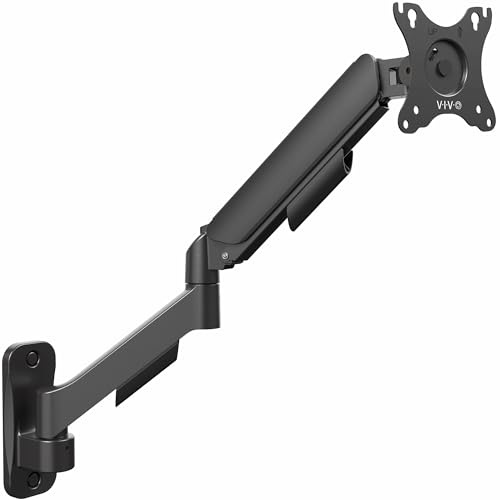 | Counterbalance Champ | VESA Compatibility: 75 × 75 mm, 100 × 100 mm | Screen Size Range: 17‑32 in | Weight Capacity: up to 19.8 lb (9 kg) | VIEW LATEST PRICE | Read Our Analysis |
More Details on Our Top Picks
Suptek Full Motion TV Wall Mount (15-32″) VESA 75/100
All right, if you’re juggling a 15‑32‑inch screen and need to flip, tilt, and swivel it for gaming, video calls, or watching movies, this Suptek mount gives you premium flexibility without a gym‑membership‑level installation. You’ll love the 360° rotation and 180° swivel; they let you angle the display for any seat in the room. The alloy‑steel construction feels sturdy, and the removable plate makes single‑person setup a breeze. It handles up to 28 lb, so most monitors fit without stress.
Now, think about your wall type. If you have a concrete wall or wood stud, the included kit covers both, but you’ll need a drill and anchors for concrete. The VESA 75×75 mm or 100×100 mm pattern matches most 15‑32‑inch panels, yet ultra‑thin ultrawide screens might need a different bracket. The 15.74‑inch extension gives you depth for cable routing, and the Velcro ties keep cords tidy.
Here’s the thing: this mount shines when you want quick adjustments and a clean look, but if you crave a hidden‑cable solution, you’ll still run a cord along the wall. Obviously, the black finish blends with most décor, and the 30‑day return lets you test it risk‑free. If you value easy installation, solid tilt, and full motion, this one’s for you. Go ahead and snap it on; you’ll feel the upgrade instantly.
- VESA Compatibility:75 × 75 mm, 100 × 100 mm
- Screen Size Range:15‑32 in
- Weight Capacity:up to 28 lb (13 kg)
- Full‑Motion Adjustability:360° rotation, 180° swivel, ±20° tilt
- Material Construction:Alloy steel
- Warranty / Return Policy:Amazon 30‑day return, warranty via link
- Additional Feature:Removable TV plate
- Additional Feature:15.74‑in extension
- Additional Feature:Alloy steel construction
MOUNTUP Wall Mount for 17-32″ Monitors (Black)
If your desk feels cramped and you need a clean, space‑saving setup, the MOUNTUP wall mount is your compact power solution. You’ll love its 360° rotation and 90° upward tilt, letting you swivel a monitor into any angle without stretching your neck. The arm folds just three inches from the wall, so you reclaim floor space while keeping the screen at eye level.
Now, you can attach any flat or curved monitor from ASUS to Dell, as long as it’s 17‑32 inches and fits 75 × 75 mm or 100 × 100 mm VESA. It holds up to 17.6 lb, so heavier gaming rigs might need a sturdier bracket, but most office and home‑office screens sit comfortably.
Obviously, the black aluminum finish blends with any décor, and the included hardware and level make installation painless. You get a three‑year warranty and Amazon’s 30‑day return, so you’re protected if anything goes awry. This one’s for you if you want a sleek, full‑motion arm that won’t dominate the room. All right—go ahead and mount it; you’ll notice the difference instantly.
- VESA Compatibility:75 × 75 mm, 100 × 100 mm
- Screen Size Range:17‑32 in
- Weight Capacity:4.4‑17.6 lb (2‑8 kg)
- Full‑Motion Adjustability:360° rotation, 90° upward tilt, 45° downward tilt, swivel
- Material Construction:Aluminum
- Warranty / Return Policy:3‑year manufacturer warranty, Amazon 30‑day return
- Additional Feature:Fold‑away 3‑in profile
- Additional Feature:Aluminum metal finish
- Additional Feature:90° upward tilt
MOUNT PRO Wall Mount for 17-43″ Ultrawide Screens Up to 33.1 lbs
You’re juggling a 34‑inch ultrawide and a cramped desk, so you need a mount that actually holds the weight without wobbling. This MOUNT PRO arm fits 17‑43″ flat or curved screens, supports every common VESA pattern, and handles up to 33.1 lb—so your 34‑inch beast stays secure. The upgraded gas spring lifts 13.2″ and endures 20,000 cycles, meaning you won’t hear a sigh when you adjust it.
All right, you’ll love the 360° rotation and ±90° tilt and swivel; you can flip to portrait for coding or tilt back for movies without a wobble. The pneumatic spring makes height changes smooth, and when you tuck it away the arm retracts to just 4.09″, freeing desk space. If you’ve got a wood stud or solid wall, the hardware and cable‑management tray keep cords tidy; drywall alone won’t hold, so plan accordingly.
Now, the premium steel construction feels solid, and the 2‑year warranty plus a 30‑day return guarantee give you peace of mind. This one’s for you if you need a versatile, heavy‑duty mount that won’t compromise stability or aesthetics. Go ahead—install it, and enjoy a clutter‑free, perfectly positioned ultrawide.
- VESA Compatibility:75 × 75 mm, 100 × 100 mm, 100 × 200 mm, 200 × 100 mm, 200 × 200 mm
- Screen Size Range:17‑43 in
- Weight Capacity:2.2‑33.1 lb (1‑15 kg)
- Full‑Motion Adjustability:360° rotation, ±90° tilt, ±90° swivel, height lift
- Material Construction:Premium steel (gas spring)
- Warranty / Return Policy:2‑year manufacturer warranty, Amazon 30‑day return
- Additional Feature:Pneumatic spring lift
- Additional Feature:13.2‑in height range
- Additional Feature:20,000 lift cycles
MOUNT PRO Adjustable Wall Mount for 13‑32″ Monitors (Black)
Struggling to find a mount that lets you swing a 27‑inch monitor into a tight corner without a hassle? You’ll love the MOUNT PRO Adjustable Wall Mount because it stretches from a compact 3.17 in retracted stance to a 25.67 in reach, letting you tuck a 32‑inch screen into a nook and still pull it out for a full‑screen view. The pneumatic spring balances up to 17.6 lb, so you adjust height with a single pull, no wobble.
All right, the arm rotates 360°, tilts +90°/‑45°, and swivels ±90°, giving you ergonomic angles for coding, gaming, or movie nights. It grips VESA 75 mm or 100 mm plates, so most brands—from ASUS to Dell—fit, but it won’t handle 1000R‑type ultra‑curved panels. If you’re mounting on a wood stud or solid brick, the included hardware and cable‑management keep the wall clean; drywall alone isn’t reliable.
Now, picture the installation: you follow the clear, labeled instructions, bolt the mount into a stud, and snap the arm onto the wall. The metal construction feels sturdy, and the black finish blends with any décor. The 2‑year warranty backs you up, and Amazon’s 30‑day return lets you test it risk‑free. This one’s for you if you need a versatile, heavy‑duty arm that works in corners and you’re okay with a solid‑wall requirement. Go ahead—install it, and enjoy a clutter‑free, adaptable workspace.
- VESA Compatibility:75 × 75 mm, 100 × 100 mm
- Screen Size Range:13‑32 in
- Weight Capacity:4.4‑17.6 lb (2‑8 kg)
- Full‑Motion Adjustability:360° rotation, +90°/‑45° tilt, ±90° swivel, height lift
- Material Construction:Metal (steel/aluminum)
- Warranty / Return Policy:2‑year warranty, Amazon 30‑day return
- Additional Feature:25.67‑in extended reach
- Additional Feature:Corner‑placement design
- Additional Feature:Pneumatic counterbalance
VIVO Single Monitor Counterbalance Wall Mount 32″ (MOUNT-V001G)
All right, you’ve got a 27‑inch screen that wants to sit sleekly on the wall, but you keep worrying about sagging or wobble. VIVO’s counterbalance arm tackles that head‑on. Its spring‑assist keeps the monitor steady even when you tilt it to its full ±90°, and the 180° swivel plus 360° rotation let you chase any angle without a wobble.
Now, if your desk space is tight, the detachable VESA plate saves you a few inches of depth, and the heavy‑duty alloy steel frame holds up to 19.8 lb, so a 32‑inch panel feels rock‑solid. The downside? It won’t stick to drywall; you’ll need a wood stud, concrete, or brick backing, which can add a bit of hassle.
Here’s the thing: you’ll love the integrated cable‑management covers because they hide the mess while you adjust the arm. The three‑year warranty backs the build quality, and the 30‑day return window protects you from dead‑on‑arrival surprises. If you want a smooth, wobble‑free experience and don’t mind a sturdier installation, this mount fits you perfectly.
- VESA Compatibility:75 × 75 mm, 100 × 100 mm
- Screen Size Range:17‑32 in
- Weight Capacity:up to 19.8 lb (9 kg)
- Full‑Motion Adjustability:360° rotation, 180° swivel, ±90° tilt
- Material Construction:Alloy steel and aluminum
- Warranty / Return Policy:3‑year manufacturer warranty, Amazon 30‑day return (restocking fee for mis‑representation)
- Additional Feature:Detachable VESA plate
- Additional Feature:Integrated cable‑management covers
- Additional Feature:Heavy‑duty alloy steel
Factors to Consider When Choosing Wall Mount Arms for Computer Monitors
You’re probably worrying whether the mount will actually hold your 32‑inch screen without sagging, and that’s why you need to check weight capacity and VESA pattern first. Now, think about how far you want to tilt, swivel, or extend—more motion means more moving parts, which can affect build quality and the type of wall you’ll need to anchor into. If the wall is drywall, you’ll want a mount with robust material and clear installation surface requirements, because otherwise you’ll end up with a wobbly arm that defeats the whole purpose.
Compatibility and Weight Capacity
If your monitor’s VESA pattern doesn’t line up, you’ll end up with a wobbly setup that looks cheap and feels unsafe. Obviously you need to double‑check the VESA spacing—75 × 75 mm or 100 × 100 mm—against the mount’s specs before you even think about drilling.
Now, weight capacity matters more than you think. Make sure the arm’s limit exceeds your monitor’s weight by at least 10 % to give yourself a safety cushion; a 15‑lb screen on a 16‑lb‑rated arm feels solid, but a 20‑lb TV on a 22‑lb arm will flex under you.
All right, screen size and curvature are next. If you have a 27‑inch flat panel, any standard arm works, but a 34‑inch ultrawide or a deep‑curved display needs a broader range and a mount that can cradle the curve without stressing the brackets.
Here’s the thing: adjustment limits can make or break ergonomics. Check tilt, swivel, and rotation ranges to ensure you can hit your ideal viewing angle without hitting the arm’s mechanical limits.
If you tick these boxes, you’ll avoid wobble, sag, and awkward positioning—making the final pick feel obvious and smart.
VESA Pattern Support
You’ve already checked the VESA spacing and weight, so now the real snag is finding a mount that actually matches those holes. Obviously the pattern is the rectangular grid on the back of your screen—75 × 75 mm, 100 × 100 mm, or the beefier 200 × 100 mm for larger panels. If the mount’s plate doesn’t line up perfectly, you’ll end up with wobble or a stripped screw.
All right, look for a model that lists multiple VESA options or offers interchangeable plates. That flexibility lets you reuse the same arm across a 27‑inch office monitor and a 32‑inch gaming display without buying a new bracket each time. The trade‑off? More moving parts can mean a slightly higher price and a bit of extra assembly, but you gain future‑proof compatibility.
Now, verify the mount’s weight rating matches your monitor’s mass; a 200 × 200 mm pattern on a heavy 34‑inch ultrawide needs a sturdier arm to avoid sag. If you’re a minimalist, a single‑size mount saves space and cost, but you’ll be locked into that specific screen size. Choose the one that aligns with your current monitor and any planned upgrades, and you’ll avoid the dreaded “doesn’t fit” nightmare.
Motion Range and Adjustability
All right, you’ve probably hit the wall—literally—when the monitor can’t swing far enough to share a screen with a colleague or tilt enough to stop neck strain. You need a mount that rotates at least 180° so you can flip portrait and landscape without fighting the arm. If you often collaborate, look for 360° swivel; otherwise 90° left‑right will suffice and keep the arm compact.
Now, tilt matters for ergonomics. ±20° covers modest adjustments, but if you like to recline or work standing, a ±90° tilt prevents neck pain. Choose pneumatic gas springs for smooth height changes across a 13‑inch range; they let you match eye level without a wrench.
Here’s the thing: reach determines how far you can pull the screen out for group viewing. A 20‑inch extension works for shared desks, but if space is tight, a 10‑inch arm reduces clutter. Pick the one that matches your workflow, and you’ll feel confident that the mount adapts to you, not the other way around.
Installation Surface Requirements
All right, you’ve finally found the perfect swivel and tilt range, but now the wall itself decides whether that setup will stay put. You need to confirm the wall material—drywall, plaster, concrete, brick, or wood stud—matches the mount’s rated load, and you must use the right anchors or studs.
Now, if you’re dealing with drywall, locate a wooden stud and fasten the mount directly, or opt for heavy‑duty toggle bolts that meet the weight rating. Concrete or brick calls for masonry anchors—sleeve or wedge types—sized precisely for the mounting holes and load specs.
Here’s the thing: a flat, crack‑free surface is non‑negotiable. Any damage can compromise stability under the monitor’s torque. Follow the manufacturer’s spacing and depth guidelines to keep load distribution even and avoid wall failure.
Obviously, checking these factors first saves you from a wobbly disaster later. Choose the wall type that fits your space, use the proper fasteners, and you’ll lock in a secure, long‑lasting mount. This makes the decision easy, smart, and stress‑free.
Build Quality and Materials
If you’ve ever felt a wobble when you adjust a monitor, you know the frustration comes from cheap materials that bend under torque. You’ll want steel or aluminum alloy arms; they hold up under the weight of larger screens without flexing. Reinforced joints, welded or bolted connections, give you durability that stamped plastic can’t match, and a solid, non‑flexible base keeps your view steady.
All right, now check the mounting plate. A metal plate with a powder‑coated or anodized finish resists corrosion, so humid rooms won’t ruin your setup. Integrated metal cable‑management channels stay rigid, avoiding cracks that plague cheap plastic trays.
Here’s the thing: if you value long‑term stability over a tiny price cut, go for the alloy‑based models with welded joints. They cost a bit more, but you’ll avoid wobble and replacement headaches. Choose confidence, and your monitor will thank you.