
You’ve got that massive ultrawide screen and the desk feels cramped, the cable mess is a nightmare, and you’re worried the arm will sag under the weight. Here’s the thing: a solid gas‑spring arm with a 44 lb capacity, sturdy VESA support, and a C‑clamp that handles a 3.5‑in thick desk will keep your view level and your space tidy. Choose the model that matches your desk thickness and budget, and you’ll finally have the ergonomic freedom you’ve been hunting for.
| ARES WING Ultrawide Monitor Arm Heavy Duty Adjustable. Black |  | Premium Performance | Compatibility (Screen Size): 17‑49 in | Weight Capacity: 44 lb per arm | VESA Mount Support: 75×75 mm & 100×100 mm | VIEW LATEST PRICE | Read Our Analysis |
| VIVO Ultrawide Monitor Arm Desk Mount (STAND-V001) |  | Budget-Friendly | Compatibility (Screen Size): 13‑38 in (ultrawide up to 38 in) | Weight Capacity: 22 lb | VESA Mount Support: 75×75 mm & 100×100 mm | VIEW LATEST PRICE | Read Our Analysis |
| VIVO Heavy Duty Monitor Arm for 49″ Screens (STAND-V101V) | 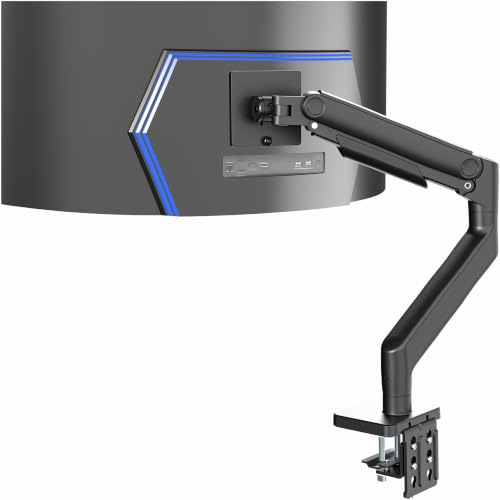 | Heavy-Duty Choice | Compatibility (Screen Size): 17‑49 in | Weight Capacity: 44 lb | VESA Mount Support: 75×75 mm & 100×100 mm | VIEW LATEST PRICE | Read Our Analysis |
| ARES WING Dual Monitor Arm with Gas Spring |  | Dual-Arm Pro | Compatibility (Screen Size): 17‑49 in | Weight Capacity: 44 lb per arm (88 lb total) | VESA Mount Support: 75×75 mm & 100×100 mm | VIEW LATEST PRICE | Read Our Analysis |
| HUANUO TitanLift Heavy Duty Monitor Arm 49″ 44 lbs Adjustable |  | High-Capacity | Compatibility (Screen Size): 17‑49 in | Weight Capacity: 44 lb | VESA Mount Support: 75×75 mm & 100×100 mm | VIEW LATEST PRICE | Read Our Analysis |
| VIVO Premium Aluminum Monitor Arm 49″ Ultrawide 33 lb Black |  | Sleek Aluminum | Compatibility (Screen Size): up to 49 in | Weight Capacity: 33 lb | VESA Mount Support: 75×75 mm & 100×100 mm | VIEW LATEST PRICE | Read Our Analysis |
| ULTRARM Heavy Duty Monitor Arm for Ultrawide Monitors Black MA20P-S |  | Ultra‑Large Support | Compatibility (Screen Size): 17‑57 in | Weight Capacity: 44 lb | VESA Mount Support: 75×75 mm & 100×100 mm | VIEW LATEST PRICE | Read Our Analysis |
More Details on Our Top Picks
ARES WING Ultrawide Monitor Arm Heavy Duty Adjustable. Black
All right, if you’re juggling a 34‑inch curved beast and need a stable, smooth‑moving mount, the ARES WING delivers premium performance without a wobble. You’ll love its 4.4‑44 lb capacity—enough for most ultrawides—plus the 75×75 mm and 100×100 mm VESA plates, so you never have to compromise on size. The aluminum‑steel frame feels solid, and the gas spring glides effortlessly when you tilt, swivel, or rotate.
Here’s the thing: you can tilt from +50° down to ‑20°, swivel 180°, and rotate a full 360°, giving you the exact viewing angle you crave. Height ranges 8.7‑18.7 in, and the arm extends up to 22.4 in, so you can pull the screen out for a cinematic feel or tuck it close for desk space. The C‑clamp fits desks 0.5‑1.8 in thick, while the grommet handles 0.5‑2 in, and the detachable VESA plate means top‑side installation without crawling under the desk. Cable management keeps cords tidy, and the three‑year warranty backs the heavy‑duty design. This one’s for you if you want a robust, flexible mount that handles both flat and curved panels without fuss. Go ahead—your ultrawide deserves a mount that works as hard as you do.
- Compatibility (Screen Size):17‑49 in
- Weight Capacity:44 lb per arm
- VESA Mount Support:75×75 mm & 100×100 mm
- Tilt Range:+50° – ‑20°
- Swivel / Rotation:Swivel 180°, Rotation 360°
- Mounting Type (Desk Attachment):C‑clamp & grommet (0.5‑1.8 in / 0.5‑2 in)
- Additional Feature:Integrated cable management
- Additional Feature:One‑on‑one installation assistance
- Additional Feature:3‑year spare‑part warranty
VIVO Ultrawide Monitor Arm Desk Mount (STAND-V001)
You’ve got a massive ultrawide screen and a cramped desk, so you need an arm that can stretch without breaking the bank. VIVO’s STAND‑V001 handles 13‑38 in panels, up to 22 lb, and fits both 75 × 75 mm and 100 × 100 mm VESA patterns. All‑steel construction feels sturdy, yet the clamp slides onto desks up to 3.25 in thick without tools, and the optional grommet gives you a clean look if you prefer.
All right, the arm swivels 360°, tilts ±90°, and rotates fully, letting you flip between portrait and landscape in seconds. Height travel reaches 16 in, so you can clear a keyboard or stack books beneath. Integrated cable clips keep cords tidy, but they’re detachable if you need extra routing.
Now, the trade‑off: it supports ultrawide up to 38 in, but anything heavier than 22 lb will strain the joints, so it’s perfect for most 34‑inch models but not a 49‑inch beast. The clamp can slip on very thin desks, so double‑check your tabletop thickness before buying. If you want a solid, budget‑friendly arm that offers full motion and easy setup, this one fits you nicely. Take the plunge; you’ll free up space and keep your view ergonomic without overpaying.
- Compatibility (Screen Size):13‑38 in (ultrawide up to 38 in)
- Weight Capacity:22 lb
- VESA Mount Support:75×75 mm & 100×100 mm
- Tilt Range:+90° / ‑90°
- Swivel / Rotation:Swivel 360°, Rotation 360°
- Mounting Type (Desk Attachment):Desk clamp (up to 3.25 in) + optional grommet
- Additional Feature:Tool‑less desk clamp
- Additional Feature:Detachable VESA plate
- Additional Feature:Amazon 30‑day return guarantee
VIVO Heavy Duty Monitor Arm for 49″ Screens (STAND-V101V)
If your 49‑inch ultrawide feels like a heavyweight that your desk can’t handle, the VIVO STAND‑V101V is the heavy‑duty choice you need. You’ll love the sturdy C‑clamp that grips up to 3.2″ thickness, and the optional grommet if your desk has a pre‑drilled hole. The detachable VESA plate makes mounting a breeze, so you won’t waste time wrestling bolts.
All right, the spring‑assist tension balances up to 44 lb, giving you smooth 11‑inch height travel without wobble. Tilt from +50° to –20°, swivel 180°, and rotate 360°—perfect for ergonomic tweaks during marathon gaming or design sessions. Integrated cable‑management covers hide cords, keeping your workspace tidy.
Now, the alloy‑steel and aluminum construction feels solid, and the black finish blends with any office décor. You get a 3‑year warranty and a 30‑day Amazon return guarantee, so you’re covered if anything feels off. This arm is for you if you need a robust, flexible mount for a massive ultrawide and don’t mind a slightly larger footprint on your desk. Choose it, and you’ll enjoy a stable, adaptable setup without second‑guessing.
- Compatibility (Screen Size):17‑49 in
- Weight Capacity:44 lb
- VESA Mount Support:75×75 mm & 100×100 mm
- Tilt Range:+50° – ‑20°
- Swivel / Rotation:Swivel 180°, Rotation 360°
- Mounting Type (Desk Attachment):Tabletop C‑clamp (up to 3.2 in) + optional grommet
- Additional Feature:Spring‑assist tension arm
- Additional Feature:11‑in height travel
- Additional Feature:Integrated cable‑management covers
ARES WING Dual Monitor Arm with Gas Spring
Ever struggled to find a sturdy arm that truly handles two massive ultrawides without wobbling? You’ve probably tried cheap clamps that sag under the weight of a 49‑inch LG or Samsung Odyssey G9, and the wobble drives you nuts. This one’s for you if you need industrial‑grade gas springs that keep both screens steady up to 44 lb each, total 88 lb, and you won’t settle for a flimsy setup.
All right, the ARES WING gives you 27.9 in of height travel and a 22.4 in extension, so you can line up your monitors for gaming or multitasking without stretching. The tilt range of –50° to +20°, swivel ±90°, and full 360° rotation let you fine‑tune ergonomics in seconds. Obviously, you’ll need a VESA adapter if your monitor lacks the 75×75 mm or 100×100 mm pattern, but that’s a minor extra.
Now, the build feels solid: aluminum arms, black finish, and a gas spring that survived over 20,000 full‑extension adjustments in testing. The C‑clamp grips desks 0.5‑1.8 in thick, and a grommet option covers 0.5‑2 in, so you won’t struggle with mounting. Quick‑release panels and video guides make setup painless, and the three‑year spare‑part guarantee keeps you covered.
Here’s the thing: the integrated USB‑C and USB‑A ports (5 V/2 A each) let you charge two devices while you work or play, cutting cable clutter. If you love a tidy desk, this feature scores big. The downside? The arm’s bulk adds a bit of visual weight, so minimalist desks might feel a touch crowded. Still, for anyone who wants reliable motion, heavy capacity, and built‑in charging, the ARES WING is a smart, hassle‑free choice. Go ahead and lock it in—you’ll thank yourself when those ultrawides sit perfectly, wobble‑free.
- Compatibility (Screen Size):17‑49 in
- Weight Capacity:44 lb per arm (88 lb total)
- VESA Mount Support:75×75 mm & 100×100 mm
- Tilt Range:+50° – ‑20°
- Swivel / Rotation:Swivel ±90°, Rotation 360°
- Mounting Type (Desk Attachment):C‑clamp (0.5‑1.8 in) & grommet (0.5‑2 in)
- Additional Feature:Built‑in USB‑C & USB‑A ports
- Additional Feature:Industrial‑grade gas springs
- Additional Feature:Quick‑release panels
HUANUO TitanLift Heavy Duty Monitor Arm 49″ 44 lbs Adjustable
Heavy‑duty ultrawide monitors need a mount that won’t buckle under a 44‑lb screen, and the HUANUO TitanLift delivers exactly that. You’ll love the reinforced VESA head—20 % thicker arms and a 30 % wider base keep the arm rock‑steady even when you push it to 49 inches. The dual C‑clamp clamps securely to wood desks up to 3.5 in thick, so you won’t have to worry about plastic or glass wobble.
Now, if you crave flexibility, the TitanLift tilts ±50°, swivels 180°, and rotates a full 360°, letting you switch between portrait and landscape in a snap. The extension reaches 22.5 in, and the height adjusts up to 19.6 in, giving you ergonomic freedom without sacrificing stability.
Here’s the thing: the arm shines on sturdy wooden workstations, but if your desk is glass or has cross‑bars, you’ll need a different solution. The one‑hand tension knob makes balancing a 44‑lb screen painless, and the built‑in cable management keeps cords tidy. With a 5‑year warranty and 30‑day return, you can commit confidently, knowing you’ve covered every angle.
- Compatibility (Screen Size):17‑49 in
- Weight Capacity:44 lb
- VESA Mount Support:75×75 mm & 100×100 mm
- Tilt Range:+50° – ‑50°
- Swivel / Rotation:Swivel 180°, Rotation 360°
- Mounting Type (Desk Attachment):Dual C‑clamp (0.8‑3.5 in) – wood only
- Additional Feature:Reinforced VESA head
- Additional Feature:One‑hand tension adjustment
- Additional Feature:5‑year warranty
VIVO Premium Aluminum Monitor Arm 49″ Ultrawide 33 lb Black
You’ve got a massive 49‑inch ultrawide that keeps stealing desk space, and you need something sturdy enough to hold it without wobbling. This VIVO Premium Aluminum Arm handles up to 33 lb, so your 49‑inch screen fits comfortably, and the pneumatic lift gives you 13 in of height adjustment without a grunt. All right, the tilt range from –30° to +45°, swivel 180°, and rotation 180° let you chase the perfect viewing angle, and the quick‑release VESA plate makes mounting painless.
Now, the desk clamp grips thicknesses from 0.4 in to 3.3 in, while the grommet option covers 0.4 in to 1.9 in, so you can adapt to most desks. The built‑in cable‑management channel tames cords, and the aluminum body stays cool and looks sleek in black. Obviously, you won’t fit a 40‑lb monitor—this arm caps at 33 lb—so if you push the weight limit, consider a heavier‑duty model.
Here’s the thing: if you value a clean, modern look and need smooth, silent height changes, this arm’s for you. The 3‑year warranty backs the build, and the 30‑day return gives you peace of mind. Choose this if you want a reliable, stylish mount that stays out of the way while you work or game.
- Compatibility (Screen Size):up to 49 in
- Weight Capacity:33 lb
- VESA Mount Support:75×75 mm & 100×100 mm
- Tilt Range:–30° to +45°
- Swivel / Rotation:Swivel 180°, Rotation 180°
- Mounting Type (Desk Attachment):Desk clamp (0.4‑3.3 in) & grommet (0.4‑1.9 in)
- Additional Feature:Pneumatic height adjustment
- Additional Feature:Quick‑release VESA plate
- Additional Feature:Cable‑management channel
ULTRARM Heavy Duty Monitor Arm for Ultrawide Monitors Black MA20P-S
All right, you’ve got a massive 57‑inch ultrawide that needs a sturdy home, and the ULTRARM MA20P‑S gives you that ultra‑large support without a wobble. You’ll love the 13‑inch gas‑spring lift; it lets you raise or lower the screen smoothly, so you never strain your neck. The 180° swivel and 180° rotation let you pivot the panel for collaborative work, and the ±25° tilt keeps glare at bay.
Now, if your desk is thick, the C‑clamp handles 0.6‑3.3 in, while the grommet option fits thinner surfaces down to 0.6 in. The aluminum frame feels solid, yet the whole arm weighs only 13 lb, so installation isn’t a workout. You can even convert it to dual‑monitor mode for two 49‑inch ultrawides, or stack a third monitor sideways—great if you need a command‑center layout.
Here’s the thing: the 44 lb capacity covers most ultrawides, but if you push the limit with a heavy 57‑inch HDR panel, expect a slight sag at full extension. That’s a trade‑off you accept for the flexibility of modular arms. The 3‑year warranty backs you up, and the 30‑day return window lets you test it risk‑free. If you crave a no‑wobble, versatile mount that grows with your setup, this one’s for you. Choose it, and you’ll finally have a stable, ergonomic workstation.
- Compatibility (Screen Size):17‑57 in
- Weight Capacity:44 lb
- VESA Mount Support:75×75 mm & 100×100 mm
- Tilt Range:+25° – ‑25°
- Swivel / Rotation:Swivel 180°, Rotation 180°
- Mounting Type (Desk Attachment):C‑clamp (0.6‑3.3 in) & grommet (0.6‑1.9 in)
- Additional Feature:Modular extension arms
- Additional Feature:Convertible dual‑monitor setup
- Additional Feature:57‑inch screen support
Factors to Consider When Choosing a Monitor Arm for Ultrawide
You’re probably wrestling with a monitor that’s too heavy for a flimsy arm, and you know you’ll need a sturdy mount that actually supports the ultrawide’s width. Obviously, you’ll want to check the weight capacity, compatibility with VESA patterns, and the range of tilt, swivel, and rotation so you can find the perfect angle without straining your neck. Here’s the thing: if you prioritize smooth height adjustment and flexible mounting options, you’ll avoid the wobble that drives you crazy, and you’ll feel confident that the arm will stay solid even when you push it to its limits.
Weight Capacity Capacity Compatibility
If your ultrawide feels like a sledgehammer, the arm’s weight capacity must out‑muscle it by at least 10–20 %—otherwise you’ll hear creaks and risk a wobble. You should first add up the monitor’s mass plus any speakers, webcam, or lighting you plan to attach, then compare that total to the arm’s listed limit. Obviously, the VESA pattern matters; make sure the arm supports 75 × 75 mm or 100 × 100 mm and that your screen’s mounting holes match.
Now, think about size: a 49‑in ultrawide can tip the scales well beyond a 27‑in model, so pick an arm whose load rating covers the upper end of that range. The arm’s height‑adjustment range and extension length must accommodate the monitor’s width without stretching the joints past their design point.
All right, verify the desk‑mounting method. A C‑clamp on a thin tabletop might flex under a heavy load, while a grommet on a solid desk offers sturdier support. Choose the mounting style that can hold the arm’s maximum load without wobbling.
Here’s the thing: if every spec checks out, you’ll enjoy a stable, flexible setup without second‑guessing the hardware. Go ahead and lock in the arm that meets those numbers—you’ve earned a wob‑free workspace.
Weight Limits and
Your ultrawide’s weight can turn a flimsy arm into a wobbling hazard, so you need a safety margin of at least 20 % above the total load. Obviously, you must check the arm’s maximum capacity against the monitor’s weight plus stand and accessories. If the arm tops out at 40 lb and your setup weighs 32 lb, you’ve got a comfortable cushion; a 20 lb model would be risky.
All right, now look at distribution. A balanced center of gravity eases strain on the clamp and desk, so choose an arm with a wide VESA plate that spreads the load. Heavy‑duty arms (40–44 lb) handle larger screens, while lighter ones (20–22 lb) suit compact ultrawides.
Here’s the thing: if you love a clean desk and frequent adjustments, a sturdier arm prevents premature tension wear. If you’re on a budget and your monitor is light, a lighter model works—just keep the 20 % safety buffer. Pick the arm that matches your weight and workflow, and you’ll avoid wobble and enjoy smooth positioning.
Mounting Options
All right, you’re staring at a desk that’s either a sleek slab or a pre‑drilled workhorse, and the mounting method will make or your new arm feels solid or wobbly. If your desk is a thick slab, grab a C‑clamp that matches the 0.5–2 in thickness range; a snug clamp keeps wobble out without a drill. If you’ve already got a pre‑drilled hole, a grommet mount slides in cleanly, also handling 0.5–2 in thickness, and it looks less industrial.
Now, check the arm’s load capacity against the hardware you choose. Heavy‑duty arms need a sturdier clamp or reinforced grommet, or you’ll risk sagging under an ultrawide’s weight. Make sure the mount doesn’t block cable trays or desk accessories, because tangled cords defeat the whole purpose.
Here’s the thing: some arms give you both clamp and grommet options, so you can switch later if your desk changes. That flexibility saves you a re‑purchase and keeps the setup tidy. Obviously, pick the method that fits your desk’s build and your aesthetic, and you’ll feel confident that the arm will stay put, no wobble, no drama.
Tilt, Swivel, Rotation Range
All right, you’ve got the mount locked down, but now you need the arm to let you actually see the screen without straining your neck. Tilt lets you angle the ultrawide up or down; you’ll want at least ±15° so you can lower the top when you sit and raise it when you stand. Swivel gives horizontal freedom—180° covers most side‑to‑side glances, while 360° lets you swing the panel to face a teammate or a wall. Rotation (or roll) is the secret sauce for portrait mode; a ±90° range lets you switch to a tall layout, whereas 360° lets you spin the whole screen for creative setups. Obviously, you’ll check that the arm’s combined angles match your workspace, both seated and standing. If you love multitasking with multiple monitors, go for the full 360° swivel and rotation; if you just need occasional side‑glances, 180° swivel saves cost. Choose the tilt range that lets your eyes stay level, and you’ll avoid neck pain for good. This one’s for you if you value ergonomic flexibility over a minimalist look. Now, pick the arm that meets those angles, and you’ll feel confident that the ultrawide truly supports your workflow.
Height Adjustment Mechanism
If you’re constantly fighting a wobbling arm that won’t settle at the right height, the adjustment mechanism is the real deal‑breaker. Gas‑spring arms glide smoothly, stay quiet, and hold up to 44 lb, so your massive ultrawide won’t sag when you push it up. Pneumatic models zip up fast but demand occasional pressure checks, and manual spring‑assist units need you to lock each notch, which can feel jittery for fine‑tuning.
All right, consider travel range. An 8.7–18.7 in span lets you drop low for a relaxed posture or rise high for a standing desk, while a 13‑in limit may cramp ergonomics. Load capacity matters too—heavier setups benefit from gas springs that keep the arm stable at any height.
Now, match the mechanism to your habits. If you adjust height dozens of times a day, the silent, precise feel of a gas spring wins. If you only need occasional shifts, a pneumatic arm’s speed might be enough, but be ready for periodic maintenance. Choose the one that fits your workflow, and you’ll never wrestle with a stubborn arm again.
Desk Thickness Requirements
When your desk is too thin or too thick, the arm can slip, wobble, or even damage the surface, and you’ll waste time read‑tightening instead of working. First, check the clamp’s range—most C‑clamps accept 0.5–1.8 in, so measure your tabletop edge and stay inside that window. If you prefer a grommet mount, verify the hole fits the arm’s 0.5–2 in thickness spec; otherwise you’ll end up with a loose fit that rattles.
All right, remember some arms need at least 0.8 in of material to generate enough pressure. Below that, the clamp can’t grip, and you’ll see wobble. For dual‑monitor or heavy‑duty setups, make sure the desk won’t flex under the combined load; a thin veneer will bend, compromising stability.
Now, the trade‑off: a thick desk gives a solid anchor but may exceed the maximum rating, causing the clamp to bite too hard and crack the surface. A thin desk feels safe but risks slippage if the arm’s clamp isn’t designed for it. Choose the arm that matches your desk’s exact thickness, and you’ll avoid endless read‑tightening and enjoy a sturdy, wobble‑free workspace.
Cable Management Solutions
So you’re wrestling with a tangled mess of power bricks and HDMI cords that keep popping out of the way whenever you reach for a coffee? All right, look for integrated cable‑management channels or clips on the arm. They hide power and video cords, cut desk clutter, and keep airflow smooth. The groove usually fits 2–4 mm cables and lets you run up to a meter without strain, which is perfect for ultrawide rigs.
Now, consider bend radius. A 5 mm minimum prevents signal loss on high‑speed HDMI or DisplayPort, so you won’t see flickering or drop‑outs. Velcro straps or zip‑ties inside the arm lock excess length and stop accidental tugging.
Here’s the thing: detachable cable‑management covers let you swap in larger bundles when you add peripherals. This one’s for you if you love modular flexibility and don’t want a permanent mess. Obviously, you’ll feel more organized and confident choosing a setup that stays tidy and functional.
Build Quality Materials
All right, you’ve probably noticed that a flimsy‑arm wobbles whenever you shift your ultrawide, and that’s a deal‑breaker. You need material that won’t bend under a 30‑inch curve. Aluminum gives you a light, rigid frame, but if you plan to load 12 kg or more, steel or alloy steel steps in with the strength you crave.
Now, a thicker arm or a wider base cuts flex dramatically—think 20 % thicker arms and a 30 % wider base for rock‑solid stability. You’ll feel the difference when you tilt or swivel; the arm stays put, not wobbling like cheap desk toys.
Here’s the thing: gas‑spring mechanisms need durable internal seals and fatigue‑tested parts to keep motion smooth after thousands of adjustments. If you love frequent re‑positioning, choose a model with proven pneumatic durability.
Obviously, integrated cable‑management channels molded into the arm protect wires and preserve structural integrity. Powder‑coat or anodized finishes resist scratches and corrosion, extending lifespan—perfect for a busy office or a gaming den.
If you value a sleek look and light weight, go aluminum with a robust base; if you prioritize max load capacity, opt for steel with a bulkier footprint. Either way, you’ll end up with an arm that feels solid, looks good, and lets your ultrawide shine without wobble.