
Imagine your elbows humming at the perfect 90‑degree angle while cables vanish into a sleek tray. Now, picture a sturdy L‑shaped surface that lets you swing between monitor and keyboard without a hitch, but only if you pick the right model for your space and workflow. This one’s for you if you crave a desk that balances power‑strip convenience, adjustable height, and a dash of style—so you can stop worrying and start working.
| SEDETA L Shaped Gaming Desk with LED Lights |  | Gaming Pro | Keyboard Tray: Included | L‑Shape Layout: Reversible L‑shape (corner or straight) | Integrated Power Outlet(s): 4‑outlet strip + 2 USB ports | VIEW LATEST PRICE | Read Our Analysis |
| Giantex 66″ L-Shaped Corner Desk with Storage and Charging Station |  | Compact Charger | Keyboard Tray: Included | L‑Shape Layout: L‑shape corner‑fit | Integrated Power Outlet(s): 2 AC outlets + 1 USB‑A + 1 USB‑C | VIEW LATEST PRICE | Read Our Analysis |
| OffiGo 55″ L-Shaped Electric Standing Desk Carbon Fiber Black | 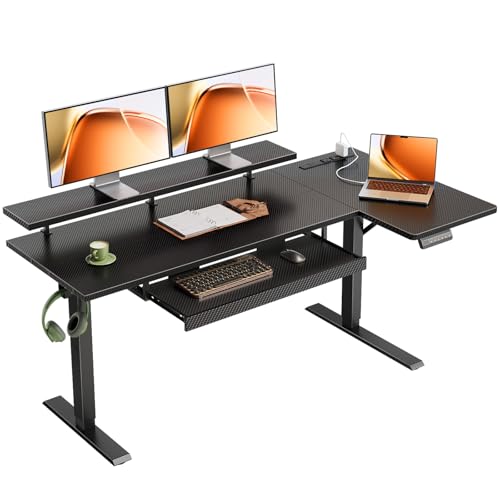 | Sit‑Stand Specialist | Keyboard Tray: Included | L‑Shape Layout: L‑shape electric standing | Integrated Power Outlet(s): 3 power sockets + 1 USB‑A + 1 USB‑C | VIEW LATEST PRICE | Read Our Analysis |
| SEDETA White L-Shaped Office Desk with LED Lights |  | White Gaming | Keyboard Tray: Included | L‑Shape Layout: L‑shape reversible | Integrated Power Outlet(s): 4‑outlet strip + 2 USB ports | VIEW LATEST PRICE | Read Our Analysis |
| RALGEND Executive L-Shaped Corner Desk with Drawer and Charging Station |  | Executive Power | Keyboard Tray: Included | L‑Shape Layout: L‑shape executive | Integrated Power Outlet(s): 3 AC outlets + 2 USB ports | VIEW LATEST PRICE | Read Our Analysis |
| SEDETA L Shaped Desk with LED Lights Power Outlet Storage Shelves |  | Rustic Tech | Keyboard Tray: Included | L‑Shape Layout: L‑shape reversible | Integrated Power Outlet(s): 4‑outlet strip + 2 USB ports | VIEW LATEST PRICE | Read Our Analysis |
| Sauder Palladia L-Shaped Desk with Drawers Vintage Oak | 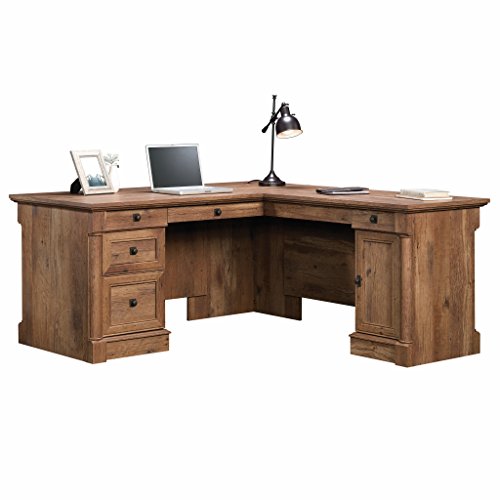 | Vintage Executive | Keyboard Tray: Included | L‑Shape Layout: L‑shape executive | Integrated Power Outlet(s): No built‑in power (grommet holes only) | VIEW LATEST PRICE | Read Our Analysis |
More Details on Our Top Picks
SEDETA L Shaped Gaming Desk with LED Lights
All right, you’re juggling a cramped corner and a growing gaming rig, and you need a desk that actually fits the setup without turning your room into a maze. This L‑shaped desk flips between a 67‑inch corner and a 94.5‑inch straight layout, so you can test both configurations before committing. The 0.75‑inch thick tabletop feels sturdy, and the powder‑coated metal frame holds up to 76 lb, which covers two PCs, a monitor trio, and a notebook.
Now, you’ll love the built‑in power strip with four outlets and two USB ports—plug in up to six devices and keep cords tidy. The RGB LED strip, controllable via app, offers 60,000+ colors and music sync, so your rig glows in rhythm. If you’re a night‑owl, the on/off switch adds safety; if you prefer minimalism, you can turn the lights off entirely.
Here’s the thing: the desk includes a keyboard tray, headphone hook, and CPU stand support, but no drawers. You’ll need the two‑tier shelves and pegboard for extra gear, which works great if you like visible organization. The included tools make assembly a two‑person job—no extra purchases required. If you have a small room and need a corner solution that still holds three monitors, this one fits you perfectly.
Obviously, the industrial black finish blends with most décor, but it’s not customizable, so if you crave a pop of color, you’ll have to add accessories. The weight is solid, so it won’t wobble, yet you’ll need a sturdy floor; it isn’t wall‑mounted. If you value flexibility, lighting, and integrated power, this desk checks the boxes without forcing you into a maze. Choose it, and you’ll get a functional, stylish hub that simplifies your gaming and work setup.
- Keyboard Tray:Included
- L‑Shape Layout:Reversible L‑shape (corner or straight)
- Integrated Power Outlet(s):4‑outlet strip + 2 USB ports
- Storage Shelves:2‑tier open shelves + 2 enclosed shelves
- Material (Engineered Wood):FSC‑certified engineered wood
- Assembly Required:Yes, tools included
- Additional Feature:Remote‑controlled RGB lighting
- Additional Feature:Music‑sync color mode
- Additional Feature:6‑device charging station
Giantex 66″ L-Shaped Corner Desk with Storage and Charging Station
If you’re juggling a laptop, a monitor, and a phone charger on a cramped floor, the Giantex 66″ L‑shaped corner desk solves that problem with a built‑in compact charger. All right, the desk spreads 66″ × 66″, giving you two work surfaces and a 19.5″‑wide tabletop that holds up to 165 lb on the left side, so your monitor stays steady while the right side supports a lighter laptop. The keyboard tray slides out, handling 15 lb, and the adjustable shelf moves in 1.2″ steps, perfect for a monitor or speakers.
Now, the storage wins. Two smooth metal‑slide drawers slide out, each holding 25 lb, and a small drawer tucks away pens and cables. The extra storage cube and a cable‑management hole keep your workstation tidy, while the built‑in power hub offers two AC outlets, a USB‑A and a USB‑C port—no more hunting for plugs. Obviously, the 4.5 ft cord reaches your wall without strain.
Here’s the thing: this desk shines for gamers and home‑office pros who need a corner solution with power and organization, but if you prefer a minimalist aesthetic, the natural wood finish might feel a bit busy. The non‑slip foot pads add stability, and cleaning is a breeze. If you value a sturdy, all‑in‑one corner station that lets you charge, store, and work without clutter, this one’s for you. Go ahead—assemble it, plug in, and enjoy a clutter‑free workflow.
- Keyboard Tray:Included
- L‑Shape Layout:L‑shape corner‑fit
- Integrated Power Outlet(s):2 AC outlets + 1 USB‑A + 1 USB‑C
- Storage Shelves:Adjustable shelf + storage cube
- Material (Engineered Wood):Engineered wood
- Assembly Required:Yes, tools included
- Additional Feature:Adjustable‑5‑position shelf
- Additional Feature:Two USB‑C/USB‑A ports
- Additional Feature:Non‑slip foot pads
OffiGo 55″ L-Shaped Electric Standing Desk
Carbon Fiber Black
You’ve got a cramped corner office and need a desk that lets you switch between sitting and standing without losing real estate, so the OffiGo 55‑inch L‑shaped electric standing desk is your sit‑stand specialist. All right, the carbon‑fiber black finish looks sleek, and the alloy‑steel base feels sturdy under heavy monitors. The 28.4‑47.2 in height range lets you find a perfect ergonomic line, while three memory buttons lock your favorite positions.
Now, the L‑shape gives you room for two laptops, a monitor stand, and a 25.6‑in keyboard tray that keeps your mouse close. A hook for headphones or a bag saves a few inches you’d otherwise waste. The built‑in power strip—three sockets, USB‑A, USB‑C—means you won’t scramble for outlets.
Here’s the thing: the sub‑table plate can flip left or right, and you can add a 31.5 × 15.8 in board if you crave extra surface. Assembly is straightforward thanks to illustrated,, but you’ll need a screwdriver and a bit of patience. This one’s for you if you love a modern look, need flexible height, and want a tidy power hub. Choose it, and you’ll turn that cramped corner into a streamlined, health‑friendly command center.
- Keyboard Tray:Included
- L‑Shape Layout:L‑shape electric standing
- Integrated Power Outlet(s):3 power sockets + 1 USB‑A + 1 USB‑C
- Storage Shelves:Open workspace, no dedicated shelves
- Material (Engineered Wood):Engineered wood top
- Assembly Required:Yes, illustrated instructions
- Additional Feature:3‑memory sit‑stand presets
- Additional Feature:Electric height adjustment
- Additional Feature:Extra board expansion panel
SEDETA White L-Shaped Office Desk with LED Lights
The corner office that doubles as a gaming hub can feel cramped—until you spot a white L‑shaped desk that actually fits both a monitor rig and a keyboard tray. You’ve been juggling cables, a clunky power strip, and a dull workspace; this SEDETA model consolidates everything. The built‑in 4‑outlet strip plus two USB ports lets you charge up to six devices, while the on/off switch keeps you safe.
All right, the LED system is a show‑stopper. With 60,000+ colors, 29 flashing modes, and music‑sync that reacts to your beats, you’ll feel like you’re piloting a cockpit. The remote app makes color changes painless, so you won’t lose focus chasing a dial.
Now, the storage solves the clutter nightmare. The reversible top hutch holds files or books, two open shelves keep décor or headphones within reach, and a pegboard plus storage bag give you flexible organization. The keyboard tray slides out smoothly, and the headphone hook keeps your gear tidy.
Here’s the thing: the desk isn’t a drawer system, so if you need deep filing, you’ll rely on the shelves. The metal frame and adjustable leg pads guarantee stability on uneven floors, but the 50‑lb weight means you’ll need a couple of friends for moving. Assembly is straightforward with tools included, and the anti‑scratch coating protects the engineered‑wood surface.
Obviously, this one’s for you if you want a modern, white aesthetic that doubles as a gaming command center with built‑in lighting and power. It fits dual‑person workstations, study sessions, or solo creative bursts without sacrificing style. Choose it, and you’ll turn that cramped corner into a bright, organized hub—no extra gadgets required.
- Keyboard Tray:Included
- L‑Shape Layout:L‑shape reversible
- Integrated Power Outlet(s):4‑outlet strip + 2 USB ports
- Storage Shelves:2‑tier open shelves + 2 enclosed shelves
- Material (Engineered Wood):Engineered wood top
- Assembly Required:Yes, tools included
- Additional Feature:Mic‑sensitive music sync
- Additional Feature:Remote‑app LED control
- Additional Feature:Anti‑scratch coating
RALGEND Executive L-Shaped Corner Desk with Drawer and Charging Station
All right, you’ve got a home office that feels cramped, and you need a desk that can actually hold two monitors, a keyboard tray, and a power hub without wobbling. The RALGEND Executive L‑Shaped Desk gives you a 59 × 69 in work surface that fits a full‑size monitor stand, so you can spread those screens wide. Its thickened top and 169‑lb engineered‑wood base hold up to 220 lb, so you won’t feel that wobble when you load up a laptop, printer, and a coffee mug.
Now, the built‑in charging station saves you a cluttered power strip. You get three AC outlets and two USB ports right where your keyboard tray sits, so you plug in phones, a tablet, and a lamp without hunting for sockets. The left side offers three open cubbies, two drawers, and a cabinet for small gear, while the right side houses a file drawer and a file cabinet for A4 paperwork—perfect if you need quick access to documents.
Here’s the thing: assembly isn’t a solo project. You’ll need two people and the included tools, because the desk arrives in two cartons and the parts are coded for easy reference. If you love a farmhouse vibe, the white‑and‑walnut finish looks crisp, but the engineered wood may not satisfy a hardwood purist. Still, for anyone who wants a sturdy, all‑in‑one corner solution with ergonomic typing and power convenience, this desk checks the boxes. Go ahead and add it to your cart; you’ll feel the difference the moment you set up your monitors.
- Keyboard Tray:Included
- L‑Shape Layout:L‑shape executive
- Integrated Power Outlet(s):3 AC outlets + 2 USB ports
- Storage Shelves:3 open cubbies + 2 drawers + cabinet
- Material (Engineered Wood):Engineered wood construction
- Assembly Required:Yes, tools included
- Additional Feature:Heavy‑duty 220 lb capacity
- Additional Feature:Farmhouse white‑walnut finish
- Additional Feature:Multiple open cubbies
SEDETA L Shaped Desk with LED Lights Power Outlet Storage Shelves
Looking for a corner workstation that feels both cozy and high‑tech? You’re probably tired of tangled cords and a bland desk that does nothing for your mood. This one’s for you if you want a rustic‑brown L‑shaped surface that doubles as a command center, complete with a built‑in 4‑outlet strip 2 USB ports and an on‑off switch, so you can plug in three monitors, two PCs, and a notebook without hunting for power strips.
All right, the LED strip adds 60 k+ colors, 29 flash modes, and music sync, so you can set the vibe for gaming or focus sessions. You’ll love the remote/app control, but remember the remote adds a tiny learning curve. The keyboard tray frees up the tabletop, while the pegboard, storage bag, and two open plus two enclosed shelves keep your accessories organized without crowding the work surface.
Now, the reversible layout lets you choose a 67‑inch corner or a 94.5‑inch long‑desk configuration, which is perfect if your room layout changes. The three keyboard‑type drawers hold stationery, but the total load limit is 66 lb, so you shouldn’t stack heavy equipment on top. Assembly needs two people and tools are included, so you won’t be stuck with a half‑built desk.
Here’s the thing: this desk shines for creators who crave ambient lighting and built‑in power, but if you need a minimalist look or ultra‑lightweight furniture, you might look elsewhere. The rustic finish blends with modern décor, and the UL‑listed safety gives you peace of mind. Decide now, and you’ll have a functional, stylish hub that makes your workflow feel effortless.
- Keyboard Tray:Included
- L‑Shape Layout:L‑shape reversible
- Integrated Power Outlet(s):4‑outlet strip + 2 USB ports
- Storage Shelves:2 open + 2 enclosed shelves
- Material (Engineered Wood):FSC‑certified engineered wood
- Assembly Required:Yes, tools included
- Additional Feature:3‑drawer keyboard‑type storage
- Additional Feature:4‑outlet + 2 USB power hub
- Additional Feature:Built‑in pegboard organizer
Sauder Palladia L-Shaped Desk with Drawers Vintage Oak
You’ve been wrestling with a cramped corner office, trying to fit a big monitor and a keyboard without sacrificing style. The Sauder Palladia L‑Shaped Desk in vintage oak spreads 68.75 in wide and 65.13 in deep, giving you a 67‑inch diagonal work surface that cradles dual monitors comfortably. All right, the built‑in keyboard tray slides out, and the flip‑down center panel becomes a laptop perch, so you keep your elbows level and cables hidden.
Now, you’ll love the five drawers: a full‑extension file drawer for letter‑size docs, three safety‑stop drawers for supplies, and a center drawer that can flip down for quick access. The cabinet behind the door holds a vertical CPU tower on an adjustable shelf, freeing floor space for a standing mat or extra chair. Obviously, the engineered‑wood construction feels sturdy at 250 lb, but it isn’t UL‑listed, so you’ll want to double‑check any office safety policies.
If you need a classic look with ample storage and a dedicated keyboard tray, this one’s for you if you value a solid, executive‑style presence over ultra‑lightweight mobility. The assembly is straightforward with all hardware included, and the five‑year parts warranty gives peace of mind. Go ahead—pick it, set it up, and watch your workflow finally breathe.
- Keyboard Tray:Included
- L‑Shape Layout:L‑shape executive
- Integrated Power Outlet(s):No built‑in power (grommet holes only)
- Storage Shelves:5 drawers + cabinet with adjustable shelf
- Material (Engineered Wood):Engineered wood base and top
- Assembly Required:Yes, hardware provided
- Additional Feature:Flip‑down laptop panel
- Additional Feature:Vertical CPU tower shelf
- Additional Feature:Vintage oak finish with metal glides
Factors to Consider When Choosing a L Shaped Desk With Keyboard Tray
You’re probably annoyed by cramped wrists and wobbling surfaces, so you need a keyboard tray that sits at the right height and angle. Now, check the desk’s weight capacity and how the load spreads across the frame; a sturdy, well‑balanced design prevents sagging when you load a monitor and a lot of paperwork. Obviously, good cable management and durable material matter, but if you’re willing to trade a bit of style for a sturdier, adjustable setup, this one’s for you if you want a hassle‑free workspace.
Ergonomic Keyboard Tray Placement
If your elbows are flaring out or you’re constantly reaching for the mouse, you’re probably sitting too far from the desk edge. Place the tray 10‑12 in from the edge; that keeps your elbows at a comfortable 90‑degree angle and eases shoulder strain. Now, set the tray height about 2‑3 in lower than your seated eye level—roughly 20‑30 in from the floor—so your wrists stay neutral and you avoid ulnar deviation.
All right, make sure the tray slides smoothly and leaves a 4‑5 in clearance for forearm movement; you don’t want the desk blocking your arms. Choose a model with a 0‑10‑degree tilt adjustment; you can match the natural wrist angle and reduce fatigue.
Here’s the thing: a built‑in cable‑management groove or grommet stops cords from pulling the keyboard forward, keeping your ergonomic setup stable. If you value a clean workspace and consistent posture, this is the setup for you. Take a moment, adjust those distances, and you’ll feel the difference instantly.
Weight Capacity and Load Distribution
All right, you’ve got the perfect ergonomic tray set up, but now the desk itself has to hold everything without wobbling. First, verify the total weight capacity; it must exceed the sum of your monitors, PC tower, and any accessories. Obviously, you don’t want a sagging surface, so check that the tabletop thickness—say 0.75 in engineered wood—can bear that load.
Now, distribute heavy items evenly across both legs or support columns. If you pile a 30‑lb monitor on one arm, the opposite side will wobble, especially in a corner layout. Choose a frame built from reinforced steel or metal; that construction keeps stability when the load shifts.
Here’s the thing: the keyboard tray should be rated for at least 2 lb plus a mouse and wrist rest. If you add a heavy graphic tablet, look for a tray that explicitly lists a higher capacity. This one’s for you if you need a sturdy base for multiple screens and a solid tray that won’t bend under daily use.
Adjustable Height and Tilt Options
All right, you’ve probably tried a static desk and felt your wrists ache when the keyboard sits flat, so you need a tray that actually tilts. A good L‑shaped desk offers a height‑adjustable frame that spans 28–48 in, letting you switch from sitting to standing without compromising posture. The tray should slide independently and tilt at least ten degrees; that angle eases wrist strain while keeping your hands in a natural line.
Now, check the tray’s weight limit—most handle 15–20 lb, enough for a keyboard, mouse, and a few accessories. If you load heavier gear, look for a sturdier model; otherwise you’ll waste money on over‑engineered hardware. Gas‑spring or pneumatic lifts give smooth, lockable movement, preventing sudden drops and letting you fine‑tune height with confidence.
Here’s the thing: if you value precise, silent adjustments and want to keep ergonomics consistent when the desk rises, choose a system with separate tray height controls. If you prefer a simpler, lower‑cost setup, a basic sliding tray may suffice, but you’ll miss the fine‑tuning. Either way, you’ll feel the difference instantly—no more cramped wrists, just a fluid workflow.
Cable Management Integration Features
All right, you’ve probably wrestled with a tangled mess of cords that crawl under your keyboard tray and trip you up every time you reach for a mouse. The good news is you can dodge that nightmare by picking a desk with built‑in cable‑management holes or grommets sized 1‑2 in, letting power and data cords zip straight through the surface. Now, look for integrated power strips or charging stations that bundle AC outlets and USB ports, so you ditch external brick piles. Here’s the thing: a keyboard tray with a cut‑out or channel lets cords run underneath without sharp bends, keeping your mouse glide smooth. If you love flexibility, choose a detachable or adjustable tray—position it to keep cables off the work surface. Also, make sure any extra shelves, drawers, or pegboards have dedicated pass‑through slots; that way your setup stays tidy. Obviously, you’ll feel more focused when you aren’t constantly untangling cords. This one’s for you if you value a clean look and quick plug‑in access. Pick the desk that matches your layout, and you’ll spend less time wrestling wires and more time getting work done.
Material Quality and Durability
If you’ve ever watched your desk sag under a stack of monitors and a heavy keyboard tray, you know the frustration of a flimsy surface. That’s why you should pick engineered wood or solid wood with FSC certification; it resists warping and guarantees sustainable sourcing. Powder‑coated metal frames add rigidity and keep rust at bay, while anti‑scratch coatings protect the tabletop from tray movement.
Now, check tabletop thickness. A minimum of 0.75 in handles typical setups, but if you stack three monitors and a hefty keyboard tray, aim for 1.5 in to eliminate flex. Verify the desk’s weight capacity exceeds the total load—otherwise you’ll face structural failure.
Here’s the thing: you’ll love a desk that endures daily hustle without denting. If you value long‑term durability and can afford a slightly higher price, this choice feels obvious and smart.
Space Efficiency and Layout Flexibility
You’ve probably felt the cramped chaos of a rectangular desk that eats up every inch of your room, making it hard to swing a chair or fit a second monitor. An L‑shaped desk can claim a corner and still give you a continuous surface, shaving up to 30 % off floor space compared with a comparable rectangle. The reversible layout lets you flip between corner and straight modes, so you can keep a 24‑inch clearance for chair movement no matter the room shape.
Now, placing the keyboard tray on the inner leg frees roughly 12 in of desktop for monitors or writing, and isolates the tray from traffic, cutting collisions. Align the longer side with the longest wall and you’ll squeeze an extra 15 % usable length versus a non‑reversible design. Obviously, if you need a tidy work zone and flexible placement, this setup fits you perfectly. All right, pick the configuration that matches your space, and you’ll feel the difference instantly.