
You’ve just unboxed two 27‑inch Dell monitors and the desk feels like a cramped runway, with cables tangled and the screens wobbling whenever you type. Now you’re looking for a stand that won’t tip over, gives you smooth height and swivel, and still looks decent. Here’s the thing: the right dual‑monitor arm can turn that chaos into a sleek, ergonomic workstation, and the options below each solve a different piece of that puzzle.
| VIVO Dual Monitor Stand with Glass Base Adjustable Arms (White) |  | Premium Elegance | VESA Compatibility: 75 × 75 mm, 100 × 100 mm | Weight Capacity per Arm: 22 lb (10 kg) | Adjustable Tilt Range: +90° / –90° | VIEW LATEST PRICE | Read Our Analysis |
| VIVO Dual Monitor Stand with Glass Base Adjustable Arms Black |  | Classic Black | VESA Compatibility: 75 × 75 mm, 100 × 100 mm | Weight Capacity per Arm: 22 lb (10 kg) | Adjustable Tilt Range: +90° / –90° | VIEW LATEST PRICE | Read Our Analysis |
| WALI Dual Monitor Stand Height Adjustable VESA Compatible (Black) |  | Long‑Lasting Warranty | VESA Compatibility: 75 × 75 mm, 100 × 100 mm | Weight Capacity per Arm: 22 lb (10 kg) | Adjustable Tilt Range: +70° / –45° | VIEW LATEST PRICE | Read Our Analysis |
| Dell MDS14 Dual Monitor Stand (5TPP7) Black/Silver | 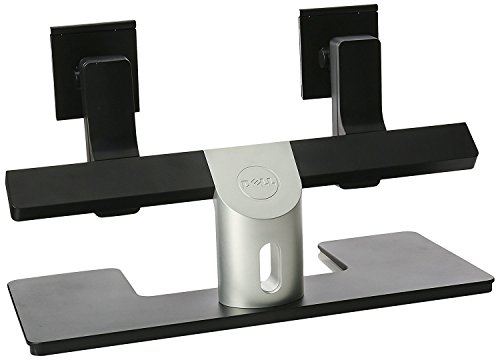 | Compact Pro | VESA Compatibility: Not specified (monitor‑stand only) | Weight Capacity per Arm: Not listed (monitor‑stand only) | Adjustable Tilt Range: Not specified (monitor‑stand only) | VIEW LATEST PRICE | Read Our Analysis |
| HUANUO FlowLift™ Dual Monitor Stand Adjustable VESA Mount |  | Gaming Ready | VESA Compatibility: 75 × 75 mm, 100 × 100 mm | Weight Capacity per Arm: 4.4–19.8 lb (≈2–9 kg) | Adjustable Tilt Range: +85° / –50° | VIEW LATEST PRICE | Read Our Analysis |
| VIVO Adjustable Dual Monitor Stand – 17‑32″, Black |  | Tool‑less Adjustment | VESA Compatibility: 75 × 75 mm, 100 × 100 mm | Weight Capacity per Arm: 19.8 lb (≈9 kg) | Adjustable Tilt Range: +90° / –90° | VIEW LATEST PRICE | Read Our Analysis |
| Mount-It! Dual Monitor Stand – Adjustable Swivel VESA‑Compatible |  | Freestanding Flexibility | VESA Compatibility: 75 × 75 mm, 100 × 100 mm | Weight Capacity per Arm: 19.8 lb (≈9 kg) | Adjustable Tilt Range: ±90° (tilt) | VIEW LATEST PRICE | Read Our Analysis |
More Details on Our Top Picks
VIVO Dual Monitor Stand with Glass Base Adjustable Arms (White)
All right, you’re juggling two monitors and crave a desk that looks as sleek as it works—this VIVO stand delivers premium elegance with its tempered‑glass base. You’ll love the 15.2 × 10.2 inch glass plate; it anchors the alloy‑steel pole and arms, keeping wobble to a minimum even when each screen weighs 22 lb. The padded underside protects your desk, and the clear design matches any modern office aesthetic.
Now, here’s the thing: the arms swivel a full 360°, tilt from +90° to –90°, and rotate, so you can switch between portrait and landscape in a snap. Height slides along the central pole, letting you find the perfect eye‑level without straining. VESA plates mount in seconds, and the included hardware makes setup painless.
Obviously, this one’s for you if you need a freestanding solution that stays stable without drilling. It shines with 13‑32‑inch displays, but if you prefer ultra‑thin monitors that sit flush, the glass base might feel a bit bulky. The three‑year warranty and 30‑day return guarantee back your purchase, so you can commit with confidence. Choose this stand, and you’ll enjoy a clutter‑free workspace that feels as professional as it looks.
- VESA Compatibility:75 × 75 mm, 100 × 100 mm
- Weight Capacity per Arm:22 lb (10 kg)
- Adjustable Tilt Range:+90° / –90°
- Swivel / Rotation Capability:360° swivel, 360° rotation
- Mounting Method:Tabletop (glass base)
- Warranty Length:3 years
- Additional Feature:Tempered glass base
- Additional Feature:Alloy‑steel pole & arms
- Additional Feature:Removable VESA plates
VIVO Dual Monitor Stand with Glass Base Adjustable Arms Black
Ever need a sleek, stable setup that doesn’t scream “office clutter”? You’ve probably wrestled with wobbly bases and tangled cables, so this black VIVO stand feels like a breath of fresh. It rests on a tempered‑glass slab that anchors 10 kg monitors solidly, while the steel pole and alloy‑steel arms keep everything rigid and stylish.
All right, now let’s talk motion. You can tilt each screen ±90°, swivel 360°, and rotate fully, so portrait or landscape work modes switch in a snap. Height slides along the central pole, handling screen thickness variations without a hitch. The VESA plates swap out fast, and the tabletop mount fits most desks without drilling.
Here’s the thing: this stand shines for you if you love a minimalist look and need sturdy support for 13‑32‑inch Dell monitors. The glass base looks premium, but it does occupy a 42.5 × 26 cm footprint, so very small desks might feel cramped. You’ll also appreciate the 3‑year warranty and responsive tech support, which cut down on post‑purchase anxiety.
Obviously, you won’t find a cheaper alternative that offers the same blend of aesthetics and adjustability. If you’re okay with a slightly larger base for the visual payoff, this black VIVO model fits right into a professional home office. Go ahead—choose confidence, not clutter.
- VESA Compatibility:75 × 75 mm, 100 × 100 mm
- Weight Capacity per Arm:22 lb (10 kg)
- Adjustable Tilt Range:+90° / –90°
- Swivel / Rotation Capability:360° swivel, 360° rotation
- Mounting Method:Tabletop (glass base)
- Warranty Length:3 years
- Additional Feature:42.5 × 26 cm glass base
- Additional Feature:Alloy‑steel construction
- Additional Feature:Quick‑assembly instructions
WALI Dual Monitor Stand Height Adjustable VESA Compatible (Black)
You’re juggling two Dell screens and need a sturdy, flexible arm that won’t wobble when you swivel or tilt—WALI’s dual monitor stand delivers just that. This one’s for you if you want metal construction, 22 lb per arm capacity, and a sleek black finish that blends with any desk. The C‑clamp and hole‑base options let you mount quickly, and the 10‑year warranty backs it up.
All right, the motion range covers everything: ±90° swivel, +70°/–45° tilt, full 360° rotation, and a 19.3‑in extension. You’ll adjust height up to 17.3 in, so you can match eye level without straining. The VESA‑75/100 mm pattern fits most Dell monitors from 13‑34 in, flat or curved.
Now, the trade‑off: the arms are a bit heavy, so you’ll feel the metal heft when you move them. If you prefer a feather‑light feel, look elsewhere, but the stability outweighs the weight for most power users. The included hardware kit and manual make setup painless, and US‑based support is available seven days a week.
Here’s the thing: you’ll love the durability and flexibility, but you won’t get a super‑compact footprint—this stand occupies a moderate desk area. If you have space to spare and value a wobble‑free experience, go ahead and lock it in. It’s a solid, no‑nonsense choice for a Dell dual‑monitor setup.
- VESA Compatibility:75 × 75 mm, 100 × 100 mm
- Weight Capacity per Arm:22 lb (10 kg)
- Adjustable Tilt Range:+70° / –45°
- Swivel / Rotation Capability:±90° swivel, 360° rotation
- Mounting Method:Desktop clamp or hole‑base (C‑clamp)
- Warranty Length:10 years
- Additional Feature:C‑clamp or hole base
- Additional Feature:10‑year warranty
- Additional Feature:19.3 in extension
Dell MDS14 Dual Monitor Stand (5TPP7) Black/Silver
The Dell MDS14 Dual Monitor Stand is the compact pro solution for anyone juggling two screens on a cramped desk. You’ve got limited real estate, and this U‑shape base slides right under your monitors, keeping them level without hogging space. The stand lets you tilt, swivel, and height‑adjust each 24‑inch panel, so you can line them up or offset them for a staggered view.
Now, if you love a clean look, you’ll appreciate the black/silver finish and the 0.45 lb weight that feels sturdy yet barely noticeable. It supports up to 60.96 in combined screen size, so you can pair a 27‑inch and a 23‑inch without breaking the spec.
All right, the trade‑off is the limited 15° viewing angle and the 5 ms response time—fine for office work, not ideal for fast‑paced gaming. The built‑in speakers are modest, perfect for personal audio but not a replacement for a dedicated system.
Here’s the thing: if you need a desk‑friendly, adjustable dual‑stand that stays out of the way and you’re okay with modest gaming specs, this one’s for you. Go ahead, snap it onto your desktop and reclaim that precious work surface.
- VESA Compatibility:Not specified (monitor‑stand only)
- Weight Capacity per Arm:Not listed (monitor‑stand only)
- Adjustable Tilt Range:Not specified (monitor‑stand only)
- Swivel / Rotation Capability:Not specified (monitor‑stand only)
- Mounting Method:Desktop (U‑shape base)
- Warranty Length:1 year
- Additional Feature:U‑shape space‑saving base
- Additional Feature:Built‑in speakers
- Additional Feature:HDMI & USB ports
HUANUO FlowLift™ Dual Monitor Stand Adjustable VESA Mount
All right, you’re juggling a cramped desk and a jittery gaming rig, so you need a stand that actually frees space without wobbling. The HUANUO FlowLift™ lifts both 13–32″ monitors off the surface, giving you room for a keyboard, notebook, or docking station, and its built‑in cable guides keep wires hidden. You’ll appreciate the alloy‑steel arms that hold up to 19.8 lb each, and the dual C‑clamp or grommet base works on wooden desks 0.59–3.54 in thick, no cross‑beams required.
Now, tilt, swivel, and rotate each screen independently—up to +85°/‑50° tilt, ±90° swivel, and 360° rotation—so you can chase ergonomic posture or portrait mode with one‑hand pulls. Height raises up to 15.75″, letting you sit back and game without straining your neck. Obviously, the stand adds 11 lb to your desk, and if you have a metal or glass top it won’t fit, but for most wood desks it feels rock‑solid.
Here’s the thing: this one’s for you if you want a flexible, wobble‑free mount that looks sleek in black and survives daily clicks, typing, and intense gaming sessions. The five‑year warranty backs the alloy construction, so you can commit without second‑guessing. Go ahead, snap it on, and enjoy the cleared workspace—your setup will thank you.
- VESA Compatibility:75 × 75 mm, 100 × 100 mm
- Weight Capacity per Arm:4.4–19.8 lb (≈2–9 kg)
- Adjustable Tilt Range:+85° / –50°
- Swivel / Rotation Capability:±90° swivel, 360° rotation
- Mounting Method:Dual C‑clamp or grommet
- Warranty Length:5 years
- Additional Feature:Dual C‑clamp or grommet mount
- Additional Feature:Cable‑management guides
- Additional Feature:5‑year warranty
VIVO Adjustable Dual Monitor Stand – 17‑32″, Black
If you’re juggling a 17‑ to‑inch monitor on a cramped desk, the VIVO stand’s tool‑less spring counterbalance lets you snap into any tilt, swivel, or rotation without a wrench. You’ll love the 180° swivel and 360° rotation for quick side‑by‑side gaming or coding. The alloy‑steel arms hold up to 19.8 lb, so even a heavy Dell UltraSharp feels steady.
All right, the tabletop clamp fits desks up to 3.1 in thick, and the optional grommet bolt‑through handles thinner surfaces. You slide your monitor onto the open‑top VESA plates, no screws required. The stand supports both 75×75 mm and 100×100 mm patterns, so your Dell’s mounting holes match perfectly.
Now, consider the trade‑off: the stand’s black finish looks sleek, but the arms extend a bit farther than minimalist clips, which might crowd a tiny work surface. If you need a sturdy, fully adjustable solution for dual 17‑32 in screens, this one fits you. The three‑year warranty backs you up, making the purchase feel safe and straightforward. Go ahead and clip it in; you’ll notice the difference instantly.
- VESA Compatibility:75 × 75 mm, 100 × 100 mm
- Weight Capacity per Arm:19.8 lb (≈9 kg)
- Adjustable Tilt Range:+90° / –90°
- Swivel / Rotation Capability:180° swivel, 360° rotation
- Mounting Method:Tabletop clamp or optional grommet bolt‑through
- Warranty Length:3 years
- Additional Feature:Tool‑less spring counterbalance
- Additional Feature:Open‑top VESA plates
- Additional Feature:Grommet bolt‑through option
Mount-It! Dual Monitor Stand – Adjustable Swivel VESA‑Compatible
You’ve probably already tried juggling two 32‑inch Dell screens on a cramped desk, and the neck‑cramping strain is real. This Mount‑It! stand lets you lift each monitor up to 16.5″ along a sturdy pole, so you can finally sit upright. It bears 19.8 lb per arm, handling two 32‑inch panels without wobble, and the VESA plates snap on in seconds—no tools, no hassle.
All right, the base sits on any surface—glass, thin tabletop, cubicle wall—so you skip clamps and keep your workspace tidy. Integrated cable routing tucks power and video cords, keeping the desk uncluttered and glare down. You’ll swivel left, right, tilt up, down, and even rotate portrait for coding or design work, cutting eye strain dramatically.
Now, the trade‑off: the free‑standing base adds a few inches to your desk footprint, so if you’re in a micro‑office you might need to shift a few items. But the heavy‑duty base feels rock‑solid, and the US‑based support plus a 30‑day Amazon return give peace of mind. This one’s for you if you crave flexibility without drilling holes. Go ahead—set it up, adjust, and let your neck thank you.
- VESA Compatibility:75 × 75 mm, 100 × 100 mm
- Weight Capacity per Arm:19.8 lb (≈9 kg)
- Adjustable Tilt Range:±90° (tilt)
- Swivel / Rotation Capability:Swivel left/right, 360° rotation
- Mounting Method:Free‑standing base (no clamp)
- Warranty Length:Manufacturer‑linked (duration not specified)
- Additional Feature:Heavy‑duty free‑standing base
- Additional Feature:Integrated cable routing
- Additional Feature:Suitable for walls & glass tabletops
Factors to Consider When Choosing a Dual Monitor Stand for Dell
You’re probably worried that the stand won’t hold your Dell’s weight or fit the VESA pattern, and that’s a legit concern. Now, check the load capacity and VESA compatibility first, then see if the arm offers tilt, swivel, and height adjustments that match your ergonomic needs. Here’s the thing: a stable base with a compact footprint and built‑in cable management will keep your desk tidy, and if those features line up, you’ll feel confident moving forward.
Compatibility and Load Capacity
All right, you’ve probably already measured those VESA holes and felt the dread of a mismatch—don’t worry, it’s a common snag. Now, make sure the pattern on the stand lines up with your Dell’s 75 × 75 mm or 100 × 100 mm holes; a mismatch means you’ll waste time and money. Obviously, weight matters: most Dell screens sit at 10–15 lb, so pick a stand that handles at least 15 lb per arm for a safety buffer.
Here’s the thing: check the size range. A 13‑in laptop monitor can wobble on a stand built for 32‑in panels, while a 32‑in TV might over‑extend a 13‑in‑only arm. Verify the height‑adjustment range covers your monitor’s thickness and the ergonomic height you crave.
Finally, consider the base load. Freestanding clamps need enough grip to hold both monitors’ combined weight without tipping. If you’re stacking two 15‑lb screens, a heavy‑duty base or wall‑mount clamp is your best bet. Choose a stand that meets these limits, and you’ll avoid wobble, strain, and regret.
VESA Mounting Standards
All right, you’ve already worried about weight and height, so the next thing to nail down is the VESA pattern on your Dell. The standard comes in two sizes—75 mm × 75 mm and 100 mm × 100 mm—so you must check the back panel of each monitor before you buy. Obviously, if the stand’s plate doesn’t match, you’ll need an adapter, and that can wobble the whole setup.
Now, look at the mounting depth. Some Dell models have deep rear casings or cable bundles that stick out; a stand with a low‑profile plate avoids hitting those. If you have a thin bezel, a shallow plate keeps the monitor flush and stable.
Here’s the thing: removable VESA plates let you swap monitors in seconds, but they’re only useful if the plates lock tightly. This one’s for you if you plan to upgrade or rotate screens often; otherwise a fixed plate saves a few dollars. Choose a stand that matches both spacing and depth, and you’ll skip the hassle of extra hardware.
Adjustability and Ergonomics
If your neck’s already sore from staring up at a low‑set screen, you know a rigid stand won’t cut it. All right, you need at least ±90° tilt and 360° swivel on each arm. That lets you angle screens to banish glare, and you can flip to portrait mode without remounting—perfect for coding or scrolling long documents.
Now, height matters. Look for poles that travel 15–20 inches vertically so the monitor tops line up with your eyes. You’ll stay upright, avoid slouching, and keep neck strain at bay.
Obviously, weight support is essential. Counterbalance or spring mechanisms handling up to 22 lb per arm keep the arms steady while you tweak them, preventing sag. Integrated cable channels keep cords tidy, letting you glide the arms smoothly.
Here’s the thing: this setup works for you if you juggle multiple Dell monitors and demand quick, ergonomic adjustments. Choose a stand that matches your height range and weight needs, and you’ll feel the difference immediately.
Base Stability and Footprint
All right, you’ve got the tilt and height sorted, but a wobbly base will ruin the whole ergonomic win. A larger base surface spreads the stand’s weight, so when you tilt or extend your Dell monitors the risk of tipping drops dramatically. Heavier materials—tempered glass or solid metal—add inertia, meaning accidental bumps won’t send your setup into a wobble dance.
Now, check the footprint. You need at least a 10‑15‑inch spread both lengthwise and widthwise so the base sits comfortably on your desk edge without overhanging. A low center of gravity helps; keep the bulk of the material near the floor and you’ll feel solid stability even when you reach for a coffee.
Here’s the thing: rubber pads or a textured underside lock the base to a flat, non‑slippery surface, preventing sliding during adjustments. If your desk is glossy, add a silicone mat—otherwise you’ll hear that dreaded squeak. This setup works for anyone who wants a sturdy, reliable dual‑monitor rig without constant re‑leveling. Choose a base that matches your desk size, and you’ll enjoy a confident, wobble‑free workspace.
Cable Management Solutions
You’ve probably tangled in a spaghetti‑like mess of HDMI, power, and USB cords every time you tilt those Dell screens, and that chaos kills the sleek look you’re after. All right, pick a stand with integrated trays or clips that guide cables vertically. That way you keep power, HDMI, and USB together, not sprawled across the desk. Obviously, you need a channel that fits up to an inch of combined thickness; otherwise you’ll crush the wires and risk intermittent connections.
Now check the clearance at the pole or base—at least two inches of free space prevents pinching when you swivel or tilt. If you love swapping monitors, choose removable organizers that let you reposition cables on the fly. This one’s for you if you frequently reconfigure your setup.
Finally, favor a detachable cover or sleeve. You can clean it, replace worn sections, and keep the look tidy without disassembling the whole arm. Here’s the thing: a stand with a removable sleeve makes maintenance a breeze, so you won’t dread future upgrades. Go with the option that matches your cable load and you’ll keep your desk looking sharp.